- Products
- Learn
- Local User Groups
- Partners
- More

MVP 2026: Submissions
Are Now Open!
What's New in R82.10?
Watch NowOverlap in Security Validation
Help us to understand your needs better
CheckMates Go:
Maestro Madness
In order to set up a new firewall, you typically use a computer on the same subnet. For example, the new firewall is configured with 192.168.1.1, so you can use a notebook on the same sub net, say 192.168.1.50, and connect a network cable between the two. Now,one can open a browser on the notebook and go to https://192.168.1.1 and get the web GUI for the firewall.
I don't have a spare notebook so I want to create a virtual machine (VMWare Workstation) on my existing desktop to help me configure the firewall. I want to connect the new firewall to a switch or router on my home network and use this virtual machine to reach the web GUI. I have not been able to make this work. Can anyone provide guidance on how to configure the NIC on the virtual machine to allow for this?
Thanks
You have to use the "Virtual Network Editor" in VMware Workstation to set up your networking accordingly.
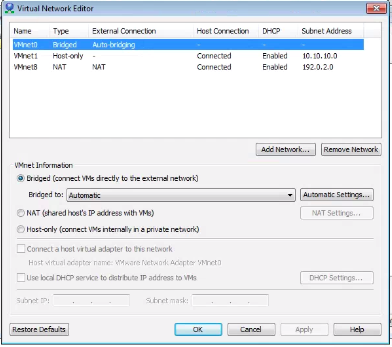
You want to create a "bridged" interface, similar to VMnet0 below.
You then connect the VM to that network and it will be on the same LAN as your desktop.

Dameon,
Thanks, but I get a message about “…no un-bridged host network adapters.” Here is my set up:
1 Win 10 desktop on 192.168.1.13
VNet0 on 192.168.24.128, assigned to a virtual Win XP machine running on the Win 10 desktop.
UTM-1 FW, INT connection already configured on 192.168.24.1
Since I cannot set up a bridged connection I just tried it on the Vnet0, Host only setting. When I attempt to go to https://192.168.24.1, I get the typical warning about “…problem with certificate…” and then I proceed. This leads to a “…Error HTTP 403 Forbidden…” With both IE and Chrome, this indicates the ability to connect to the website, but no permission to view the web page. Any other thoughts?
Note: I do have a spare Win XP notebook that I have configured properly and connect directly to the UTM-1. However, I wanted to see if this could be done with a virtual machine instead.
Thanks,
Jeff
Windows XP without SP3 installed cannot validate SHA256 certificates, which for R80.10, at least, is the default for the Gaia portal.
I'm guessing this is the issue.
Hi Jeff,
I found the following video guides from Youtube.
I managed to set it up like they explained.
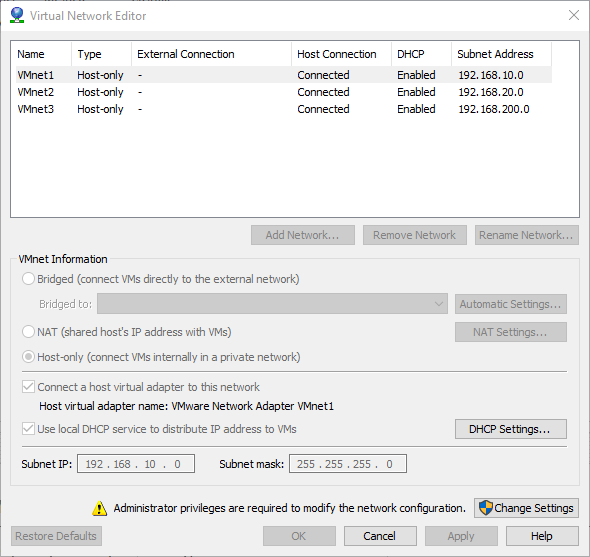
First I had to create the networks via Virtual Network Editor.
VMnet0 runs bridged mode.

Then configure after the following steps.
Checkpoint VMWARE LAB setup and Cluster configuration Part 1 - YouTube
Checkpoint VMWARE LAB setup and Cluster configuration Part 2 - YouTube
Dameon Welch Abernathy I managed to setup virtual lab with video guide above. Though I though the CheckMates Pro license would cover a cluster setup (sgw1 + sgw2 and sgwmgmt). is it true and one is only able to setup secure gateway running gateway magement server.
Any ways the CheckMates Pro license would also include a license to run seperate cluster nodes with and advanced networking (clusterXL) license?
Thanks
Kim
I'll have to double check what we're giving out here license-wise.
Leaderboard
Epsum factorial non deposit quid pro quo hic escorol.
| User | Count |
|---|---|
| 21 | |
| 20 | |
| 19 | |
| 8 | |
| 7 | |
| 3 | |
| 3 | |
| 3 | |
| 3 | |
| 3 |
Fri 12 Dec 2025 @ 10:00 AM (CET)
Check Mates Live Netherlands: #41 AI & Multi Context ProtocolTue 16 Dec 2025 @ 05:00 PM (CET)
Under the Hood: CloudGuard Network Security for Oracle Cloud - Config and Autoscaling!Fri 12 Dec 2025 @ 10:00 AM (CET)
Check Mates Live Netherlands: #41 AI & Multi Context ProtocolTue 16 Dec 2025 @ 05:00 PM (CET)
Under the Hood: CloudGuard Network Security for Oracle Cloud - Config and Autoscaling!Thu 18 Dec 2025 @ 10:00 AM (CET)
Cloud Architect Series - Building a Hybrid Mesh Security Strategy across cloudsAbout CheckMates
Learn Check Point
Advanced Learning
YOU DESERVE THE BEST SECURITY