- Products
- Learn
- Local User Groups
- Partners
- More

AI Security Masters E7:
How CPR Broke ChatGPT's Isolation and What It Means for You
Blueprint Architecture for Securing
The AI Factory & AI Data Center
Call For Papers
Your Expertise. Our Stage
Good, Better, Best:
Prioritizing Defenses Against Credential Abuse
Ink Dragon: A Major Nation-State Campaign
Watch HereCheckMates Go:
CheckMates Fest
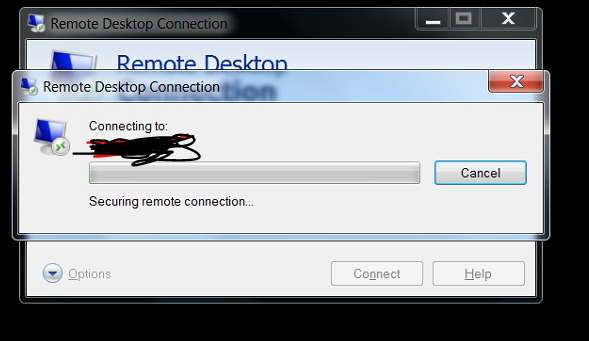
problem with rdp access
hangs on this window for a minute or two and then connects
any ideas what to look for?
happens from every computer on a given vlan to another vlan on the checkpoint gaia appliance
What do you see on a tcpdump between the relevant hosts?
Anything in the logs that might suggest what's going on?
This sounds like a DNS issue of some sort that is unrelated to the firewall.
This Sounds like a
DNS issue or
RDP encryption issue or
RDP authentication (ntlm vs. kerberos) issue.
Anything in in the Windows event logs?
Or old RDP client and new Windows 2012/2016/2019 Server.
Microsoft Troubleshooting RDP Client connection problems:
https://support.microsoft.com/en-us/help/186645/troubleshooting-rdp-client-connection-problems
i've narrowed down the issue :
when you try to connect using mstsc, the application tries to contact microsoft's servers. the hang is caused by the firewall trying to process it (i think)
It looks like it is hitting a UserCheck rule of some sort (e.g. the redirect log entries).
You might want to explicitly allow that traffic or create a REJECT (as opposed to drop) rule for it.
thank you
1. the problem is that this ip is a part of a very large pool. cp recognizes it as windows update in the application layer.
2. why reject vs drop? what's the advantage ?
With a drop, the application will receive no response and may wait for the attempted TCP connection to timeout.
With a reject, the firewall sends a TCP Reset, which will hopefully cause the application to quit trying to reconnect.
so, in general (very interesting information), in what cases should i use drop and what cases should i use reject?
In the vast majority of cases, I would use Drop.
Reject is useful in situations similar to what you describe.
thank you
for the moment, i've created a policy letting me access windows update at the application level, and it looks fine. i'll keep track of it
Hi
the problem seems to be persistent. every few days, some new address pops up
i've came across addresses like : map2.hwcdn.net, and like 3.a.download.windowsupdate.com and so on and so forth
how can i make the proper exclution for all those url's in a wildcard form? i don't mind handling each domain, but dealing with each ip is crazy
thank you
Leaderboard
Epsum factorial non deposit quid pro quo hic escorol.
| User | Count |
|---|---|
| 64 | |
| 22 | |
| 13 | |
| 12 | |
| 12 | |
| 9 | |
| 8 | |
| 7 | |
| 7 | |
| 7 |
Tue 21 Apr 2026 @ 05:00 PM (IDT)
AI Security Masters E7: How CPR Broke ChatGPT's Isolation and What It Means for YouTue 28 Apr 2026 @ 06:00 PM (IDT)
Under the Hood: Securing your GenAI-enabled Web Applications with Check Point WAFTue 21 Apr 2026 @ 05:00 PM (IDT)
AI Security Masters E7: How CPR Broke ChatGPT's Isolation and What It Means for YouTue 28 Apr 2026 @ 06:00 PM (IDT)
Under the Hood: Securing your GenAI-enabled Web Applications with Check Point WAFThu 30 Apr 2026 @ 03:00 PM (PDT)
Hillsboro, OR: Securing The AI Transformation and Exposure ManagementAbout CheckMates
Learn Check Point
Advanced Learning
YOU DESERVE THE BEST SECURITY