- Products
- Learn
- Local User Groups
- Partners
- More

AI Security Masters
E1: How AI is Reshaping Our World
MVP 2026: Submissions
Are Now Open!
What's New in R82.10?
Watch NowOverlap in Security Validation
Help us to understand your needs better
CheckMates Go:
Maestro Madness
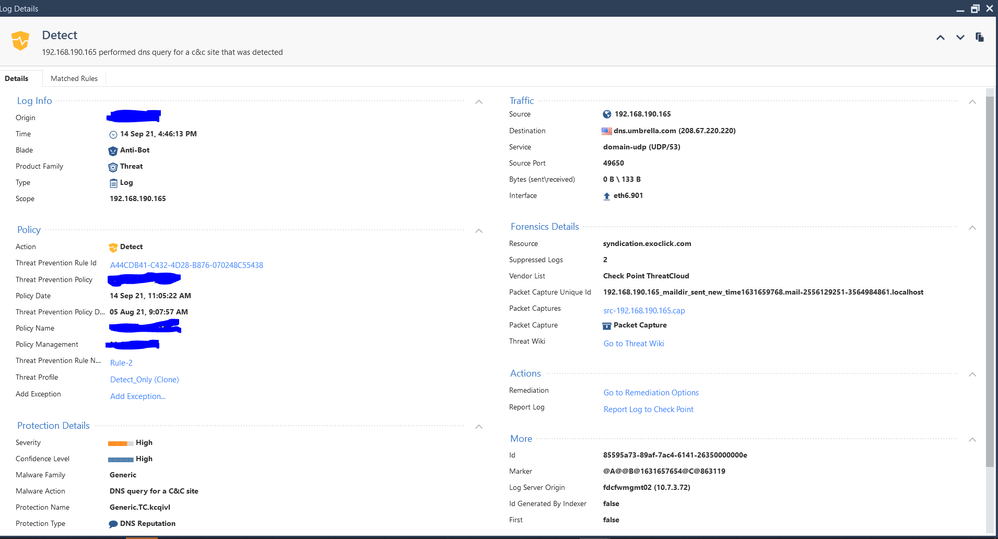
so i see this log on the checkpoint:
How do i go about blocking this resource "syndication.exoclick.com" on port 53? do i need to create a url rule for that? and how would it look like (we have url filtering blade enabled but not https inspection, categorize https inspection is enabled though). And if not url filtering then how else would i block it?
Thank You.
Just my personal opinion...what I would do is create a rule that has a source as custom application/site object and in there, simply add under url list *syndication.exoclick*
I find that doing it that way works 100% of the time, at least from my experience. Slap that as the source, destination any, action block, log and thats it.
Andy
Thanks for replying but shouldn't it be a destination? You say source but it should be destination right?and source should be our internal network? And service selected should be 53?
And just to be clear *syndication.exoclick* will cover the "syndication.exoclick.com" url?
Yes, but my apologies, my first reply is wrong, my bad.
Let me rephrase that...you cant do it as source or dst, you do it under service/application tabs...need more coffee :)). So once you had created that custom app/site, you have a rule like this, just tested it in my lab:
source -> any
destination -> Internet
vpn -> any
services & application -> custom app/site object you create (I named it sundication.exoclick and in "match by" I simply added *syndication.exoclick* and yes, 100% covers anything or any sub domain for that. Its literally if you wanted to block anything facebook under the sun, you could do the same *facebook*. I tried it many times and works like a charm.
action -> block
track -> log
If you have any issues, hit me up and we can do remote.
Oh thank you once again for the quick reply, I will try it out and update here and if it doesn't work I will reach out to you thanks!
Any time!
Forgot to mention, yes, you can also add services to rule like that, so if you ONLY wish to block service with port 53, you can do so, no problem...BUT, just be vigilant not to inadvertently block access to important service for network that should have it, thats all.
Using a custom application/site won’t work for things that aren’t http/https.
It is the sort of thing enabling DNS Trap will help with, which basically rewrites these lookups to “trap” IP addresses.
Note that prior to R81, these events show up as Detect even though they are effectively prevented.
Leaderboard
Epsum factorial non deposit quid pro quo hic escorol.
| User | Count |
|---|---|
| 19 | |
| 17 | |
| 13 | |
| 8 | |
| 7 | |
| 3 | |
| 3 | |
| 3 | |
| 3 | |
| 3 |
Tue 16 Dec 2025 @ 05:00 PM (CET)
Under the Hood: CloudGuard Network Security for Oracle Cloud - Config and Autoscaling!Thu 18 Dec 2025 @ 10:00 AM (CET)
Cloud Architect Series - Building a Hybrid Mesh Security Strategy across cloudsTue 16 Dec 2025 @ 05:00 PM (CET)
Under the Hood: CloudGuard Network Security for Oracle Cloud - Config and Autoscaling!Thu 18 Dec 2025 @ 10:00 AM (CET)
Cloud Architect Series - Building a Hybrid Mesh Security Strategy across cloudsThu 08 Jan 2026 @ 05:00 PM (CET)
AI Security Masters Session 1: How AI is Reshaping Our WorldAbout CheckMates
Learn Check Point
Advanced Learning
YOU DESERVE THE BEST SECURITY