- Products
- Learn
- Local User Groups
- Partners
- More

MVP 2026: Submissions
Are Now Open!
What's New in R82.10?
Watch NowOverlap in Security Validation
Help us to understand your needs better
CheckMates Go:
Maestro Madness
Hi all,
rdp can transfer file from server RDP to local laptop/pc. can checkpoint block only transfer file between server RDP with local laptop/pc.
i means normally rdp is we do rdp to server/pc and copy some file and paste to local pc/laptop is success, but i want block feature copy/paste on rdp.
thanks.
I am not 100% sure if CP can block this, I think not. But I would still rather fix this in the RDP setup with a GPO or policy or something like that. That will also give you a bit more flexebility if, say, you want some of the sessions to be able to do this.
https://serverfault.com/questions/1038954/how-to-block-filetransfer-through-rdp-port-3389
I don't have the possibility to test this for now but could Content Awareness help?
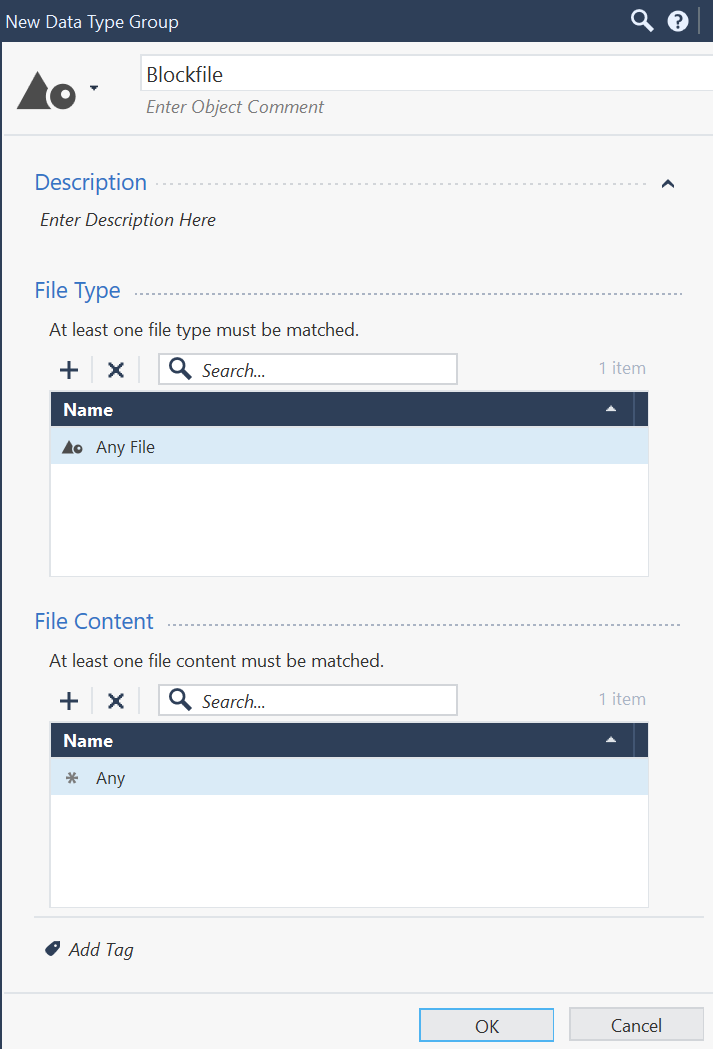
If you make a policy with RDP as service and create a data type with any file type in either direction. You'd have to have RDP inspection enabled in case you do encryption though.
EDIT: Tried it but RDP is not in the list of supported protocols for Content Awareness, so it won't work.
Using Native RDP? No.
It is something we can definitely block when accessed through Harmony Connect (specifically the clientless access piece).
Believe you can also block it by accessing through Mobile Access Blade (using Guacamole).
Is it possible to block using harmony endpoint?
To answer my question, it seems possible to control clipboard access on Harmony Endpoint by "restricting" remote access when clipboard setting is enabled in RDP.
This is controlled by the following registry: HKLM/SOFTWARE\Microsoft\Terminal Server Client\DisableClipboardRedirection. Set REG_DWORD to 1 for disable, 0 for enable clipboard.
You can create a Compliance->Applications/Files check -> Modify and check registry, input the above key name in the registry value name, check REG_DWORD under "Reg type" and Exist under "Check registry key and value".
The problem is that it seems the compliance check, goes and checks the wrong registry location. I found that by selecting Action=Update. I found that it updated the following location: HKLM/SOFTWARE\WOW6432Node\Microsoft\Terminal Server Client\DisableClipboardRedirection. So it's adding WOW6432Node in the registry path.
Any idea on how to resolve this?
Sounds like that might be worth a TAC case.
Leaderboard
Epsum factorial non deposit quid pro quo hic escorol.
| User | Count |
|---|---|
| 19 | |
| 17 | |
| 14 | |
| 8 | |
| 7 | |
| 3 | |
| 3 | |
| 3 | |
| 3 | |
| 2 |
Tue 16 Dec 2025 @ 05:00 PM (CET)
Under the Hood: CloudGuard Network Security for Oracle Cloud - Config and Autoscaling!Thu 18 Dec 2025 @ 10:00 AM (CET)
Cloud Architect Series - Building a Hybrid Mesh Security Strategy across cloudsTue 16 Dec 2025 @ 05:00 PM (CET)
Under the Hood: CloudGuard Network Security for Oracle Cloud - Config and Autoscaling!Thu 18 Dec 2025 @ 10:00 AM (CET)
Cloud Architect Series - Building a Hybrid Mesh Security Strategy across cloudsAbout CheckMates
Learn Check Point
Advanced Learning
YOU DESERVE THE BEST SECURITY