- Products
- Learn
- Local User Groups
- Partners
- More
MVP 2026: Submissions
Are Now Open!
What's New in R82.10?
10 December @ 5pm CET / 11am ET
Announcing Quantum R82.10!
Learn MoreOverlap in Security Validation
Help us to understand your needs better
CheckMates Go:
Maestro Madness
Hello everyone! I am learning VSX and trying to make my first lab for it.
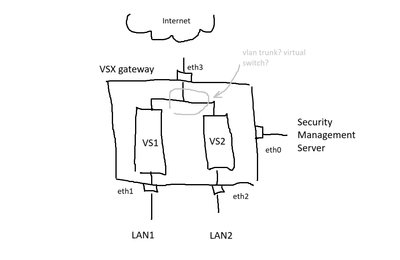
I want to try to implement the following configuration (I drew a picture for clarification):
A vsx gateway with physical interfaces eth0, eth1, eth2, eth3.
There are two virtual systems vs1 and vs2 on the gateway.
eth0 is the interface leading to the management server, which is not accessible to the virtual systems.
eth3 is the interface leading to the internet, accessible to both the vsx gateway and the virtual systems.
eth1 is the interface leading to LAN 1 via vs1.
eth2 is the interface leading to LAN 2 via vs2.
Virtual systems are not a cluster, as they lead to different local networks.
I tried to configure this several times, but I had problems.
The first problem. I have created windows machines in the lan1 and lan2 networks to check the functionality of the gateway. However, for some reason there is no ping from these win machines to the relevant vs.
The second problem, which causes the most questions. I don't know how to properly configure the interface leading to the Internet for use by both virtual systems. I've tried different methods, tried creating a virtual switch, tried without it. I even began to doubt whether such a configuration is workable.
Does anyone know if it is possible to work with such a scheme? If so, how to configure it correctly? I would be grateful for any help!
If you want two VSs to share an interface (be it physical or VLAN sub-interface) you must create a Virtual Switch.
Thank you very much for your answer! I want to make sure that I understand correctly. Please tell me, should the interfaces leading to the VSwitch for each VS be in the same network as the address of the physical interface eth3?
For example, if in the settings of the VSX GW virtual machine, the address 10.10.10.130 is specified for eth3, I should make the interfaces for vs1 eth3.10 10.10.10.131 and for vs2 eth3.20 10.10.10.132, am I right?
eth3 would belong to the virtual switch, which doesn't have any IP addresses, so eth3 wouldn't have any address.
The other VSs would have warp interfaces to the switch. The warp interfaces have the addresses.
Thank you very much! Can you please tell me if I can specify eth3 as a vlan trunk and assign it an address for the vsx gateway itself, not for any of the virtual systems, or will this be wrong?
First, a warning: VSX cares very deeply about the names of the interfaces it uses. It's exceptionally hard to move things from one logical interface to another after creation. Instead of using eth3 directly, you should create a bond in VS 0, add eth3 to the bond, and make all your subsequent configuration reference the bond. This lets you change what physical interface backs the bond very easily (e.g, to move it from a 1g interface to a 10g interface). As long as you don't use LACP (802.3ad) for the bond mode, adjacent switches and routers don't have to care that you are using a bond.
There are a few rules for allocating interfaces on VSX:
If you want VS 0 and two non-0 VSs to all have interfaces to a given network, you build a switch VS, give the interface to that network (tagged or not) to the switch, then build warp interfaces between the switch VS and each other VS you want to have an interface on the network.
If you want VS 0 to have an address on one VLAN and two other VSs to have addresses on another VLAN on the same physical interface, that's easy. You just mark the interface as usable for VLAN trunking in the VSX cluster object, add an interface to VS 0 for the VLAN you want it to use, then add a switch VS and give it the VLAN you want the switch to use.
Thank you very much for the explanation!
Leaderboard
Epsum factorial non deposit quid pro quo hic escorol.
| User | Count |
|---|---|
| 22 | |
| 20 | |
| 16 | |
| 5 | |
| 4 | |
| 4 | |
| 3 | |
| 3 | |
| 3 | |
| 3 |
Fri 12 Dec 2025 @ 10:00 AM (CET)
Check Mates Live Netherlands: #41 AI & Multi Context ProtocolFri 12 Dec 2025 @ 10:00 AM (CET)
Check Mates Live Netherlands: #41 AI & Multi Context ProtocolTue 16 Dec 2025 @ 05:00 PM (CET)
Under the Hood: CloudGuard Network Security for Oracle Cloud - Config and Autoscaling!About CheckMates
Learn Check Point
Advanced Learning
YOU DESERVE THE BEST SECURITY
