- Products
- Learn
- Local User Groups
- Partners
- More
MVP 2026: Submissions
Are Now Open!
What's New in R82.10?
Watch NowOverlap in Security Validation
Help us to understand your needs better
CheckMates Go:
Maestro Madness
Dear all, I would like to request assistance with a project scenario, as described below:
We have a client with a need to connect several remote branches to the company's main office with link redundancy. They already have a LAN-to-LAN structure in production, fiber links that extend from the main office to these branches, providing local and internet connectivity.
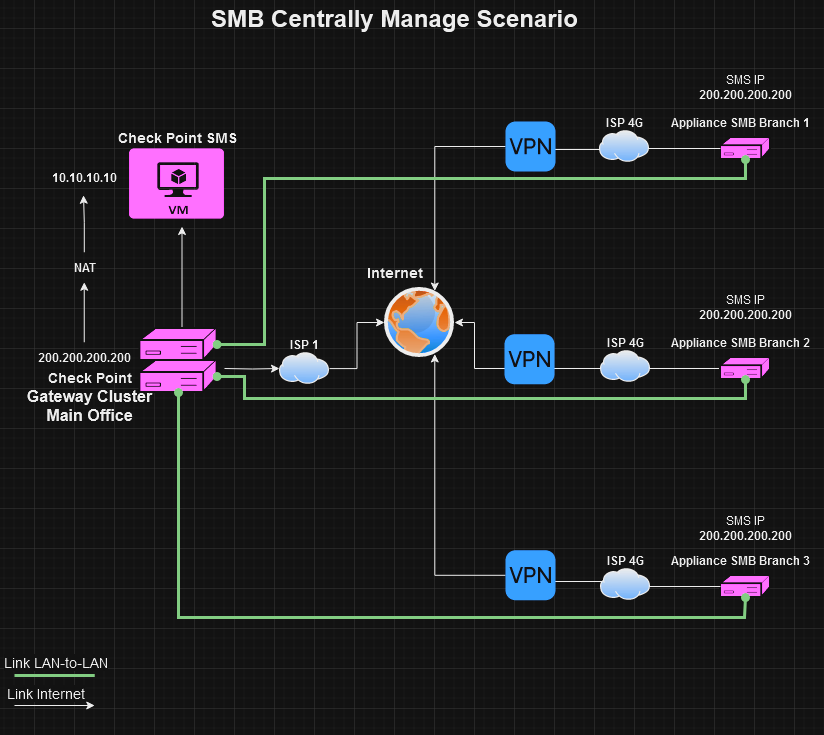
Additional internet links will be added to these branches, mostly 4G links (dynamic IP). SMB appliances (1500 Spark) will be installed, and the management of these appliances will be the same as the Main Office Cluster, as shown in the topology image. This means both the Main Office cluster and the branches will be in the same SMS.
To ensure that internal resources of the Main Office remain available to the branches in case the LAN-to-LAN link goes down, it is necessary to establish a VPN tunnel through the secondary link (4G).
However, here is the challenge: if we have the Main Office cluster and the Spark from a branch in the same SMS, when we create the Star Community and add the participating gateways, any traffic coming from Spark is expected by the Cluster to be within the Community.
How could I separate this traffic both in Spark and the Cluster? In a way that, while the primary link (LAN-to-LAN) is up, all traffic goes through it, outside the VPN tunnel. When this traffic reaches the Cluster outside the tunnel, it should be accepted and routed normally. And when the primary link (LAN-to-LAN) goes down, the VPN tunnel with the secondary link (4G dynamic IP) should be established and continue to provide connectivity to the internal resources of the Main Office.
We tried to establish the VPN tunnel through the LAN-to-LAN link, believing that when this link became unavailable, the secondary link would establish the tunnel normally. However, the tunnel is not established by the secondary link; according to logs and debugs, apparently, phase 1 is completed, but for some reason, phase 2 never starts.
I have attached the topology image of the project described above. If the tests are successful, approximately 400 Spark appliances will be installed as part of this topology.
I appreciate you for helping me overcome this challenge.
Thank you in advance for your attention.
Topology:
Wire Mode plus MEP seems like it’d be the right approach.
See: https://sc1.checkpoint.com/documents/R81.20/WebAdminGuides/EN/CP_R81.20_SitetoSiteVPN_AdminGuide/Con...
Hello @PhoneBoy , thanks for the advice!
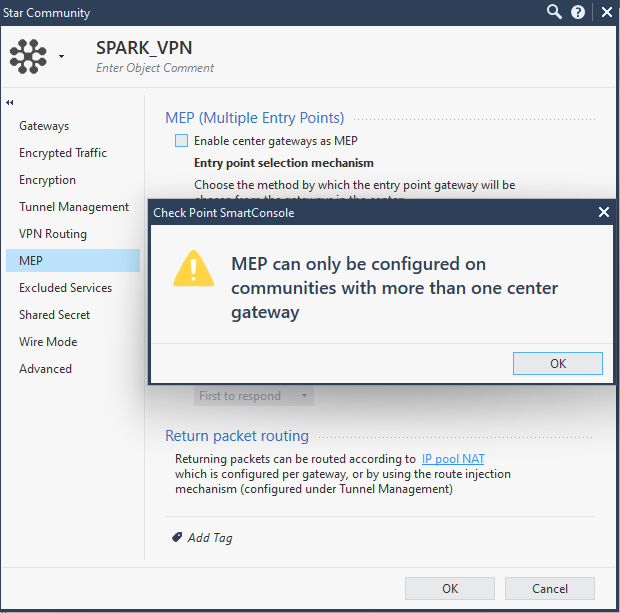
From what I've seen, MEP is used when there are at least 2 central gateways in a community, but that's not my case. I have only one cluster, which is the central gateway, and the Spark will be the satellite gateway.
The issue is that the Spark will have 2 internet links, and I need the tunnel to be established by both links. If the primary link fails, the secondary one should establish the tunnel.
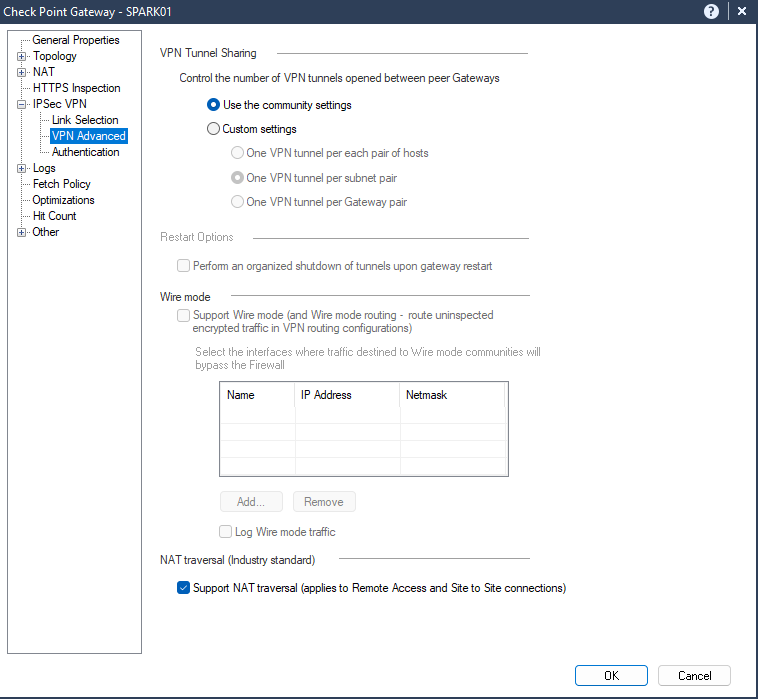
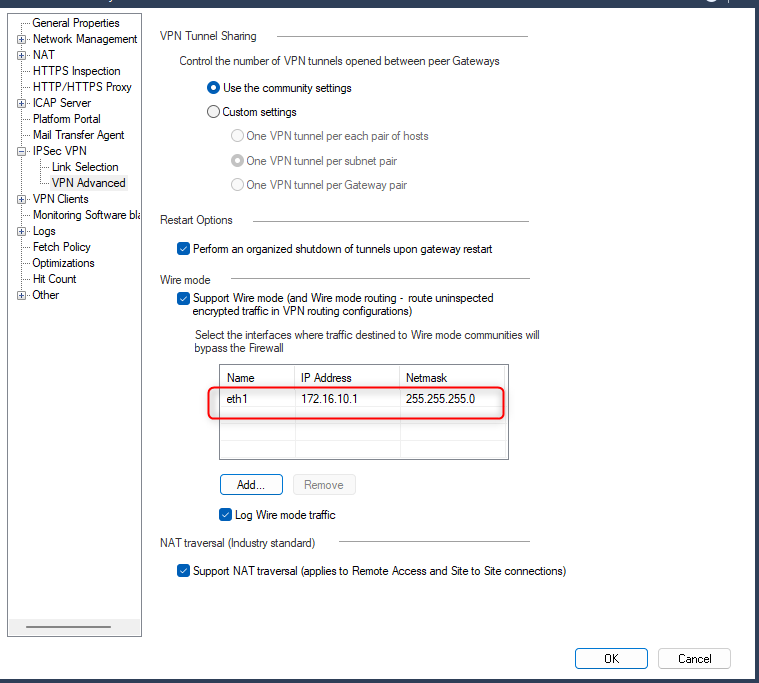
Regarding Wire Mode, I can configure it in the community and the cluster object, but in the Spark object, the option is blocked. Does Spark not support Wire Mode when management is centralized?
Below are the images:
MEP
Wire Mode Spark
Wire Mode Cluster
Ah yes, this doesn't quite make sense and is probably not necessary.
I believe if ISP Redundancy is configured on the Quantum Spark device, it should automatically establish the VPN using the secondary.
This assumes you're doing certificate-based authentication.
@Bernardes wrote:Dear all, I would like to request assistance with a project scenario, as described below:
We have a client with a need to connect several remote branches to the company's main office with link redundancy. They already have a LAN-to-LAN structure in production, fiber links that extend from the main office to these branches, providing local and internet connectivity.
Additional internet links will be added to these branches, mostly 4G links (dynamic IP). SMB appliances (1500 Spark) will be installed, and the management of these appliances will be the same as the Main Office Cluster, as shown in the topology image. This means both the Main Office cluster and the branches will be in the same SMS.
To ensure that internal resources of the Main Office remain available to the branches in case the LAN-to-LAN link goes down, it is necessary to establish a VPN tunnel through the secondary link (4G).
However, here is the challenge: if we have the Main Office cluster and the Spark from a branch in the same SMS, when we create the Star Community and add the participating gateways, any traffic coming from Spark is expected by the Cluster to be within the Community.
How could I separate this traffic both in Spark and the Cluster? In a way that, while the primary link (LAN-to-LAN) is up, all traffic goes through it, outside the VPN tunnel. When this traffic reaches the Cluster outside the tunnel, it should be accepted and routed normally. And when the primary link (LAN-to-LAN) goes down, the VPN tunnel with the secondary link (4G dynamic IP) should be established and continue to provide connectivity to the internal resources of the Main Office. Skyward FBISD
We tried to establish the VPN tunnel through the LAN-to-LAN link, believing that when this link became unavailable, the secondary link would establish the tunnel normally. However, the tunnel is not established by the secondary link; according to logs and debugs, apparently, phase 1 is completed, but for some reason, phase 2 never starts.
I have attached the topology image of the project described above. If the tests are successful, approximately 400 Spark appliances will be installed as part of this topology.
I appreciate you for helping me overcome this challenge.
Thank you in advance for your attention.
Topology:
Based on the information you provided, it seems that you need to separate the traffic both in Spark and the Cluster. While the primary link (LAN-to-LAN) is up, all traffic should go through it, outside the VPN tunnel. When this traffic reaches the Cluster outside the tunnel, it should be accepted and routed normally. And when the primary link (LAN-to-LAN) goes down, the VPN tunnel with the secondary link (4G dynamic IP) should be established and continue to provide connectivity to the internal resources of the Main Office.
To achieve this, you can use the VPN Link Selection feature. This feature allows you to specify the order in which VPN tunnels are used for traffic. You can configure the VPN Link Selection to use the LAN-to-LAN link as the primary link and the 4G link as the secondary link. When the LAN-to-LAN link is up, all traffic will go through it, outside the VPN tunnel. When the LAN-to-LAN link goes down, the VPN tunnel with the 4G link will be established and continue to provide connectivity to the internal resources of the Main Office.
To configure the VPN Link Selection, you need to create two VPN communities: one for the LAN-to-LAN link and one for the 4G link. You can then configure the VPN Link Selection to use the LAN-to-LAN community as the primary link and the 4G community as the secondary link. You can also configure the VPN Link Selection to use the LAN-to-LAN link as the backup link for the 4G link.
in case you don't want to encrypt the traffic over the Layer 2 WAN, you have two options that i can think of:
if you don't mind to encrypt the traffic also over the Layer 2 WAN you have two options:
Thanks
Leaderboard
Epsum factorial non deposit quid pro quo hic escorol.
| User | Count |
|---|---|
| 21 | |
| 20 | |
| 19 | |
| 8 | |
| 7 | |
| 3 | |
| 3 | |
| 3 | |
| 3 | |
| 3 |
Tue 16 Dec 2025 @ 05:00 PM (CET)
Under the Hood: CloudGuard Network Security for Oracle Cloud - Config and Autoscaling!Thu 18 Dec 2025 @ 10:00 AM (CET)
Cloud Architect Series - Building a Hybrid Mesh Security Strategy across cloudsTue 16 Dec 2025 @ 05:00 PM (CET)
Under the Hood: CloudGuard Network Security for Oracle Cloud - Config and Autoscaling!Thu 18 Dec 2025 @ 10:00 AM (CET)
Cloud Architect Series - Building a Hybrid Mesh Security Strategy across cloudsAbout CheckMates
Learn Check Point
Advanced Learning
YOU DESERVE THE BEST SECURITY