- Products
- Learn
- Local User Groups
- Partners
- More

MVP 2026: Submissions
Are Now Open!
What's New in R82.10?
Watch NowOverlap in Security Validation
Help us to understand your needs better
CheckMates Go:
Maestro Madness
I have a culster of 5000 appliances and firmware R80.30.
I got 4 ISPs link configured for multiple purposes. 2 of them are for VPN and Remote Access.
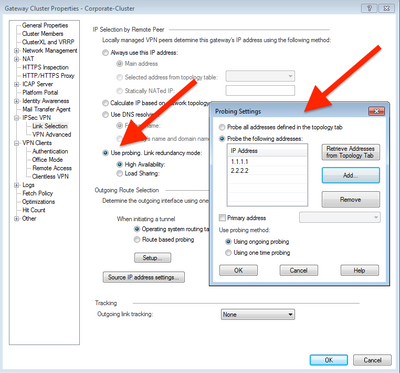
Currently, the Link Selection of the VPN configuration image are in attachments, and there are set up both public addresses used for VPN. I have it configured as Use Probing HA and both public IP address are set in there.
In the cluster object, the main IP address is set to be one public IP used for VPN connection. Each member has their private IP. When a user tries to connect to VPN using Client, it is successful and there is no problem with it.
For TAC indication, the cluster object main IP has to be set with the private Virtual IP for correct installation of policies between member, sync and logs delivery to the server, etc. Here is where the problem comes. By doing so, the VPN Clients server IP in the site configuration is set to be the Public IP, and the connection to it is successful, but when is disconnected, the server IP in the Client changes to the private Virtual IP of the cluster (which is current the main IP of the object) and makes impossible the connection, due to user are in different locations, WFH, etc.
The solution for it is to get back the public IP as the object main IP.
Why does the VPN Client changes the server IP configured in the site after first connection? And can I do for having the private Virtual IP as main of the object and also keep the VPN Clients server IP with the Public one?
Go to "Use Probing", then click to "Configure". In the next menu, set up your public IP addresses.
Hi,thank you for reply.
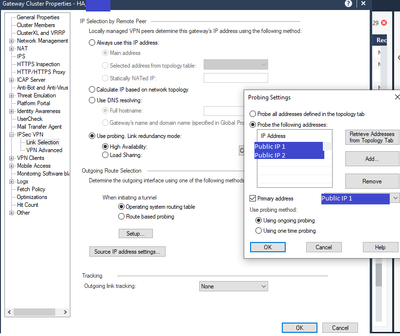
Actually, I have it this way. Here is an actual image of the Link Selection object settings. I got both IP addresses used for VPN, where Public IP 1 is the default one.
The IP given to the object in General Properties is set to be the Public IP 1 and works well for the VPN connection, but cause troubles in the cluster when installing policies.
I want that IP (in Global Properties) to be set with a private IP, but when a do so, the VPN clients automatically change the Server IP of the connection from Public (this is the server IP configurated in the client for VPN connection) to the Private one, and then they are unable to connect to VPN.
You need to make sure Link Selection is configured correctly for Remote Access.
See: https://support.checkpoint.com/results/sk/sk32229
Please note R80.30 is end of support and you should consider upgrading.
Additionally can you please confirm the endpoint/VPN client version used if the problem persists following configuration of the link selection settings?
Hello Friends,
I'm facing the exact same issue mentioned by @emacias-pronet . I've made sure that everything is correctly configured in the link selection. I've also checked the sk that @PhoneBoy provided, but it doesn't seem to apply to this scenario because it asks to fix a single IP for Remote Access VPN connections, and in both @emacias-pronet 's and my case, we need 2 IPs.
Is there a solution for this situation? Thank you!
Outside of configuring ISP Redundancy appropriately, you cannot use more than one IP for Remote Access.
Possible this will be addressed as part of R82 with some of the changes coming to VPN.
Strongly recommend working with your local Check Point office on an RFE if this is a critical requirement.
Leaderboard
Epsum factorial non deposit quid pro quo hic escorol.
| User | Count |
|---|---|
| 19 | |
| 17 | |
| 13 | |
| 8 | |
| 7 | |
| 3 | |
| 3 | |
| 3 | |
| 3 | |
| 2 |
Tue 16 Dec 2025 @ 05:00 PM (CET)
Under the Hood: CloudGuard Network Security for Oracle Cloud - Config and Autoscaling!Thu 18 Dec 2025 @ 10:00 AM (CET)
Cloud Architect Series - Building a Hybrid Mesh Security Strategy across cloudsTue 16 Dec 2025 @ 05:00 PM (CET)
Under the Hood: CloudGuard Network Security for Oracle Cloud - Config and Autoscaling!Thu 18 Dec 2025 @ 10:00 AM (CET)
Cloud Architect Series - Building a Hybrid Mesh Security Strategy across cloudsAbout CheckMates
Learn Check Point
Advanced Learning
YOU DESERVE THE BEST SECURITY