- Products
- Learn
- Local User Groups
- Partners
- More

MVP 2026: Submissions
Are Now Open!
What's New in R82.10?
Watch NowOverlap in Security Validation
Help us to understand your needs better
CheckMates Go:
Maestro Madness
Hello
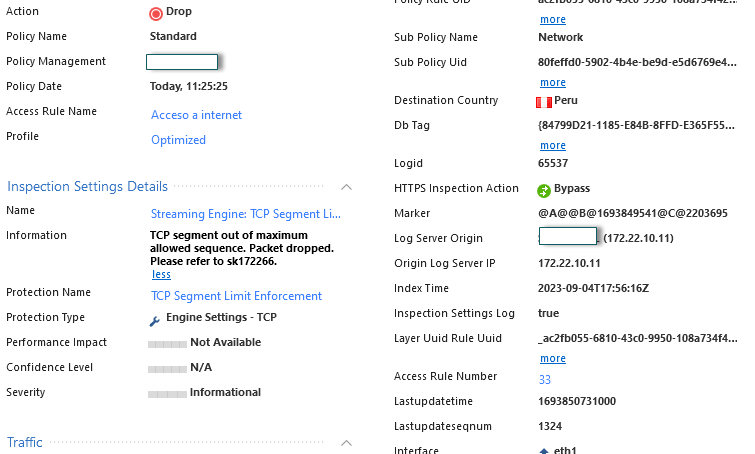
Hoping someone can help! I am relatively new to checkpoints, we are seeing a lot of packets dropped with this description
"https Traffic Dropped from XX.XXX.XXX.XXX to XX.XXX.XXX.XXX due to TCP segment out of maximum allowed sequence. Packet dropped."
This happens when users try to access an internal confluence site. Its very slow to load, I see a lot of the errors listed above, then eventually it will work and go through. So there isn't a rule blocking it as such. Its intermittent but repeatable.
I did google for this and found an article suggesting that it could be high memory usage, I got up a CLI and run the TOP command whilst the issue was occuring however %mem was never high, cpu spiked here and there, usually with cphwd_w_init_ke at the top, but its certainly not sitting at 100pc.
any help much appreciated!
Thanks
This is one of the sanity checks we perform by default on connections.
It can be triggered under load as described here: https://supportcenter.checkpoint.com/supportcenter/portal?eventSubmit_doGoviewsolutiondetails=&solut...
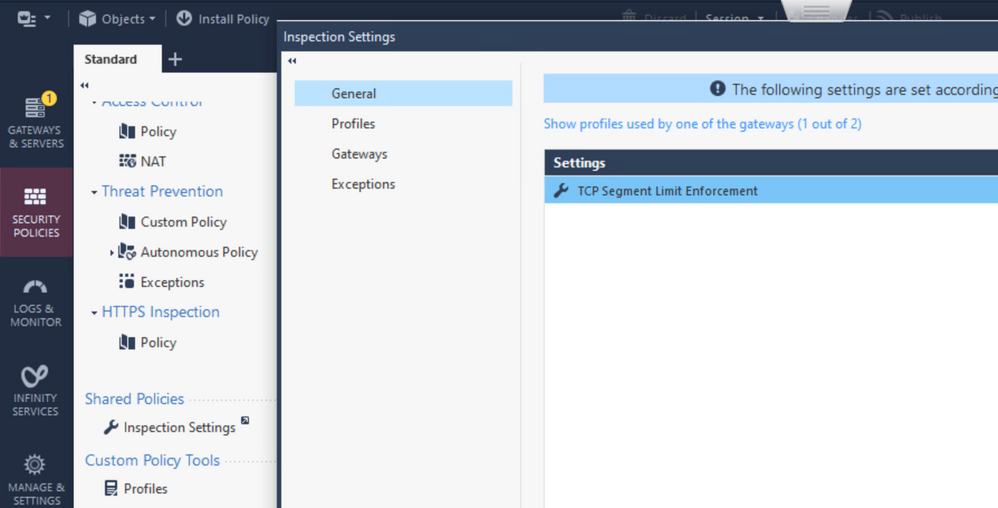
You can disable this check or create a specific exception here:
Note these Inspection Settings are done in the firewall (not IPS) and require pushing the Access Policy to take effect.
Is it expected behavior? Depends on the exact traffic involved.
The protection itself might not cause extra memory usage, but the client's reaction to the connection dropping might.
Regardless, if this is happening with a specific, trusted source or destination on a regular basis, your best bet is to create an exception for this protection.
This is one of the sanity checks we perform by default on connections.
It can be triggered under load as described here: https://supportcenter.checkpoint.com/supportcenter/portal?eventSubmit_doGoviewsolutiondetails=&solut...
You can disable this check or create a specific exception here:
Note these Inspection Settings are done in the firewall (not IPS) and require pushing the Access Policy to take effect.
Hello
Thanks so much for your reply, so if I set that to allow instead, it should speed up the loading of the site?
Thanks
James
Hello,
I have the same scenario.
The memory, is exceeding the 90% usage threshold.
The message is the same as reported at the beginning of this post.
It is an "expected behavior" (normal), that this kind of alerts occur, and that the memory is "triggered" in terms of its consumption?
I have checked sk114529, but I don't see any definitive "solutions".
Could someone recommend me, what kind of solution can be applied for this scenario, please?
Regards.
Is it expected behavior? Depends on the exact traffic involved.
The protection itself might not cause extra memory usage, but the client's reaction to the connection dropping might.
Regardless, if this is happening with a specific, trusted source or destination on a regular basis, your best bet is to create an exception for this protection.
Leaderboard
Epsum factorial non deposit quid pro quo hic escorol.
| User | Count |
|---|---|
| 19 | |
| 17 | |
| 13 | |
| 8 | |
| 7 | |
| 3 | |
| 3 | |
| 3 | |
| 3 | |
| 2 |
Tue 16 Dec 2025 @ 05:00 PM (CET)
Under the Hood: CloudGuard Network Security for Oracle Cloud - Config and Autoscaling!Thu 18 Dec 2025 @ 10:00 AM (CET)
Cloud Architect Series - Building a Hybrid Mesh Security Strategy across cloudsTue 16 Dec 2025 @ 05:00 PM (CET)
Under the Hood: CloudGuard Network Security for Oracle Cloud - Config and Autoscaling!Thu 18 Dec 2025 @ 10:00 AM (CET)
Cloud Architect Series - Building a Hybrid Mesh Security Strategy across cloudsAbout CheckMates
Learn Check Point
Advanced Learning
YOU DESERVE THE BEST SECURITY