- Products
- Learn
- Local User Groups
- Partners
- More

AI Security Masters E7:
How CPR Broke ChatGPT's Isolation and What It Means for You
Blueprint Architecture for Securing
The AI Factory & AI Data Center
Call For Papers
Your Expertise. Our Stage
Good, Better, Best:
Prioritizing Defenses Against Credential Abuse
Ink Dragon: A Major Nation-State Campaign
Watch HereCheckMates Go:
CheckMates Fest
Good day All;
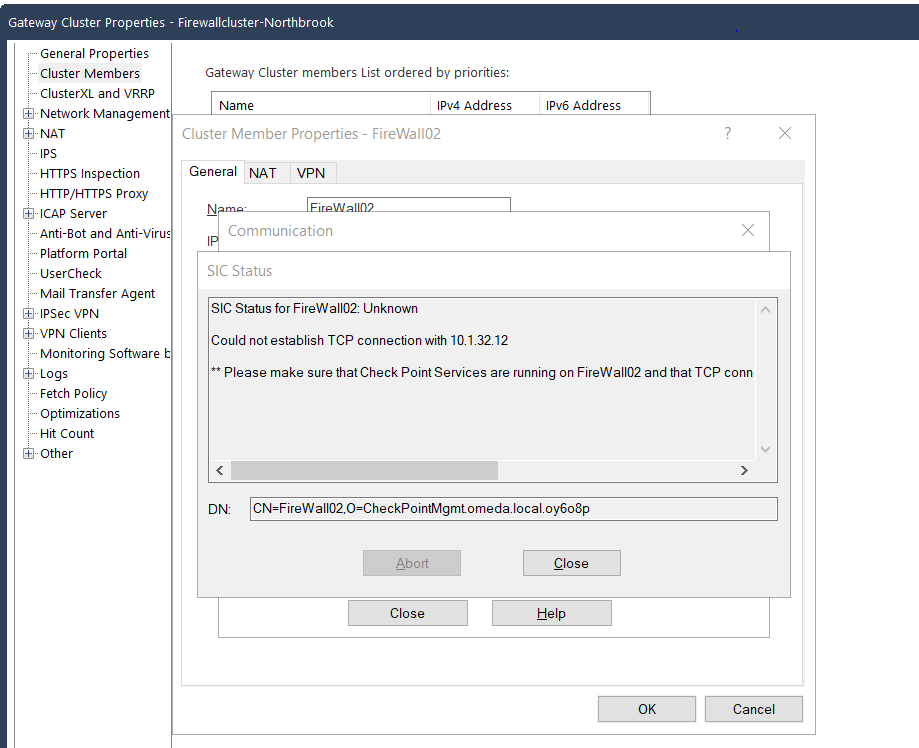
I already am talking to TAC about this, but before the Thanksgiving weekend I have a cluster of two 16K firewalls. Both working as usual but after we came back from the long weekend I was trying to put in a temporary block an a suspicious IP. When I received the following message: " Unable to fetch Suspicious Activity Rule from Firewall02" Long story short TAC had me reboot the management server and now firewall02 I am unable to ping its IP address(10.1.32.12) or connect to it via the management server. I can ping the management IP from firewall02 and can ping firewall02 from anywhere else in the network, just not from the management server. I also see the that the management PC is learning the MAC of firewall02. Not sure what happened, anyone experience this?
Thank you,
Warren
Good day All;
The issue has been resolved, I would like to thank everyone for there help in trying to help me figure this out. Long story short the issue was with the automatic SAM rules that are created. For some reason a SAM rule was created that was blocking our management server. We discovered this when we
[Expert@Firewall02:0]# fw ctl zdebug drop | grep 10.1.32.13
@;336430;[vs_0];[tid_5];[fw4_5];fw_log_drop_ex: Packet proto=6 10.1.32.13:52570 -> 10.1.32.12:18192 dropped by fw_handle_first_packet Reason: sam filter drop; @;336759;[vs_0];[tid_11];[fw4_11];fw_log_drop_ex: Packet proto=6 10.1.32.13:45756 -> 10.1.32.12:18191 dropped by fw_handle_first_packet Reason: sam filter drop; @;336880;[vs_0];[tid_14];[fw4_14];fw_log_drop_ex: Packet proto=6 10.1.32.13:45756 -> 10.1.32.12:18191 dropped by fw_handle_first_packet Reason: sam filter drop;
Since we could not do anything we had to go into firewall2 via the console and do:
[Expert@Firewall02:0]# cd $FWDIR/log [Expert@Firewall02:0]# ls -lh sam* -rw-rw---- 1 admin root 102K Nov 29 08:51 sam.dat
Made a backup copy:
[Expert@Firewall02:0]# cp sam.dat sam.dat.BKP
Then did a cpstop
[Expert@Firewall02:0]# rm -f sam.dat
cpstart
once we did that, we were able to run SIC and get the management and firewall02 talking again.
Thank you all again for your help!!!!
Does anything show in the logs?
Have you confirmed the packets are being received on the gateway with tcpdump?
I will have to do that still, but I have 7 other interfaces on firewall02 and I am able to ping all of them its just eth1-01 that I am not able to ping. Let me run tcpdump.
Is it maybe related to this https://support.checkpoint.com/results/sk/sk97587 - standby is not reachable because active is answering?
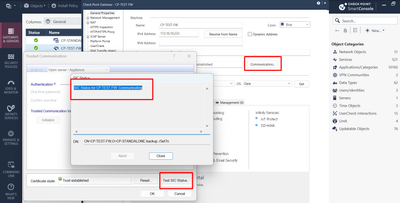
Does SIC even work? If not, then you may need to reset it via cpconfig and smart console object itself.
Andy
I am new to Checkpoint, came from Palo Alto. I was trying to verify that, I found the admin guide for R81.10 but it shows me how to set it up. How do I verify if it is work if you know off the top of your head otherwise still trying to find docs.
Palo Alto, you are fine brother...when you know one fw vendor, its not that hard to learn another, trust me. One thing that ALWAYS trips me with PAN is inbound nat, I will never undertand it, though I know how it works lol. Check from below in smart console
Andy
Thank you sir for the information!!! I am still learning PAN!!! I keep finding out that there is more to learn....lol!! But now my focus is on Checkpoint. Looks like I might need to reestablish SIC on firewall02:
You do...so run cpconfig, then option for secure int. communication, reset it...can be any password, 1234, password, anything...its one time encrypted key anyway that does not get saved. BUT, be mindful, this will restart CP services and load whats called initial policy, which literally blocks most things, but then you can use that key to establish SIC on smart console, once done, try install policy.
Cheers,
Andy
So I have a quick question, I have 2 firewalls that are in a cluster, Firewall02 is the standby and Firewall01 is the active one. When I run cpconfig on Firewall02 will this by any chance affect my active Firewall because they are in a cluster?
Correct, does not affect anything, as you are not touching current active fw. To be 100% sure, you can run cphaprob roles command from fw01 and if it shows master, you are good. Like below in my lab:
[Expert@CP-FW-02:0]# cphaprob roles
ID Role
1 Non-Master
2 (local) Master
[Expert@CP-FW-02:0]#
Andy
Awesome!!! Thank you sir!!! I will try that and let you know....I guess that is why they call you the_rock, cause you ROCK!!!! Sorry corney but couldn't help it 😁
Thats what SHE said brother...just kidding, no one ever said that : - )
Anyway, happy to help!
Andy
Ufortuanatly, I have to jump through hoops first in order to do this cause they want to make sure it doesn't interrupt production. So it more than likely will be later today.
I get it, definitely better to do after hours, just to be on the safe side brother. Keep us posted how it goes. Now, here is something to keep in mind. In case this process fails, meaning say sic works, but after policy install you get the same issue, what I would do is actually examine the routing. I hope it works fine, but something to keep in mind if there is a problem after you push the policy to the cluster.
Hope that helps.
Best regards,
Andy
That message is saying it can't tell whether SIC is established or not, because there's a TCP connectivity problem. That's lower-level than SIC. I would not reset SIC yet. Resetting SIC with cpconfig will take the member down until you reestablish SIC and push policy. The other member will probably be okay, so this shouldn't cause a traffic outage. If the problem is lower level, like the error message says it is, you won't be able to reestablish SIC after resetting it on the member.
If you are able to connect to the problem member, check the normal traffic things:
I see ok will hold off on this
[Expert@Firewall02:0]# cphaprob state
Cluster Mode: High Availability (Active Up) with IGMP Membership
ID Unique Address Assigned Load State Name
1 192.168.255.253 100% ACTIVE FireWall01
2 (local) 192.168.255.254 0% STANDBY FireWall02
[Expert@Firewall02:0]# tcpdump -ennvi eth2-01 host 10.1.32.13
tcpdump: listening on eth2-01, link-type EN10MB (Ethernet), capture size 262144 bytes
15:50:19.056148 00:1c:7f:a5:09:2e > 00:50:56:8f:f4:6e, ethertype IPv4 (0x0800), length 204: (tos 0x0, ttl 64, id 44749, offset 0, flags [DF], proto TCP (6), length 190)
10.1.32.12.54484 > 10.1.32.13.257: Flags [P.], cksum 0x70fd (correct), seq 2067075409:2067075547, ack 948068494, win 40, options [nop,nop,TS val 2049325344 ecr 104931060], length 138
15:50:19.056224 00:50:56:8f:f4:6e > 00:1c:7f:a5:09:2e, ethertype IPv4 (0x0800), length 66: (tos 0x0, ttl 64, id 29308, offset 0, flags [DF], proto TCP (6), length 52)
10.1.32.13.257 > 10.1.32.12.54484: Flags [.], cksum 0x41ca (correct), ack 138, win 174, options [nop,nop,TS val 104934060 ecr 2049325344], length 0
15:50:19.725269 00:50:56:8f:f4:6e > 00:1c:7f:a5:09:2e, ethertype IPv4 (0x0800), length 74: (tos 0x0, ttl 64, id 44940, offset 0, flags [DF], proto TCP (6), length 60)
10.1.32.13.42829 > 10.1.32.12.18192: Flags [S], cksum 0x6f4a (correct), seq 1843036869, win 29200, options [mss 1460,sackOK,TS val 104934729 ecr 0,nop,wscale 10], length 0
15:50:20.727336 00:50:56:8f:f4:6e > 00:1c:7f:a5:09:2e, ethertype IPv4 (0x0800), length 74: (tos 0x0, ttl 64, id 44941, offset 0, flags [DF], proto TCP (6), length 60)
10.1.32.13.42829 > 10.1.32.12.18192: Flags [S], cksum 0x6b5f (correct), seq 1843036869, win 29200, options [mss 1460,sackOK,TS val 104935732 ecr 0,nop,wscale 10], length 0
15:50:21.056277 00:1c:7f:a5:09:2e > 00:50:56:8f:f4:6e, ethertype IPv4 (0x0800), length 320: (tos 0x0, ttl 64, id 44750, offset 0, flags [DF], proto TCP (6), length 306)
10.1.32.12.54484 > 10.1.32.13.257: Flags [P.], cksum 0xe06c (correct), seq 138:392, ack 1, win 40, options [nop,nop,TS val 2049327344 ecr 104934060], length 254
15:50:21.056547 00:50:56:8f:f4:6e > 00:1c:7f:a5:09:2e, ethertype IPv4 (0x0800), length 66: (tos 0x0, ttl 64, id 29309, offset 0, flags [DF], proto TCP (6), length 52)
10.1.32.13.257 > 10.1.32.12.54484: Flags [.], cksum 0x312b (correct), ack 392, win 174, options [nop,nop,TS val 104936061 ecr 2049327344], length 0
15:50:22.731312 00:50:56:8f:f4:6e > 00:1c:7f:a5:09:2e, ethertype IPv4 (0x0800), length 74: (tos 0x0, ttl 64, id 44942, offset 0, flags [DF], proto TCP (6), length 60)
10.1.32.13.42829 > 10.1.32.12.18192: Flags [S], cksum 0x638b (correct), seq 1843036869, win 29200, options [mss 1460,sackOK,TS val 104937736 ecr 0,nop,wscale 10], length 0
^C
Not sure if I am doing this right but this is what I typed:
fw ctl zdebug drop -F 10.1.32.13 -F 10.1.32.13
Firewall02> fw monitor -F 10.1.32.13 -F 10.1.32.13
PPAK 0: Get before set operation succeeded of fwmonitor_kiss_enable
PPAK 0: Get before set operation succeeded of simple_debug_filter_off
PPAK 0: Get before set operation succeeded of kiss_debug_force_kdprintf_enable
PPAK 0: Get before set operation succeeded of fwmonitorfreebufs
PPAK 0: Get before set operation succeeded of kiss_debug_force_kdprintf_enable
Partial debug filter, setting missing parameters to 'Any'
Partial debug filter, setting missing parameters to 'Any'
Partial debug filter, setting missing parameters to 'Any'
Partial debug filter, setting missing parameters to 'Any'
fw ctl set string simple_debug_filter_saddr_1 10.1.32.13 -a
PPAK 0: Get before set operation succeeded of simple_debug_filter_saddr_1
fw ctl set int simple_debug_filter_sport_1 0 -a
PPAK 0: Get before set operation succeeded of simple_debug_filter_sport_1
fw ctl set string simple_debug_filter_daddr_1 0 -a
PPAK 0: Get before set operation succeeded of simple_debug_filter_daddr_1
fw ctl set int simple_debug_filter_dport_1 0 -a
PPAK 0: Get before set operation succeeded of simple_debug_filter_dport_1
fw ctl set int simple_debug_filter_proto_1 0 -a
PPAK 0: Get before set operation succeeded of simple_debug_filter_proto_1
PPAK 0: Get before set operation succeeded of kiss_debug_force_kdprintf_enable
Partial debug filter, setting missing parameters to 'Any'
Partial debug filter, setting missing parameters to 'Any'
Partial debug filter, setting missing parameters to 'Any'
Partial debug filter, setting missing parameters to 'Any'
fw ctl set string simple_debug_filter_saddr_2 10.1.32.13 -a
PPAK 0: Get before set operation succeeded of simple_debug_filter_saddr_2
fw ctl set int simple_debug_filter_sport_2 0 -a
PPAK 0: Get before set operation succeeded of simple_debug_filter_sport_2
fw ctl set string simple_debug_filter_daddr_2 0 -a
PPAK 0: Get before set operation succeeded of simple_debug_filter_daddr_2
fw ctl set int simple_debug_filter_dport_2 0 -a
PPAK 0: Get before set operation succeeded of simple_debug_filter_dport_2
fw ctl set int simple_debug_filter_proto_2 0 -a
PPAK 0: Get before set operation succeeded of simple_debug_filter_proto_2
FW monitor will record only ip & transport layers in a packet
For capturing the whole packet please do -w
PPAK 0: Get before set operation succeeded of fwmonitor_ppak_all_position
monitor: getting filter (from command line)
monitor: compiling
monitorfilter:
Compiled OK.
monitor: loading
monitor: monitoring (control-C to stop)
buffer size 8388608 is too big for 138 buffers, using 7002630
PPAK 0: Get before set operation succeeded of fwmonitormaxpacket
PPAK 0: Get before set operation succeeded of fwmonitormask
PPAK 0: Get before set operation succeeded of fwmonitorallocbufs
PPAK 0: Get before set operation succeeded of printuuid
PPAK 0: Get before set operation succeeded of fwmonitor_kiss_enable
[vs_0][ppak_0] eth2-01:iq[44]: 10.1.32.13 -> 10.1.32.12 (TCP) len=52 id=29360
TCP: 257 -> 54484 ....A. seq=3882608e ack=7b353f27
[vs_0][fw_16] eth2-01:iq[44]: 10.1.32.13 -> 10.1.32.12 (TCP) len=52 id=29360
TCP: 257 -> 54484 ....A. seq=3882608e ack=7b353f27
[vs_0][fw_16] eth2-01:IQ[44]: 10.1.32.13 -> 10.1.32.12 (TCP) len=52 id=29360
TCP: 257 -> 54484 ....A. seq=3882608e ack=7b353f27
[vs_0][ppak_0] eth2-01:iq[44]: 10.1.32.13 -> 10.1.32.12 (TCP) len=52 id=29361
TCP: 257 -> 54484 ....A. seq=3882608e ack=7b354025
[vs_0][fw_16] eth2-01:iq[44]: 10.1.32.13 -> 10.1.32.12 (TCP) len=52 id=29361
TCP: 257 -> 54484 ....A. seq=3882608e ack=7b354025
[vs_0][fw_16] eth2-01:IQ[44]: 10.1.32.13 -> 10.1.32.12 (TCP) len=52 id=29361
TCP: 257 -> 54484 ....A. seq=3882608e ack=7b354025
[vs_0][ppak_0] eth2-01:iq[44]: 10.1.32.13 -> 10.1.32.12 (TCP) len=52 id=29362
TCP: 257 -> 54484 ....A. seq=3882608e ack=7b3540af
[vs_0][fw_16] eth2-01:iq[44]: 10.1.32.13 -> 10.1.32.12 (TCP) len=52 id=29362
TCP: 257 -> 54484 ....A. seq=3882608e ack=7b3540af
[vs_0][fw_16] eth2-01:IQ[44]: 10.1.32.13 -> 10.1.32.12 (TCP) len=52 id=29362
TCP: 257 -> 54484 ....A. seq=3882608e ack=7b3540af
[vs_0][ppak_0] eth2-01:iq[44]: 10.1.32.13 -> 10.1.32.12 (TCP) len=52 id=29363
TCP: 257 -> 54484 ....A. seq=3882608e ack=7b354139
[vs_0][fw_16] eth2-01:iq[44]: 10.1.32.13 -> 10.1.32.12 (TCP) len=52 id=29363
TCP: 257 -> 54484 ....A. seq=3882608e ack=7b354139
[vs_0][fw_16] eth2-01:IQ[44]: 10.1.32.13 -> 10.1.32.12 (TCP) len=52 id=29363
TCP: 257 -> 54484 ....A. seq=3882608e ack=7b354139
[vs_0][ppak_0] eth2-01:iq[44]: 10.1.32.13 -> 10.1.32.12 (TCP) len=52 id=29364
TCP: 257 -> 54484 ....A. seq=3882608e ack=7b3541c3
[vs_0][fw_16] eth2-01:iq[44]: 10.1.32.13 -> 10.1.32.12 (TCP) len=52 id=29364
TCP: 257 -> 54484 ....A. seq=3882608e ack=7b3541c3
[vs_0][fw_16] eth2-01:IQ[44]: 10.1.32.13 -> 10.1.32.12 (TCP) len=52 id=29364
TCP: 257 -> 54484 ....A. seq=3882608e ack=7b3541c3
[vs_0][ppak_0] eth2-01:iq[44]: 10.1.32.13 -> 10.1.32.12 (TCP) len=60 id=11750
TCP: 44946 -> 18192 .S.... seq=aa2ec06c ack=00000000
[vs_0][fw_16] eth2-01:iq[44]: 10.1.32.13 -> 10.1.32.12 (TCP) len=60 id=11750
TCP: 44946 -> 18192 .S.... seq=aa2ec06c ack=00000000
[vs_0][ppak_0] eth2-01:iq[44]: 10.1.32.13 -> 10.1.32.12 (TCP) len=60 id=11751
TCP: 44946 -> 18192 .S.... seq=aa2ec06c ack=00000000
[vs_0][fw_23] eth2-01:iq[44]: 10.1.32.13 -> 10.1.32.12 (TCP) len=60 id=11751
TCP: 44946 -> 18192 .S.... seq=aa2ec06c ack=00000000
[vs_0][ppak_0] eth2-01:iq[44]: 10.1.32.13 -> 10.1.32.12 (TCP) len=52 id=29365
TCP: 257 -> 54484 ....A. seq=3882608e ack=7b35424d
[vs_0][fw_16] eth2-01:iq[44]: 10.1.32.13 -> 10.1.32.12 (TCP) len=52 id=29365
TCP: 257 -> 54484 ....A. seq=3882608e ack=7b35424d
[vs_0][fw_16] eth2-01:IQ[44]: 10.1.32.13 -> 10.1.32.12 (TCP) len=52 id=29365
TCP: 257 -> 54484 ....A. seq=3882608e ack=7b35424d
[vs_0][ppak_0] eth2-01:iq[44]: 10.1.32.13 -> 10.1.32.12 (TCP) len=60 id=11752
TCP: 44946 -> 18192 .S.... seq=aa2ec06c ack=00000000
Based on that, seems fine to me. Does fw2 have right policy? Can you run fw stat -b AMW command? Or just fw stat...
Cheers,
Andy
For the drop debug and packet capture, the filter should be like this:
fw ctl zdebug drop -F "10.1.32.13,0,0,0,0" -F "0,0,10.1.32.13,0,0"
The filter expression is five fields separated by commas. Source IP, source port, destination IP, destination port, IP protocol number. A 0 in any field is a wildcard for that field. Note that reply traffic is not automatically caught by the filter, so be sure to specify the filter in both directions, like I did above.
Start the drop debug. Connect to your management and open the cluster member object. Test SIC in SmartConsole. See if you got anything in the drop debug.
Start the packet capture. Connect to your management and open the cluster member object. Test SIC in SmartConsole. See if you got anything in the packet capture. Look for ports 18191 and 18192.
HI Bob;
I will try this next time, hopefully there is no next time but will take note of this.
Thank you, sir!!!!
Good day All;
The issue has been resolved, I would like to thank everyone for there help in trying to help me figure this out. Long story short the issue was with the automatic SAM rules that are created. For some reason a SAM rule was created that was blocking our management server. We discovered this when we
[Expert@Firewall02:0]# fw ctl zdebug drop | grep 10.1.32.13
@;336430;[vs_0];[tid_5];[fw4_5];fw_log_drop_ex: Packet proto=6 10.1.32.13:52570 -> 10.1.32.12:18192 dropped by fw_handle_first_packet Reason: sam filter drop; @;336759;[vs_0];[tid_11];[fw4_11];fw_log_drop_ex: Packet proto=6 10.1.32.13:45756 -> 10.1.32.12:18191 dropped by fw_handle_first_packet Reason: sam filter drop; @;336880;[vs_0];[tid_14];[fw4_14];fw_log_drop_ex: Packet proto=6 10.1.32.13:45756 -> 10.1.32.12:18191 dropped by fw_handle_first_packet Reason: sam filter drop;
Since we could not do anything we had to go into firewall2 via the console and do:
[Expert@Firewall02:0]# cd $FWDIR/log [Expert@Firewall02:0]# ls -lh sam* -rw-rw---- 1 admin root 102K Nov 29 08:51 sam.dat
Made a backup copy:
[Expert@Firewall02:0]# cp sam.dat sam.dat.BKP
Then did a cpstop
[Expert@Firewall02:0]# rm -f sam.dat
cpstart
once we did that, we were able to run SIC and get the management and firewall02 talking again.
Thank you all again for your help!!!!
Amazing job @gurowar

Leaderboard
Epsum factorial non deposit quid pro quo hic escorol.
| User | Count |
|---|---|
| 36 | |
| 11 | |
| 10 | |
| 10 | |
| 9 | |
| 8 | |
| 7 | |
| 7 | |
| 6 | |
| 6 |
Tue 28 Apr 2026 @ 06:00 PM (IDT)
Under the Hood: Securing your GenAI-enabled Web Applications with Check Point WAFThu 30 Apr 2026 @ 03:00 PM (PDT)
Hillsboro, OR: Securing The AI Transformation and Exposure ManagementTue 28 Apr 2026 @ 06:00 PM (IDT)
Under the Hood: Securing your GenAI-enabled Web Applications with Check Point WAFTue 12 May 2026 @ 10:00 AM (CEST)
The Cloud Architects Series: Check Point Cloud Firewall delivered as a serviceThu 30 Apr 2026 @ 03:00 PM (PDT)
Hillsboro, OR: Securing The AI Transformation and Exposure ManagementAbout CheckMates
Learn Check Point
Advanced Learning

YOU DESERVE THE BEST SECURITY