- Products
- Learn
- Local User Groups
- Partners
- More

MVP 2026: Submissions
Are Now Open!
What's New in R82.10?
Watch NowOverlap in Security Validation
Help us to understand your needs better
CheckMates Go:
Maestro Madness
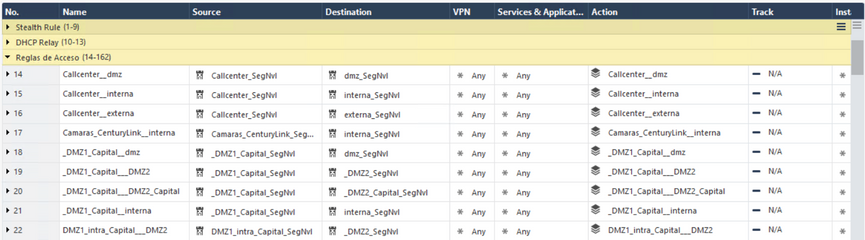
My client has deployed a ClusterXL R81.10 Load Sharing, with Take_22. Its policies manage it with Zones through Inline Layer, and so it was working perfectly. And each vlan or subinterface of the Firewall is attached with a Security Zone.
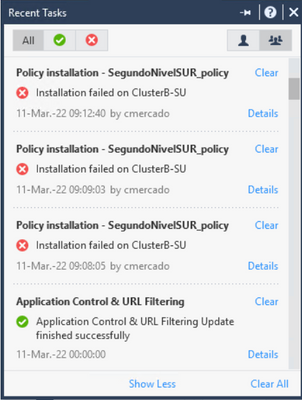
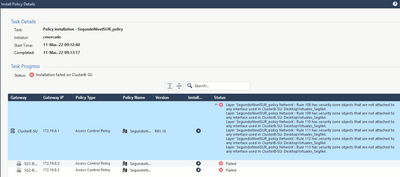
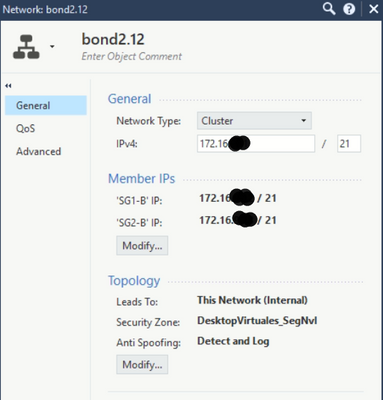
Over time, a new vlan or subinterface (bond2.12) attached to the Security Zone called "DesktopVirtuales_SegNvl" was added where, when policies are installed, there is an installation error indicating that the zone is not attached to any interface.
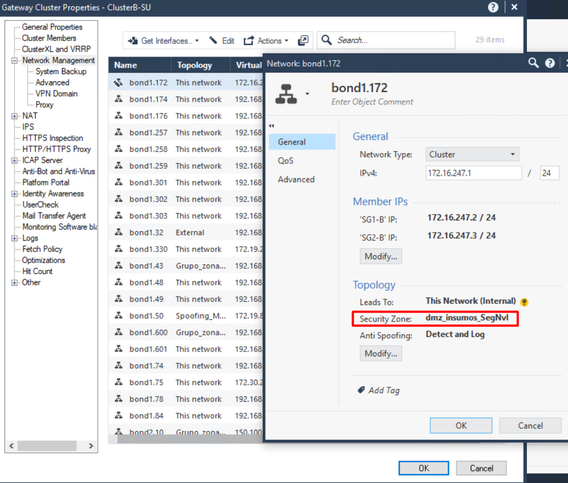
Here we can see that the "DesktopVirtuales_SegNvl" zone is attached to the bond2.12 vlan or subinterface.
Does anyone know how to fix this error?
Regards
Hi Luis,
Two suggestions for you:
1. Please review sk177129 to see if it helps with your scenario
2. Attempt to disable accelerated policy install temporarily per sk168055
I find solution in that sk very odd for this issue...would not workaround described simply cause a failover from dashboard??
Thanks for your response Chris. Regarding your suggestions:
1. Does not apply to my client's scenario.
2. I couldn't validate said sk168055 but I'll keep it in mind.
I was able to perform a kind of workaround or artifice to be able to temporarily solve the problem of installing policies.
What I did was:
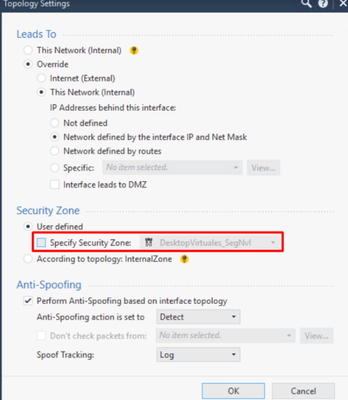
- Disassociate or remove the Security Zone check "DesktopVirtuales_SegNvl" from the bond2.12 subinterface.
Then just Post. And then I re-attached it or placed the Security Zone check.
Finally, I published and installed policies. And it was installed successfully.
But it seems that this policy installation problem occurs every so often.
Does anybody know what is it due to?
What could be a definitive solution?
Is this error only happening on accelerated installs? I already said that if this is the case you can get a hotfix for that as this is a bug on the management server. You can open a support case and request a fix for that or just wait a few months to get that fixed (not yet included in Ongoing Take 38). The bug id to look at is: PRHF-22326 (I hope I'm allowed to share that).
Hi Marcel, thanks for your reply.
Yes, the policy installation is an accelerated installation.
So, is it a bug of the Security Management Server but not of the Security Gateway?
Is there public information with the bug id PRHF-22326?
Correct, the hotfix we received is for the management. There is no public info yet as from searching the knowledgebase.
If this is only happening with an accelerated policy install there is a private hotfix available for the management server.
Leaderboard
Epsum factorial non deposit quid pro quo hic escorol.
| User | Count |
|---|---|
| 19 | |
| 17 | |
| 13 | |
| 8 | |
| 7 | |
| 3 | |
| 3 | |
| 3 | |
| 3 | |
| 2 |
Tue 16 Dec 2025 @ 05:00 PM (CET)
Under the Hood: CloudGuard Network Security for Oracle Cloud - Config and Autoscaling!Thu 18 Dec 2025 @ 10:00 AM (CET)
Cloud Architect Series - Building a Hybrid Mesh Security Strategy across cloudsTue 16 Dec 2025 @ 05:00 PM (CET)
Under the Hood: CloudGuard Network Security for Oracle Cloud - Config and Autoscaling!Thu 18 Dec 2025 @ 10:00 AM (CET)
Cloud Architect Series - Building a Hybrid Mesh Security Strategy across cloudsAbout CheckMates
Learn Check Point
Advanced Learning
YOU DESERVE THE BEST SECURITY