- Products
- Learn
- Local User Groups
- Partners
- More
AI Security Masters E7:
How CPR Broke ChatGPT's Isolation and What It Means for You
Blueprint Architecture for Securing
The AI Factory & AI Data Center
Call For Papers
Your Expertise. Our Stage
Good, Better, Best:
Prioritizing Defenses Against Credential Abuse
Ink Dragon: A Major Nation-State Campaign
Watch HereCheckMates Go:
CheckMates Fest
Hey guys,
Just wanted to say I installed jumbo 79 in the lab, so far so good, I see lots of improvements from the documentation.
Andy
https://sc1.checkpoint.com/documents/Jumbo_HFA/R81.20/R81.20/Take_79.htm?tocpath=_____6
Hi @the_rock
I would like to ask one question:
Among your productive installations, is there any FWK issues? Randomly stops, etc? I have some in my, thats why I am asking you about this, because take 79 has a lot of FWK fixes.
Have you any expereience in this?
Akos
Ask any questions mate, no worries. No issues I had observed so far. If anything, I will definitely update.
Best,
Andy
HI @the_rock , urgent help need,
We have firewall in Datacenter and SMB 1500 device in remote site, both are connected via S2S VPN tunnel, I did upgrade the Datacenter firewall from R81.10 to R81.20 Take 76 on Aug 6th. All of sudden on Aug 16th , VPN is up on remote site, but not able to reach the internal IPs. When i check the routes on Datacenter firewall, I don't see the routes for the remote sites.
Basically, RIM is not working, It is not inserting the routes on to the DC routing table. VPN is up on both ends, but i suspects there is some issue on VPN that's the reason routes are not learning on DC firewall. can you advise on this, any bug on R81.20 Take 76?
Mate, if its urgent, I would pick up the phone, call TAC and ask for remote session.
No, Im not aware myself of any issue like one you described. I would run basic vpn debug, maybe examine messages files, as well as routed.log
Andy
HI @the_rock , urgent help need,
We have firewall in Datacenter and SMB 1500 device in remote site, both are connected via S2S VPN tunnel, I did upgrade the Datacenter firewall from R81.10 to R81.20 Take 76 on Aug 6th. All of sudden on Aug 16th , VPN is up on remote site, but not able to reach the internal IPs. When i check the routes on Datacenter firewall, I don't see the routes for the remote sites.
Basically, RIM is not working, It is not inserting the routes on to the DC routing table. VPN is up on both ends, but i suspects there is some issue on VPN that's the reason routes are not learning on DC firewall.
can you advise on this, any bug on R81.20 Take 76?
Are you using Domain-based VPN or route-based?
@paulraj29 You posted exact same thing mate...did you read my response, not only here, but also to the other post?
Happy to do remote if you want to check further.
Andy
Found an issue.
After upgrading the SMS we where no longer able to login to SmartConsole. The following message appeared as the symptom.
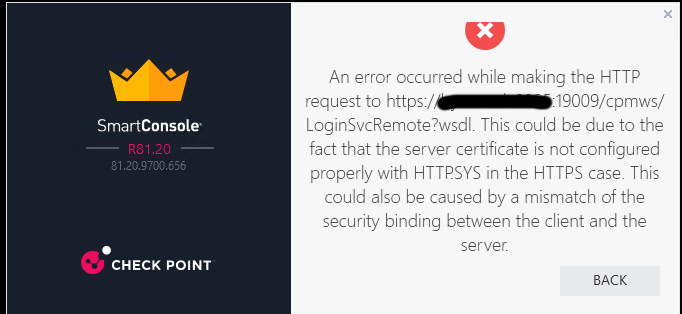
Error after applying JHFA79
After investigation found SK169253 which basically tells us that the host machine running smartconsole does not support TLS cipher DHE_RSA_WITH_AES_128_GCM_SHA256.
I verified this by running the following from powershell prompt:
Get-TlsCipherSuite TLS_ECDHE_RSA_WITH_AES_128 | Format-Table -Property Name
TLS_ECDHE_RSA_WITH_AES_128_CBC_SHA256_P384
TLS_ECDHE_RSA_WITH_AES_128_CBC_SHA256_P256
TLS_ECDHE_RSA_WITH_AES_128_CBC_SHA_P384
TLS_ECDHE_RSA_WITH_AES_128_CBC_SHA_P256
As you can see above the required cipher is not listed.
So you would need to add this to the host machine (using SK instructions or via group policies)
Question is why is this now a restriction and where is it documented in the Jumbo list?
In the meantime we have reverted back to JHFA70 which works fine.
People just be aware of this requirement when applying JHFA79 as it may not show up in a LAB, but in a production environment the system hosting smartconsole is likely to be hardened, and therefore you may come across this.
Also the other observation is TLSv1.2 requirement, but implies no TLSv1.3 support so if you only enabled TLSv1.3 on the SMS perhaps this would also break things.
Tx for that @genisis__
This could be the following from the release notes.
|
PRJ-50381, |
Security Management |
UPDATE: Various Web Portals on the Security Management Server (for example, Web SmartConsole, SmartView) no longer accept HTTPS connections to ports 443 and 19009 with specific TLS 1.2 ciphers. Refer to sk181879. |
thanks, at least there is something noted, what the SK does not indicate is the list of supported ciphers from JHFA79, or is it just that single cipher using TLSv1.2?
Leaderboard
Epsum factorial non deposit quid pro quo hic escorol.
| User | Count |
|---|---|
| 66 | |
| 19 | |
| 13 | |
| 12 | |
| 11 | |
| 9 | |
| 9 | |
| 7 | |
| 7 | |
| 7 |
Tue 28 Apr 2026 @ 06:00 PM (IDT)
Under the Hood: Securing your GenAI-enabled Web Applications with Check Point WAFThu 30 Apr 2026 @ 03:00 PM (PDT)
Hillsboro, OR: Securing The AI Transformation and Exposure ManagementTue 28 Apr 2026 @ 06:00 PM (IDT)
Under the Hood: Securing your GenAI-enabled Web Applications with Check Point WAFTue 12 May 2026 @ 10:00 AM (CEST)
The Cloud Architects Series: Check Point Cloud Firewall delivered as a serviceThu 30 Apr 2026 @ 03:00 PM (PDT)
Hillsboro, OR: Securing The AI Transformation and Exposure ManagementAbout CheckMates
Learn Check Point
Advanced Learning
YOU DESERVE THE BEST SECURITY
