- Products
- Learn
- Local User Groups
- Partners
- More

AI Security Masters E7:
How CPR Broke ChatGPT's Isolation and What It Means for You
Blueprint Architecture for Securing
The AI Factory & AI Data Center
Call For Papers
Your Expertise. Our Stage
Good, Better, Best:
Prioritizing Defenses Against Credential Abuse
Ink Dragon: A Major Nation-State Campaign
Watch HereCheckMates Go:
CheckMates Fest
Hi,
I'm trying to activate Anti-Bot and Anti-Virus in Detect Only.
We already have IPS activated with Medium-/High-Confidance in Prevent Mode. To check what Traffic (AB/AV) would be prevented if activated in the same Policy, we've created a second Policy where only AB/AV are activ and all Confidance Levels set to Detect.
Sadly this does not work, as Threat Prevention only seems to use the first Policy or whichever Policy is highest. If the Policies are switched, then AV/AB works but IPS does'nt.
To summarize: Top Policy with IPS activated, Second/Bottom with AV/AB only. See Screenshot attached.
Thanks!
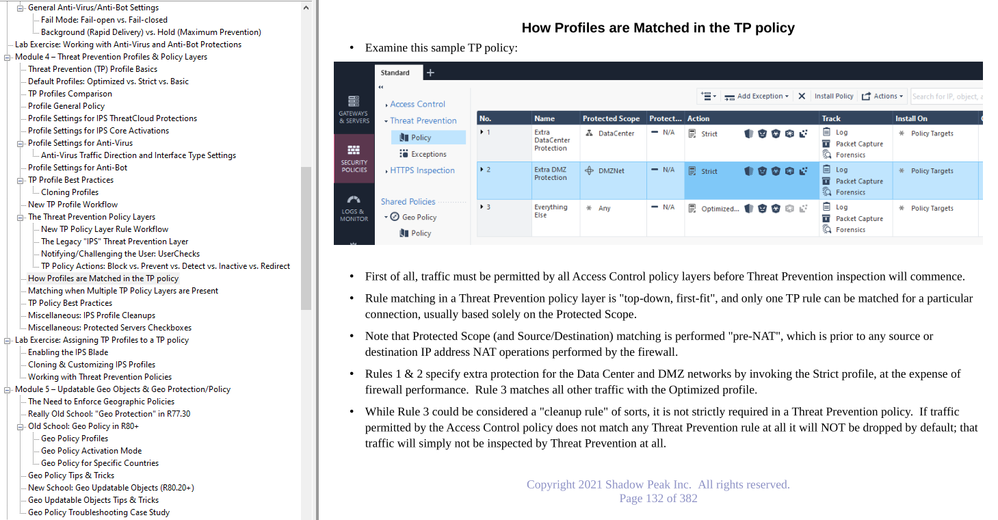
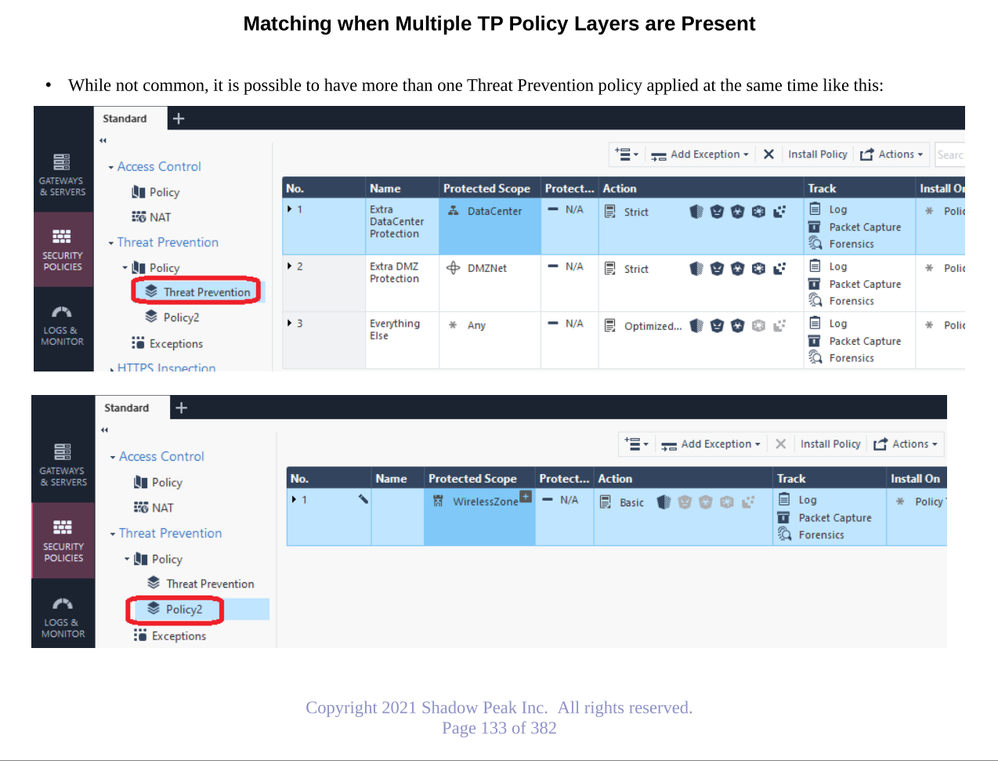
Hi. Currently you use two rules. In this setup only the first rule will be matched / activated. To get the action you described, create a new layer (right-click on the policy on the left) and move the second rule to this new layer. Now both rules will be matched.
I believe what @yalmog said is actually correct. These rules don't work quite the same way as regular policy, so his suggestion makes sense.
What @yalmog said is correct, only one Threat Prevention rule per TP layer can be matched. Here is some extra background on having more than one TP layer present from my IPS/AV/ABOT video course; this situation is not too common in my experience primarily because there could only be one TP layer prior to R80:
Thank you for the Insight! We actually solved the Problem by just inserting AV/AB into the main policy, because it was able to activate AV/AB as detect only in the Cluster Properties.
What do you mean exactly by inserting av/ab into main policy? You cant really do that, as its threat prevention blade(s), so it would only work as per screenshot @Timothy_Hall posted.
My inital request was much simpler, it was to use AV/AB and IPS in the same policy, but have AV/AB detect only. Since it's possible to change the cluster Properties use: "Detect only" or "As Profile Settings", we didn't have to worry about AB/AV activated according to Profile Settings and preventing False Positives.
O yes, you have to make sure those settings are correct, agreed. I was more referring to the fact that you cannot use AV/AB blades in the main access control policy, as those are threat prevention blades.
Leaderboard
Epsum factorial non deposit quid pro quo hic escorol.
| User | Count |
|---|---|
| 66 | |
| 19 | |
| 13 | |
| 12 | |
| 11 | |
| 10 | |
| 9 | |
| 7 | |
| 7 | |
| 7 |
Tue 28 Apr 2026 @ 06:00 PM (IDT)
Under the Hood: Securing your GenAI-enabled Web Applications with Check Point WAFThu 30 Apr 2026 @ 03:00 PM (PDT)
Hillsboro, OR: Securing The AI Transformation and Exposure ManagementTue 28 Apr 2026 @ 06:00 PM (IDT)
Under the Hood: Securing your GenAI-enabled Web Applications with Check Point WAFTue 12 May 2026 @ 10:00 AM (CEST)
The Cloud Architects Series: Check Point Cloud Firewall delivered as a serviceThu 30 Apr 2026 @ 03:00 PM (PDT)
Hillsboro, OR: Securing The AI Transformation and Exposure ManagementAbout CheckMates
Learn Check Point
Advanced Learning
YOU DESERVE THE BEST SECURITY