- Products
- Learn
- Local User Groups
- Partners
- More

MVP 2026: Submissions
Are Now Open!
What's New in R82.10?
10 December @ 5pm CET / 11am ET
Announcing Quantum R82.10!
Learn MoreOverlap in Security Validation
Help us to understand your needs better
CheckMates Go:
Maestro Madness
Hi experts,
My CLUSTER security gateway (R80.10) is using https inspection to control internet access. It is using certificate with SHA1. Now I need to upgrade SHA1 to SHA256.
I think I will follow sk115894 to generate new cert, but I still have some questions , please help clear, thank in advance:
>> I have a cluster, so where to generate cert (gateway 1 or 2 or on SMC) ?
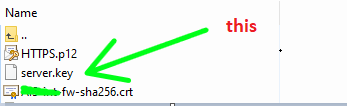
>> After generating new cert, I will import cert into SMC as sk115894 guide. But about file server.key, its default location is /home/admin of firewall (where it was born) , so Do I need to move it to some required location?
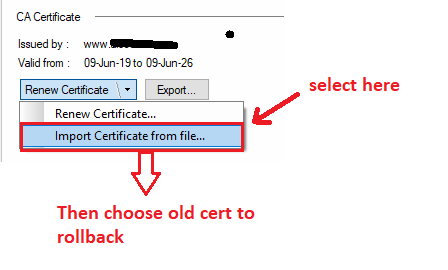
>> If this new cert gets problem after activating on SMC (as sk115894 guide) , could I rollback to old cert like this below ?
Thank you!!!
First of all, R80.10 is very close to End of Support.
Also, HTTPS Inspection has been improved substantially in later versions and it's highly recommended you upgrade to at least R80.40.
Anyway, to your question: what you are generating in sk115894 is a Certificate Authority key.
You can generate the CA key on a gateway, management, or any other system.
When you upload the CA key via SmartConsole and push policy, the gateways will be updated with the new CA key, which will be used to generate certificates for HTTPS traffic.
And, likewise, you can revert by simply uploading the old CA key and pushing policy.
Thank you mr PhoneBoy,
As I see when generating key as sk115894 , it also generates a private key (file called "server.key" in /home/admin). Do I need some actions on this file or leave it as default.
Thanks!!
server.key is an intermediary file that is used to create the .p12 file, which is what is ultimately being uploaded.
Don't believe you need to do anything with the server.key file.
Thank PhoneBoy for instanting reply me.
I summary two ways , I can process my work:
1- upgrade to higher version checkpoint (ex R80.40)
2- if still R80.10, I generate a cert as SK above mentioned. Then I upload CA file (*.crt extension -> is this exactly?) to SMC, and then push policy, using GPO push crt file to PC desktop....
Thanks!
Actually, you'll need to upload the new .p12 file regardless of what version you are on.
Upgrading to at least R80.40 is recommended for many many other reasons.
oh; I just see again, I need upload file *p12, not file *crt.
In case of rollback to old cert, I also need file p12 of old cert, but when the time, I created old cert on smart console , I didn't know where *p12 file of old cert is located.
Could you please tell me where location on firewall is storing it ?
I don't believe it is stored in a .p12 file or in any format that is easily extractable.
TAC might be able to assist here.
Regardless, provided you've distributed the new CA key to the relevant clients, there shouldn't be an issue that requires you to back out.
Leaderboard
Epsum factorial non deposit quid pro quo hic escorol.
| User | Count |
|---|---|
| 21 | |
| 20 | |
| 16 | |
| 8 | |
| 7 | |
| 3 | |
| 3 | |
| 3 | |
| 3 | |
| 3 |
Fri 12 Dec 2025 @ 10:00 AM (CET)
Check Mates Live Netherlands: #41 AI & Multi Context ProtocolTue 16 Dec 2025 @ 05:00 PM (CET)
Under the Hood: CloudGuard Network Security for Oracle Cloud - Config and Autoscaling!Fri 12 Dec 2025 @ 10:00 AM (CET)
Check Mates Live Netherlands: #41 AI & Multi Context ProtocolTue 16 Dec 2025 @ 05:00 PM (CET)
Under the Hood: CloudGuard Network Security for Oracle Cloud - Config and Autoscaling!About CheckMates
Learn Check Point
Advanced Learning
YOU DESERVE THE BEST SECURITY