- Products
- Learn
- Local User Groups
- Partners
- More

MVP 2026: Submissions
Are Now Open!
What's New in R82.10?
Watch NowOverlap in Security Validation
Help us to understand your needs better
CheckMates Go:
Maestro Madness
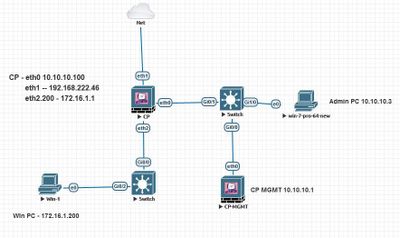
I have setup a Lab and not able to reach VSX Lan interface. Please find the attached Lab diagram
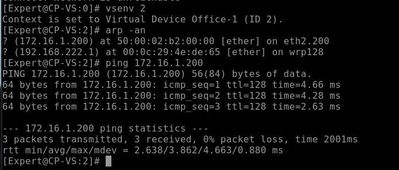
All traffic is allowed on VS and i am able to reach Win PC 172.16.1.100. However i am not able to reach 172.16.1.1 from win pc.
I am not able to find any solution for this. Please guide me to fix this.
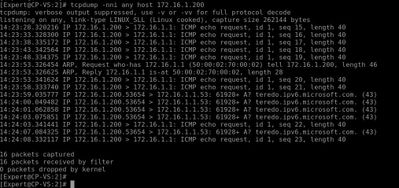
Please find the TCPDUMP output . I am suspecting firewall is not replying to ARP.
I think it is normal. VS is most probably answering with its "funny IP", which break the ping. To check that, run FW monitor while pinging and see
On the second thought, please check here:
Hi Mate,
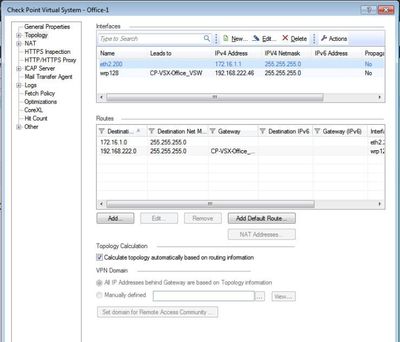
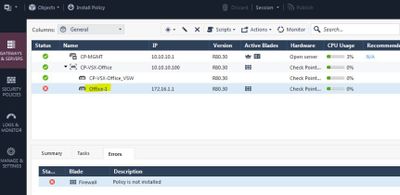
Thanks for reply. I installed policy on VS-2 however it is still showing default one.
I run fw unloadlocal and was able to ping VS-2 Lan IP that is 172.16.1.1, but i am not able to figure out why policy is not installing on VS-2.
Do you have any screenshots of the policy installation?
Hi Jack,
Please find snapshot.
And what errors do you get when you try install a policy? @Captain_Igen
Leaderboard
Epsum factorial non deposit quid pro quo hic escorol.
| User | Count |
|---|---|
| 20 | |
| 19 | |
| 19 | |
| 8 | |
| 7 | |
| 3 | |
| 3 | |
| 3 | |
| 3 | |
| 3 |
Tue 16 Dec 2025 @ 05:00 PM (CET)
Under the Hood: CloudGuard Network Security for Oracle Cloud - Config and Autoscaling!Thu 18 Dec 2025 @ 10:00 AM (CET)
Cloud Architect Series - Building a Hybrid Mesh Security Strategy across cloudsTue 16 Dec 2025 @ 05:00 PM (CET)
Under the Hood: CloudGuard Network Security for Oracle Cloud - Config and Autoscaling!Thu 18 Dec 2025 @ 10:00 AM (CET)
Cloud Architect Series - Building a Hybrid Mesh Security Strategy across cloudsAbout CheckMates
Learn Check Point
Advanced Learning
YOU DESERVE THE BEST SECURITY