- Products
- Learn
- Local User Groups
- Partners
- More

AI Security Masters E7:
How CPR Broke ChatGPT's Isolation and What It Means for You
Blueprint Architecture for Securing
The AI Factory & AI Data Center
Call For Papers
Your Expertise. Our Stage
Good, Better, Best:
Prioritizing Defenses Against Credential Abuse
Ink Dragon: A Major Nation-State Campaign
Watch HereCheckMates Go:
CheckMates Fest
Hello Checkmates,
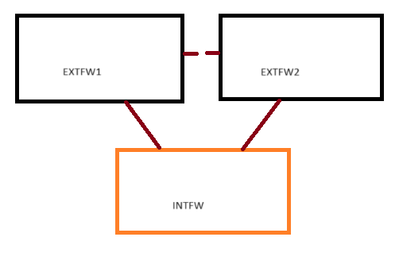
I have a question regarding the behavior of my internal firewall. Please see image below as reference:
Currently, anything below INTFW has internet access, but for some reason, INTFW doesn't. I have confirmed this when I checked my URL and App Control updates, and it shows a failed attempt. Logs show allowed via implied rule as seen in the screenshot below:
Running fwctl zdebug + drop | grep [INTFW IP] on EXTFW1 (current active cluster member) doesn't show any drops, so it confirmed that the allowed log entries are correct. It shouldn't be about the routes as my internal network is working as it should be, it's only INTFW that doesn't have internet.
I would like insight to this as it would allow me to then update my internal firewall to the latest JHF and would probably fix a lot of issues that I'm experience.
Thanks!
What do the logs say, does it show the traffic is being NAT'd at the Ext firewall??
Here's an example of a log egress to 8.8.8.8 from the INTFW
I see no translation entries, but we do have a NAT policy, the group INTERNAL should have the 192.168.4.X IP address configured on the internal firewall.
The source address shown in the log is different to the subnet you mention so it may not be hitting your current NAT rules.
Granted since it's not an RFC1918 it might be a moot point if the address is valid otherwise.
Would I still need NAT if the scenario is:
INTFW [20.20.0.4] <---> EXTFW1 [20.20.0.3]
That IP is the link that is directly connected to the EXTFW1, so I would assume I don't need to NAT it as its directly connected.
If it's a public routeable address that is valid and belongs to your org then no...
Yes, that's why the behavior is unusual. To add, I can ping to my DMZ-residing servers without issue, it's that one hop going to the internet that is not working for some reason. So, for ping tests:
I've sent you a DM to check something related here regarding your choice of IP addresses.
If you run ip r g 8.8.8.8 command, what does it show?
Andy
Most likely the issue is the source IP in this case.
Leaderboard
Epsum factorial non deposit quid pro quo hic escorol.
| User | Count |
|---|---|
| 64 | |
| 19 | |
| 13 | |
| 12 | |
| 11 | |
| 9 | |
| 8 | |
| 7 | |
| 7 | |
| 7 |
Tue 28 Apr 2026 @ 06:00 PM (IDT)
Under the Hood: Securing your GenAI-enabled Web Applications with Check Point WAFThu 30 Apr 2026 @ 03:00 PM (PDT)
Hillsboro, OR: Securing The AI Transformation and Exposure ManagementTue 28 Apr 2026 @ 06:00 PM (IDT)
Under the Hood: Securing your GenAI-enabled Web Applications with Check Point WAFTue 12 May 2026 @ 10:00 AM (CEST)
The Cloud Architects Series: Check Point Cloud Firewall delivered as a serviceThu 30 Apr 2026 @ 03:00 PM (PDT)
Hillsboro, OR: Securing The AI Transformation and Exposure ManagementAbout CheckMates
Learn Check Point
Advanced Learning
YOU DESERVE THE BEST SECURITY