- Products
- Learn
- Local User Groups
- Partners
- More

MVP 2026: Submissions
Are Now Open!
What's New in R82.10?
10 December @ 5pm CET / 11am ET
Announcing Quantum R82.10!
Learn MoreOverlap in Security Validation
Help us to understand your needs better
CheckMates Go:
Maestro Madness
Hello all,
I had trouble with the isp redundancy on a production environnement, because it didn't switched to the backup link when the main link failed.
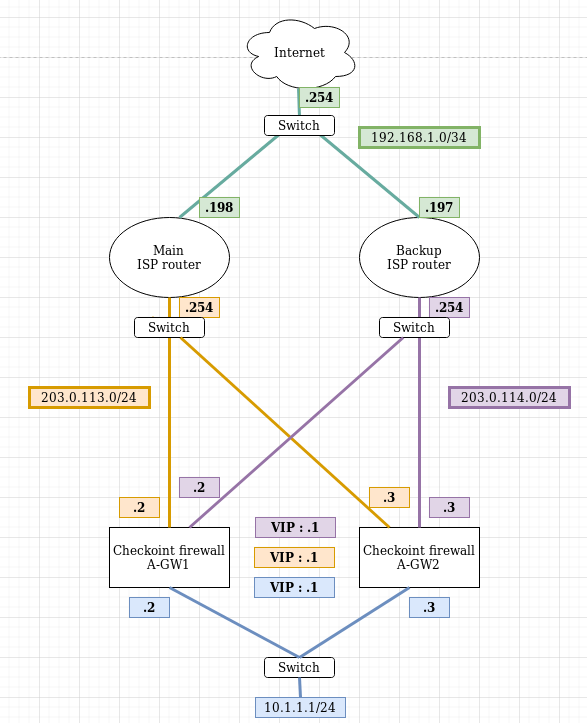
In order to troubleshoot this issue, I created the following virtual lab, but I can't make it work as expected.
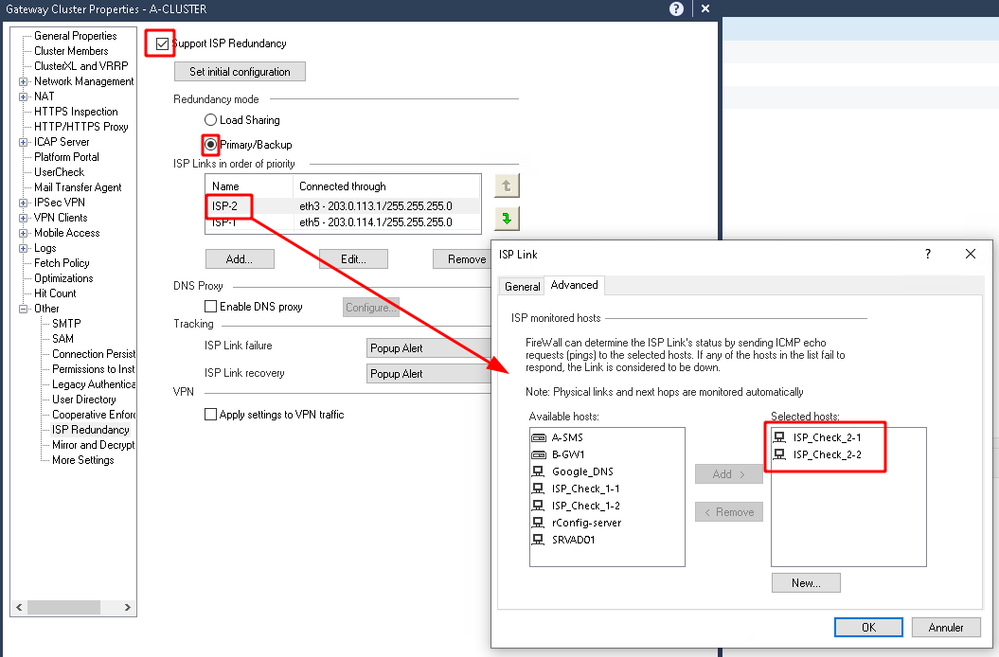
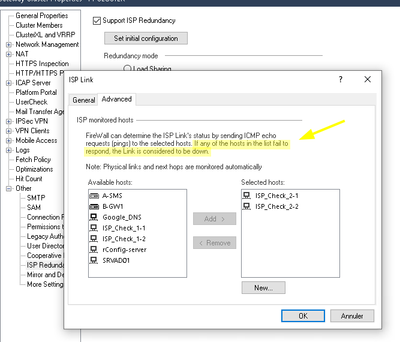
The ISP failover is configured as following :
And Access/ThreatPrevention Policy were installed on the cluster.
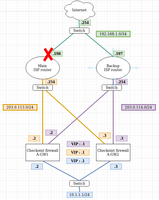
Now, if I shutdown the link eth0 from the Main Router, like this
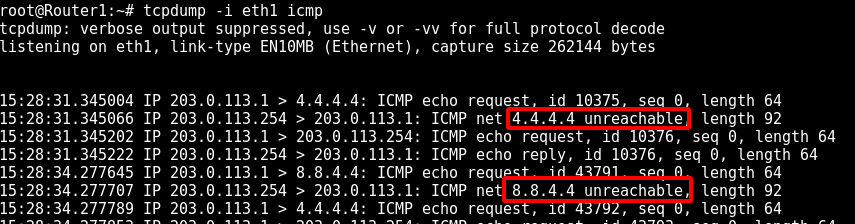
And if I tcpdump icmp traffic on the main router, I can see the icmp response "unreachable" to the gateway which is testing the link as following :
However, the default gateway don't change on the active cluster member. Did I missed something ?
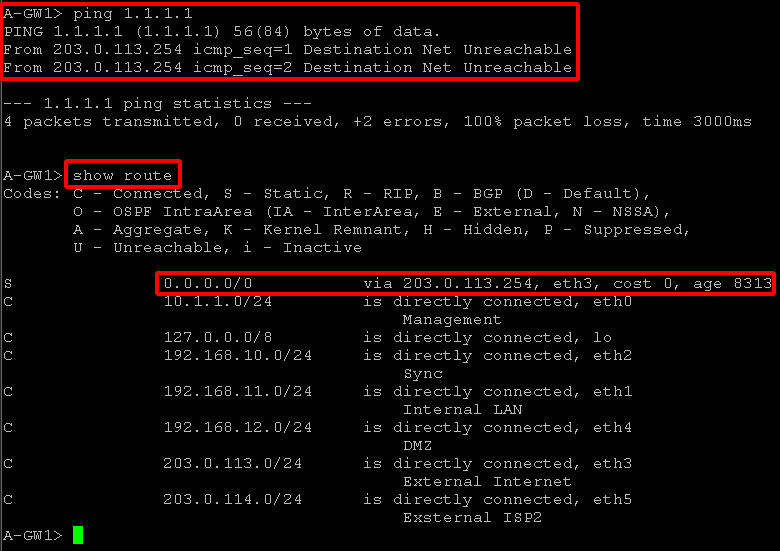
-> I can't ping the internet from internal lan
-> I can't ping the internet from the active gateway, and the default gateway do not change automaticaly.
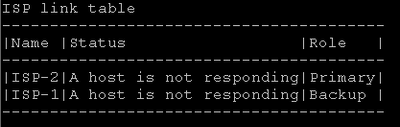
and if I try to make the isplink down it says no isp link :
cpstat fw :
Thank you for reading.
Best regards,
Hi,
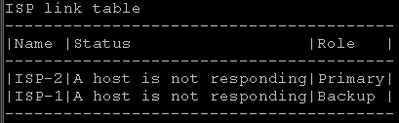
At this point, it's hard to figure out where the issue is, but I would start to investigate why in the ISP link table you see both ISP's ( routers ) as host not responding.
Then, I would start to tshoot with:
Use the fw isp_link command to force the ISP link state to Up or Down. Use this to test installation and deployment, or to force the Security Gateway to recognize the true link state if it cannot (the ISP link is down but the gateway sees it as up).
You can run this command on the Security Gateway or the Security Management Server: fw isp_link [target-gw] <link_name> {up|down}
<link_name> is the name in the ISP Link window.
I can also see ISP-1 is on eth3 and ISP-2 on eth5 .If it still doesn't work, as a last resort, I would redo the configuration
Hi,
Well, if you shutdown the interface ( .198 ) which is not directly connected to the firewall cluster, then I guess it's a normal behavior since it's responsive/reachable from the fw in the same subnet.
For situations where you might experience a failure of link, like in this case, if the equipment is a cisco to create a track ip sla and monitor reachability, make decisions based on that to what happens with the traffic.
If you disable the interface where the .254 ip is assigned is the behaviour changing ?
Do you also have multiple default static routes on the GW with different priorities ?
Which hosts did you monitor for the ISP-links, are these are different hosts for every ISP-link?
Your „ cpstat fw“ shows „a host not responding“ for both links. If no monitored host response this ISP link will be down.
To bring an ISP-link down you have to use the name of your link. In your case you should run „fw isp_link ISP-2 down“ not „fw isp_link eth3 down“.
regards
Wolfgang
Hello all, and thanks for helping.
I didn't set multiple static routes in gaia because I configured the default routes in the smartconsole with isp redundancy. Shoud I also add the 2 default routes with clish on both gateways?
If I shutdown the .254 interface on the main router, it do not change anything.
I have configured different monitored ip on the 2 isp links
@everybody :
In order to debug this, I turned up all interfaces on the routers, and configured 2 routes as following in gaia with clish :
set static-route default nexthop gateway address 203.0.113.254 priority 1 on
set static-route default nexthop gateway address 203.0.114.254 priority 2 on
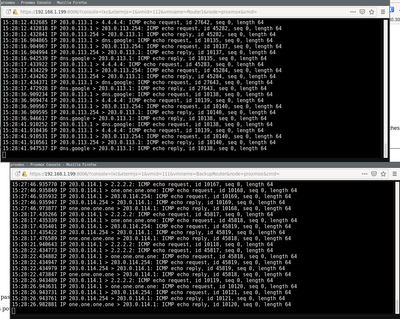
Here are the tcpdumps en the .254 interfaces on both routers :
The cpstat fw still command output this :
I can't understand why the 2 links are seen down since even with the 2 routers full operationnal, they are showed down in cpstat fw. (tcpdump shows the icmp response from the monitored ip on the gateway)
Thank you for your time.
Hi,
At this point, it's hard to figure out where the issue is, but I would start to investigate why in the ISP link table you see both ISP's ( routers ) as host not responding.
Then, I would start to tshoot with:
Use the fw isp_link command to force the ISP link state to Up or Down. Use this to test installation and deployment, or to force the Security Gateway to recognize the true link state if it cannot (the ISP link is down but the gateway sees it as up).
You can run this command on the Security Gateway or the Security Management Server: fw isp_link [target-gw] <link_name> {up|down}
<link_name> is the name in the ISP Link window.
I can also see ISP-1 is on eth3 and ISP-2 on eth5 .If it still doesn't work, as a last resort, I would redo the configuration
Hello, and sorry for the late feed back,
In my case, the issue was related to the "perform_cluster_hide_fold" value. (see https://supportcenter.checkpoint.com/supportcenter/portal?eventSubmit_doGoviewsolutiondetails=&solut...)
Thank you for your help guys!
Leaderboard
Epsum factorial non deposit quid pro quo hic escorol.
| User | Count |
|---|---|
| 21 | |
| 20 | |
| 16 | |
| 8 | |
| 7 | |
| 3 | |
| 3 | |
| 3 | |
| 3 | |
| 3 |
Fri 12 Dec 2025 @ 10:00 AM (CET)
Check Mates Live Netherlands: #41 AI & Multi Context ProtocolTue 16 Dec 2025 @ 05:00 PM (CET)
Under the Hood: CloudGuard Network Security for Oracle Cloud - Config and Autoscaling!Fri 12 Dec 2025 @ 10:00 AM (CET)
Check Mates Live Netherlands: #41 AI & Multi Context ProtocolTue 16 Dec 2025 @ 05:00 PM (CET)
Under the Hood: CloudGuard Network Security for Oracle Cloud - Config and Autoscaling!About CheckMates
Learn Check Point
Advanced Learning
YOU DESERVE THE BEST SECURITY