Create a Post
cancel
Showing results for 
Search instead for 
Did you mean: 
This widget could not be displayed.
4 Replies

Hello,


I Need to configure IPv6 Logical Server (R80&R81)  and when I'm trying to install the policy I'm receivng the attached error.

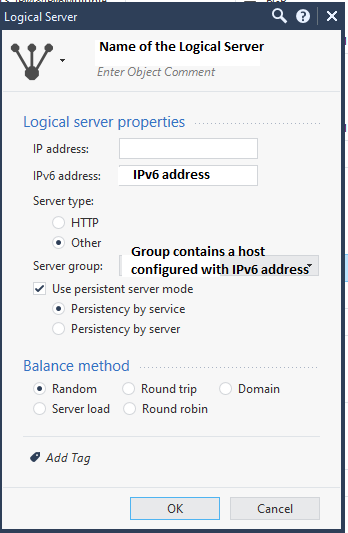
The configuration of Ipv6 Logical Server is quite simple, I added name, ipv6 address and a server group that contains only a host configured with IPv6 address. I also attached a image with the configuration.


Does anytone has an idea if this is suppported or not, or if it's a configuration error?

Thank you,

Dan


IPv6 Logical Server

IPv6 Logical Server

Hello,


I Need to configure IPv6 Logical Server (R80&R81)  and when I'm trying to install the policy I'm receivng the attached error.

The configuration of Ipv6 Logical Server is quite simple, I added name, ipv6 address and a server group that contains only a host configured with IPv6 address. I also attached a image with the configuration.


Does anytone has an idea if this is suppported or not, or if it's a configuration error?

Thank you,

Dan


Hello,


I Need to configure IPv6 Logical Server (R80&R81)  and when I'm trying to install the policy I'm receivng the attached error.

The configuration of Ipv6 Logical Server is quite simple, I added name, ipv6 address and a server group that contains only a host configured with IPv6 address. I also attached a image with the configuration.


Does anytone has an idea if this is suppported or not, or if it's a configuration error?

Thank you,

Dan


0 Kudos
0 Kudos
DanM1
Participant
DanM1
Participant

Hello, 

Thank you so much for your answer.

Since the post. I tried also other scenarios to configure Logical Server object with IPv6 address:


 1. Tried to enter a full IPv6 address = 128 bits -> no success and the same error;
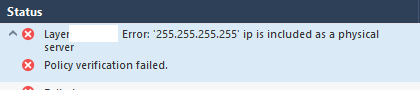
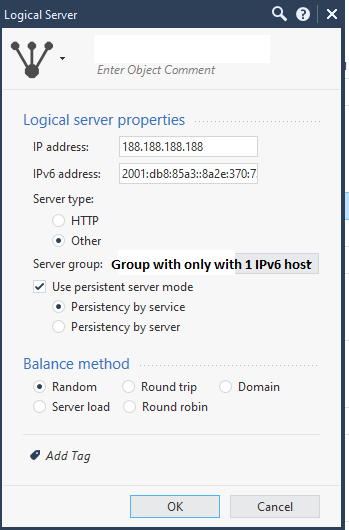
 2. Tried to configure logical server with both IPv4 & IPv6 addresses (dual stack) -> at this point, when I'm trying to install the policy the error is changed: "Layer 'X': Error: '255.255.255.255' ip is included as a physical server Policy verification failed".  

This behaviour is on both, R80 and R81.

Note: There are no other issue regard policy instalation. If I disabled the rule that contains Logical Server Object configured with IPv6 the installation will succed.


At this moment I think the logical server can't be configured with IPv6 or with both IPv4+IPv6 addresses, but I couldn't find this in the documentation.


Thank you,

Dan

Hello, 

Thank you so much for your answer.

Since the post. I tried also other scenarios to configure Logical Server object with IPv6 address:


 1. Tried to enter a full IPv6 address = 128 bits -> no success and the same error;
 2. Tried to configure logical server with both IPv4 & IPv6 addresses (dual stack) -> at this point, when I'm trying to install the policy the error is changed: "Layer 'X': Error: '255.255.255.255' ip is included as a physical server Policy verification failed".  

This behaviour is on both, R80 and R81.

Note: There are no other issue regard policy instalation. If I disabled the rule that contains Logical Server Object configured with IPv6 the installation will succed.


At this moment I think the logical server can't be configured with IPv6 or with both IPv4+IPv6 addresses, but I couldn't find this in the documentation.


Thank you,

Dan

0 Kudos
0 Kudos
PhoneBoy
Admin
Admin
PhoneBoy
Admin
Admin

Outside of CloudGuard Network Security, R80.20 is the last time we've done any testing on this feature, at least according to: https://supportcenter.checkpoint.com/supportcenter/portal?eventSubmit_doGoviewsolutiondetails=&solut... 
However, that SK doesn't reflect we're still using this feature in that context.
Most of those contexts assume IPv4 only, where the feature does work.

Regardless, I suspect using Connect Control with IPv6 isn't supported and the above SK suggests it's not something we plan to address.

Outside of CloudGuard Network Security, R80.20 is the last time we've done any testing on this feature, at least according to: https://supportcenter.checkpoint.com/supportcenter/portal?eventSubmit_doGoviewsolutiondetails=&solut... 
However, that SK doesn't reflect we're still using this feature in that context.
Most of those contexts assume IPv4 only, where the feature does work.

Regardless, I suspect using Connect Control with IPv6 isn't supported and the above SK suggests it's not something we plan to address.

0 Kudos
0 Kudos
DanM1
Participant
DanM1
Participant

Thank you so much for this great information.

Dan


Thank you so much for this great information.

Dan


0 Kudos
0 Kudos