- Products
- Learn
- Local User Groups
- Partners
- More

MVP 2026: Submissions
Are Now Open!
What's New in R82.10?
Watch NowOverlap in Security Validation
Help us to understand your needs better
CheckMates Go:
Maestro Madness
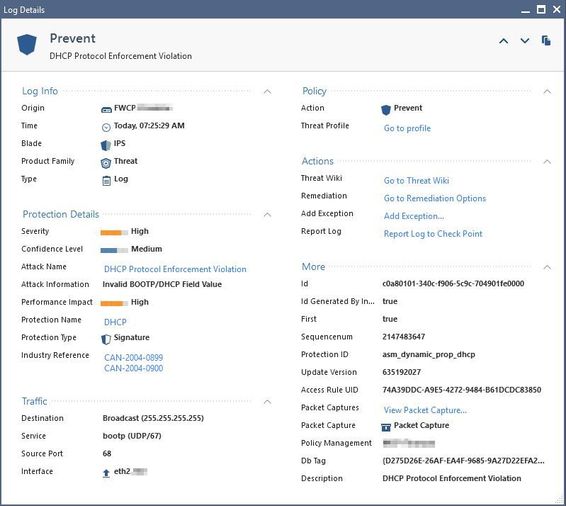
We have been having this problem during this week, every day at the same time the IPS discards the DHCP requests that go through the firewall, attached image.
I would like to know how we can restore the communication, I have already tried to add an exception for that DHCP signature, but it does not work. What we have had to do is restart the firewall to reestablish communication with the DHCP server.
It should be mentioned that all other communications pass the firewall without problem.
any help is appreciated.
Thanks
Exactly how did you add the DHCP exception? Unless you did so by clicking the "Add Exception" directly from the log card, you almost certainly did not add the exception in the correct place to make it effective. There are separate exceptions for Inspection Settings, Core Activations, IPS ThreatCloud Signatures, generic Threat Prevention exceptions, plus slightly different rules for properly applying exceptions on R77.30 gateways. The only reliable way to ensure the exception is in the right place is creating it from the log card hyperlink.
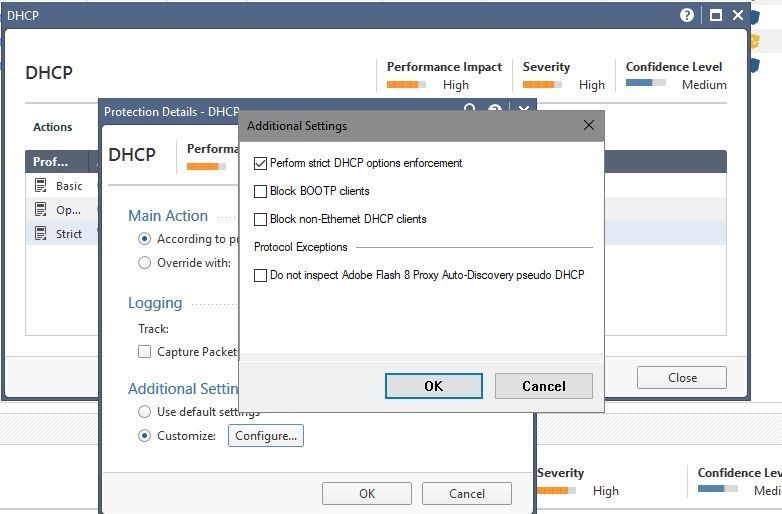
Anyway what I think you need to do is uncheck "Perform Strict DHCP Options Enforcement" as shown in the screenshot below, just make sure you do it for the proper IPS profile applied to your gateway:
Exactly how did you add the DHCP exception? Unless you did so by clicking the "Add Exception" directly from the log card, you almost certainly did not add the exception in the correct place to make it effective. There are separate exceptions for Inspection Settings, Core Activations, IPS ThreatCloud Signatures, generic Threat Prevention exceptions, plus slightly different rules for properly applying exceptions on R77.30 gateways. The only reliable way to ensure the exception is in the right place is creating it from the log card hyperlink.
Anyway what I think you need to do is uncheck "Perform Strict DHCP Options Enforcement" as shown in the screenshot below, just make sure you do it for the proper IPS profile applied to your gateway:
Thank you, this has solved for me the issue.
Regards.
Leaderboard
Epsum factorial non deposit quid pro quo hic escorol.
| User | Count |
|---|---|
| 20 | |
| 19 | |
| 18 | |
| 8 | |
| 7 | |
| 3 | |
| 3 | |
| 3 | |
| 3 | |
| 3 |
Tue 16 Dec 2025 @ 05:00 PM (CET)
Under the Hood: CloudGuard Network Security for Oracle Cloud - Config and Autoscaling!Thu 18 Dec 2025 @ 10:00 AM (CET)
Cloud Architect Series - Building a Hybrid Mesh Security Strategy across cloudsTue 16 Dec 2025 @ 05:00 PM (CET)
Under the Hood: CloudGuard Network Security for Oracle Cloud - Config and Autoscaling!Thu 18 Dec 2025 @ 10:00 AM (CET)
Cloud Architect Series - Building a Hybrid Mesh Security Strategy across cloudsAbout CheckMates
Learn Check Point
Advanced Learning
YOU DESERVE THE BEST SECURITY