- Products
- Learn
- Local User Groups
- Partners
- More
MVP 2026: Submissions
Are Now Open!
What's New in R82.10?
10 December @ 5pm CET / 11am ET
Announcing Quantum R82.10!
Learn MoreOverlap in Security Validation
Help us to understand your needs better
CheckMates Go:
Maestro Madness
For Custom Application/Site object definitions sk165094 recommends avoiding wildcards like "*" as much as possible, as using them increases the load on the gateway's pattern matcher as measured by fw pm_stats. However a very good question came up during the most recent run of my Gateway Performance Optimization class.
Below are two different Custom Application/Site objects that both successfully accomplish the following three goals:
1) Match website shadowpeak.com
2) Match all subdomains of shadowpeak.com (i.e. www.shadowpeak.com, www.shop.shadowpeak.com) even if there is more than one subdomain.
3) Do NOT match a domain like SCAMshadowpeak.com
The first candidate object does not have the regular expressions checkbox set:
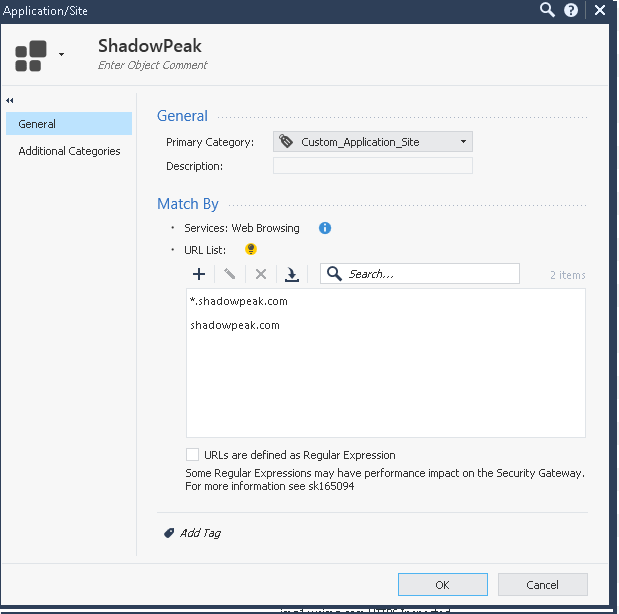
The second candidate object does have the checkbox set, but successfully avoids the use of the "*" wildcard:
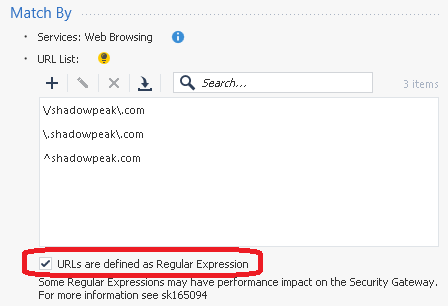
Both of these object definitions accomplish the three stated goals, however the install policy operation takes much, much longer when the second object utilizing regular expressions is created; presumably this is triggering a recompilation of the entire pattern matcher database.
Two questions:
1) Once the policy is successfully installed to the gateway, which of these objects will do the job most efficiently from a CPU consumption perspective for the Pattern Matcher? Part of me thinks the first one will since the regexp checkbox is not set, but the other half of me thinks it would be the second object since we are avoiding the use of "*", but we now have the regexp checkbox set which may cause additional overhead?
2) When the SK says to avoid wildcards, obviously "*" is being referred to as matching zero or more characters. What other ones should be avoided for performance reasons? I'm assuming regexp constructs that match 0/1 "or more" characters are the ones to avoid, as the "or more" concept requires the pattern matcher to cycle through many different possible combinations. So would the following list be authoritative as to which regex constructs should be avoided:
* Matches the previous element zero or more times.
+ Matches the previous element one or more times.
*? Matches the previous element zero or more times, but as few times as possible.
+? Matches the previous element one or more times, but as few times as possible.
Like many of my esoteric questions, this will almost certainly have to be answered by R&D so I'm tagging @PhoneBoy
Edit: I saw the term "greedy matching" in another thread which is what I think we want to avoid here for performance reasons.
A question asked so often and never really answered...hopefully we get some real insights this time. And funny enough the CPX 2023 HTTPS Inspection Best Practices presentation even says "Use wildcards - less URLs" pointing to the sk saying avoid using it 😅
I know, right? lol
EVERY time I was on remote with TAC (regardless if it was T2, T3 or esc person), we always ended up using wildcards to make this work. Seems to me that whats communicated to customers varies big time : - )
When working on an RAD issue a couple of years ago, R&D said that we should only really use regular expressions due to the performance advantages.
Did you also check whether they match the domain name in the username portion or path of the URL? I've been seeing a lot of spam with well-known domains in the username of the URL lately. How about case? For example:
http://shadowpeak.com@totallynotphishing.info/
http://totallynotphishing.info/shadowpeak.com/
http://ShadowPeak.COM/
I'd love documentation on the input to Check Point's match space. Does it always include the scheme? If a username is specified in the URL, is that included in the input to the match? What about the password? Port number? Is there any normalization (domain names aren't case-sensitive, but paths are)?
From experimentation, I know the answers to some of these. Would still be nice to have real documentation providing official answers to help optimize matching expressions.
Related Links for Custom Sites/Applications
Recommendations
Special considerations
Risk mitigation
Common mistakes
Excellent advice, as always.
Great tips, thanks Danny and I will work them into the course. Still hoping someone from R&D can answer my original question as I couldn't find any easy way to measure CPU utilization by the pattern matcher while utilizing either version of the ShadowPeak custom object, the fw pm_stats command is supposed to show you that information but its output is not exactly easy reading.
Pretty sure the underlying infrastructure used in both cases is the Pattern Matcher (used by multiple blades).
A properly constructed regex should perform better than a wildcard.
I tend to agree with your list of things to avoid.
Basically, the less precise the regex, the more pattern matcher has to work to do so.
I received a private reply from the owner of sk165094, and they have clarified that the authoritative list of wildcards to avoid if possible in Custom Site/Application objects are:
So it would appear my second example is the preferred method. I notified this individual of the presence of this thread and invited them to chime in if they like.
Leaderboard
Epsum factorial non deposit quid pro quo hic escorol.
| User | Count |
|---|---|
| 26 | |
| 20 | |
| 16 | |
| 5 | |
| 4 | |
| 4 | |
| 4 | |
| 3 | |
| 3 | |
| 3 |
Fri 12 Dec 2025 @ 10:00 AM (CET)
Check Mates Live Netherlands: #41 AI & Multi Context ProtocolTue 16 Dec 2025 @ 05:00 PM (CET)
Under the Hood: CloudGuard Network Security for Oracle Cloud - Config and Autoscaling!Fri 12 Dec 2025 @ 10:00 AM (CET)
Check Mates Live Netherlands: #41 AI & Multi Context ProtocolTue 16 Dec 2025 @ 05:00 PM (CET)
Under the Hood: CloudGuard Network Security for Oracle Cloud - Config and Autoscaling!Thu 18 Dec 2025 @ 10:00 AM (CET)
Cloud Architect Series - Building a Hybrid Mesh Security Strategy across cloudsAbout CheckMates
Learn Check Point
Advanced Learning
YOU DESERVE THE BEST SECURITY
