- Products
- Learn
- Local User Groups
- Partners
- More

The State of Ransomware Q1 2026
Key Trends and Their Impact
Good, Better, Best:
Prioritizing Defenses Against Credential Abuse
AI Security Masters E7:
How CPR Broke ChatGPT's Isolation and What It Means for You
Blueprint Architecture for Securing
The AI Factory & AI Data Center
Call For Papers
Your Expertise. Our Stage
CheckMates Go:
CheckMates Fest
Hello Everyone!
Currently we are facing a rather confusing problem as follows:
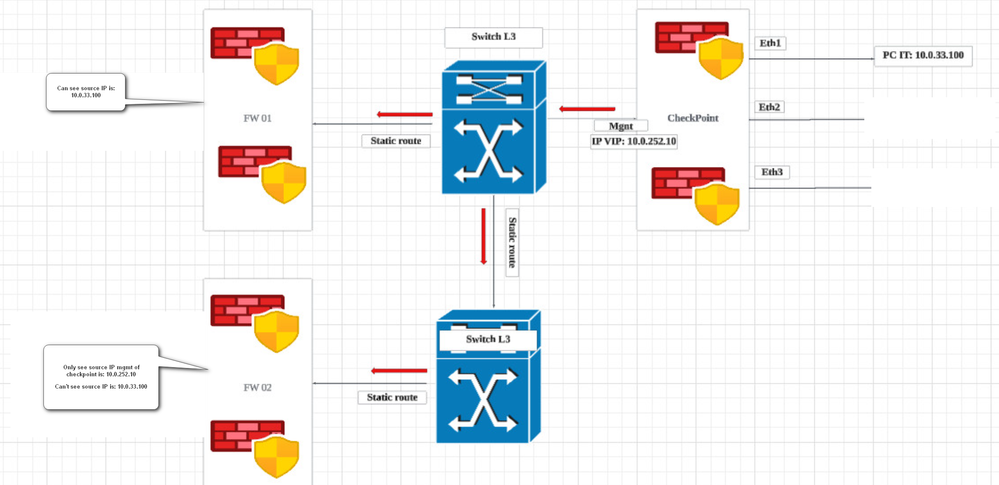
1. We have 1 pair of Checkpoint devices and 2 pairs of other vendor's Fw devices connected as shown in the attached image.
2. We use a host with IP 10.0.33.100 located behind the Checkpoint device to access the service on Fw1, traffic goes through a Switch device in the middle. Then we are login to Fw1 device and check the logs on Fw1, we can see source IP 10.0.33.100 connected.
3. We use hosting with IP 10.0.33.100 located behind the Checkpoint device to access the service on Fw2, traffic goes through two Switch devices in the middle. Then we log in to the Fw2 device and check the log on Fw2, we can only see the source IP is Checkpoint's administrative IP, in addition we cannot find any other source IP.
Has anyone had any problems?
If you have exact source and dst IP, have you tred running fw monitor to see what happens with the traffic?
Best,
Andy
also, if say dst is 1.1.1.1 (just replace with right IP), run ip r g 1.1.1.1 from expert mode to see if its taking the correct route.
Andy
Traffic when passing through the checkpoint we checked to see that it was on the right route. On the checkpoint we can clearly see the source and dst.
However, as I mentioned, when traffic from a host located behind the checkpoint accesses a host located behind device fw1 through 1 Switch device as shown in the picture I attached, then when we log in to device fw1 and check, we can easily see source is the IP of the host behind the Checkpoint.
However, when traffic from a host located behind the checkpoint accesses a host located behind the fw2 device through 2 Switch device as shown in the picture I attached, then when we log in to the fw2 device and check, we Only seeing the source is the administrative IP of the checkpoint update.
Sorry, I cant see the attachment...can you paste the diagram?
K, I see it now, ty. Just to make sure, these are 2 single firewalls managede by the same mgmt server?
Best,
Andy
We only have 1 pair of checkpoints configured in Cluster with separate management components.
And fw1 and fw2 are two pairs of firewalls from another vendor.
Currently, when logging into the fw2 device to check the logs, we cannot see the exact source IP of the host behind the Checkpoint device. When done, use that host to access the services behind fw2.
We can only see the VIP IP MGMT of the Checkpoint device.
K, so its a cluster, got it. Does same issue happen regardless of which fw is the active one?
Andy
The Cluster Checkpoint device run on mode active/active
Did you run zdebug to see if anything is dropped?
From your description it sounds like when you access fw1 the checkpoint don't perform source nat, but when you go to fw2 checkpoint do source nat.
Did you check the logs on checkpoint for traffic to fw2 and see if indeed you have xlate src and what nat rule does it match?
Leaderboard
Epsum factorial non deposit quid pro quo hic escorol.
| User | Count |
|---|---|
| 34 | |
| 10 | |
| 10 | |
| 10 | |
| 10 | |
| 8 | |
| 7 | |
| 6 | |
| 6 | |
| 6 |
Tue 12 May 2026 @ 10:00 AM (CEST)
The Cloud Architects Series: Check Point Cloud Firewall delivered as a serviceWed 13 May 2026 @ 11:00 AM (EDT)
TechTalk: The State of Ransomware Q1 2026: Key Trends and Their ImpactThu 14 May 2026 @ 07:00 PM (EEST)
Under the Hood: Presentando Check Point Cloud Firewall como ServicioTue 12 May 2026 @ 10:00 AM (CEST)
The Cloud Architects Series: Check Point Cloud Firewall delivered as a serviceAbout CheckMates
Learn Check Point
Advanced Learning
YOU DESERVE THE BEST SECURITY