- Products
- Learn
- Local User Groups
- Partners
- More

MVP 2026: Submissions
Are Now Open!
What's New in R82.10?
10 December @ 5pm CET / 11am ET
Improve Your Security Posture with
Threat Prevention and Policy Insights
Overlap in Security Validation
Help us to understand your needs better
CheckMates Go:
Maestro Madness
Hi Everybody
I want to set up the SMTP/TLS configuration with a certificate on our Checkpoint cluster under MTA.
I have summarized the certificate in a .p12, as this is the file type Checkpoint wants. At least it can only be uploaded as .p12.
I have executed the following command:
openssl pksc12 -export -out cert.p12 -inkey key.pem -in fullchain.pem
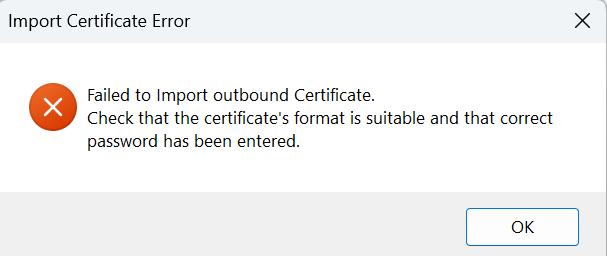
Then the password query appears and I have tried everything. Even with a two-digit password that I have entered correctly, the import always fails with this error message:
Is there something wrong with the format that I need to be aware of?
Thanks for your help!
Marius
Hi @marius_kade
What is the version? R81.20 take ?
Here is an sk: https://support.checkpoint.com/results/sk/sk123237
"Failed to import outbound certificate. Check that the certificate's format is suitable and that the correct password has been entered"
Maybe you are under take 70.
Akos
Hi @marius_kade
Great, but I suggest you to consider the upgrade 🙂
Akos
Looks like this may be the issue: https://support.checkpoint.com/results/sk/sk123237
Upgrade to JHF 152 or above.
Hi @marius_kade
What is the version? R81.20 take ?
Here is an sk: https://support.checkpoint.com/results/sk/sk123237
"Failed to import outbound certificate. Check that the certificate's format is suitable and that the correct password has been entered"
Maybe you are under take 70.
Akos
Hi @AkosBakos ,
thanks for your reply. 🙂
We are currently on R81.10 Take 150
But i can see in Take 152 the problem may be solved. I will check if my certificate is using SHA 256 hashing algorithm tomorrow and maybe do an update to Take 152.
I will come back and report.
Thanks,
Have great day!
Hi @marius_kade
Great, but I suggest you to consider the upgrade 🙂
Akos
The Certificate is in SHA256.
I will do the Update to Take 172 and try again after this.
Thanks for your help! 🙂
Have you verified the .p12 file contains all the relevant information?
It should contain the private key and the entire (public) certificate chain (CA and all intermediates).
Yes, the .p12 contains the certificate, key and fullchain.
Creted with this command:
openssl pksc12 -export -out cert.p12 -inkey key.pem -in fullchain.pem
Inside the fullchain.pem are these certificates in this order:
cert - intermediate1 - intermediate2 - root(CA)
Thanks!
Looks like this may be the issue: https://support.checkpoint.com/results/sk/sk123237
Upgrade to JHF 152 or above.
It's all done and worked after the update.
Many thanks and have nice weekend to both of you! 😄
Leaderboard
Epsum factorial non deposit quid pro quo hic escorol.
| User | Count |
|---|---|
| 24 | |
| 20 | |
| 8 | |
| 6 | |
| 6 | |
| 6 | |
| 5 | |
| 5 | |
| 4 | |
| 4 |
Thu 04 Dec 2025 @ 03:00 PM (CET)
End-of-Year Event: Securing AI Transformation in a Hyperconnected World - EMEAThu 04 Dec 2025 @ 02:00 PM (EST)
End-of-Year Event: Securing AI Transformation in a Hyperconnected World - AmericasThu 04 Dec 2025 @ 03:00 PM (CET)
End-of-Year Event: Securing AI Transformation in a Hyperconnected World - EMEAThu 04 Dec 2025 @ 02:00 PM (EST)
End-of-Year Event: Securing AI Transformation in a Hyperconnected World - AmericasFri 12 Dec 2025 @ 10:00 AM (CET)
Check Mates Live Netherlands: #41 AI & Multi Context ProtocolAbout CheckMates
Learn Check Point
Advanced Learning
YOU DESERVE THE BEST SECURITY