- Products
- Learn
- Local User Groups
- Partners
- More

AI Security Masters E7:
How CPR Broke ChatGPT's Isolation and What It Means for You
Blueprint Architecture for Securing
The AI Factory & AI Data Center
Call For Papers
Your Expertise. Our Stage
Good, Better, Best:
Prioritizing Defenses Against Credential Abuse
Ink Dragon: A Major Nation-State Campaign
Watch HereCheckMates Go:
CheckMates Fest
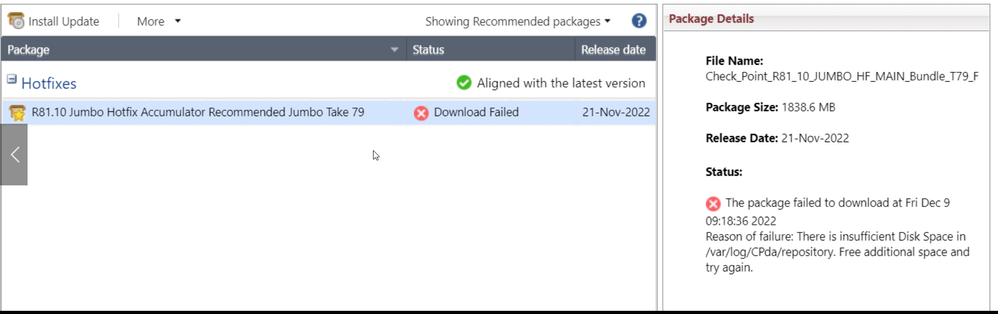
I try to download JHF R81.10 take 79 but it still can't download completely
It says right there in your screenshot: you don’t have enough disk space.
Further, if you don’t have enough unallocated disk space to take a snapshot of the root filesystem, installing said JHF will also fail.
You can do this. As phoneboy said, it tells you right in the screenshot you attached. Run find /var/log/CPda/repository -size +200000000c and see what you get. This will search for files bigger than 200 MBs in that directory, but you can always search for smaller file size as well. Whatever is safe to delete, remove those files and you will be good to go.
Hope that helps.
Andy
I would uninstall and delete all older Jumbos first.
It says right there in your screenshot: you don’t have enough disk space.
Further, if you don’t have enough unallocated disk space to take a snapshot of the root filesystem, installing said JHF will also fail.
Hello PhoneBoy
Now I can solve this issue by delete the old log in /var/log/
and upgrade JHF successfully thank for your help
Regard,
sopanha
You can do this. As phoneboy said, it tells you right in the screenshot you attached. Run find /var/log/CPda/repository -size +200000000c and see what you get. This will search for files bigger than 200 MBs in that directory, but you can always search for smaller file size as well. Whatever is safe to delete, remove those files and you will be good to go.
Hope that helps.
Andy
What does the following command in expert mode tell you about how much space is free on the system?
df -h
Also make sure the system has the latest Deployment Agent for CPUSE (2255).
I would uninstall and delete all older Jumbos first.
hi G_W_Albrecht
I did delete the old log and the disk decreased from 100% to 50% it's so mazing work
regard,
sopanha
Great advices too from @Chris_Atkinson and @G_W_Albrecht . One important note though...whatever you do, do NOT delete anything from /opt/CPda directory, because if you do and files related to older jumbos are gone, you will never be able to install jumbo 79. I had customer do that before in R80.40, but their saving grace was that I had a lab with exact same jumbo they deleted, so it was easy to fix. Its totally safe to delete from /var/log/CPda/repository.
Hope Radius auth issue is fixed in take 79.
Never delete anything from both CPda directories - only use GAiA WebGUI or CLI CPUSE to remove old packages!
Its definitely safe to remove jumbo tgz from var/log/CPda/repository once installed, I done it many times.
But it is not best practice and why should that be necessary - you can always use GAiA WebGUI or CLI CPUSE to remove old, uninstalled packages ! Remember, in bash you delete it from CPUSE without CPUSE knowing this. No good idea...
I find it works either way 🙂
I know it may work both way if you know how - but i prefer the supported and recommended way 8)
Leaderboard
Epsum factorial non deposit quid pro quo hic escorol.
| User | Count |
|---|---|
| 39 | |
| 19 | |
| 13 | |
| 12 | |
| 11 | |
| 10 | |
| 7 | |
| 7 | |
| 7 | |
| 7 |
Tue 28 Apr 2026 @ 06:00 PM (IDT)
Under the Hood: Securing your GenAI-enabled Web Applications with Check Point WAFThu 30 Apr 2026 @ 03:00 PM (PDT)
Hillsboro, OR: Securing The AI Transformation and Exposure ManagementTue 28 Apr 2026 @ 06:00 PM (IDT)
Under the Hood: Securing your GenAI-enabled Web Applications with Check Point WAFTue 12 May 2026 @ 10:00 AM (CEST)
The Cloud Architects Series: Check Point Cloud Firewall delivered as a serviceThu 30 Apr 2026 @ 03:00 PM (PDT)
Hillsboro, OR: Securing The AI Transformation and Exposure ManagementAbout CheckMates
Learn Check Point
Advanced Learning
YOU DESERVE THE BEST SECURITY