- Products
- Learn
- Local User Groups
- Partners
- More

AI Security Masters
E1: How AI is Reshaping Our World
MVP 2026: Submissions
Are Now Open!
What's New in R82.10?
Watch NowOverlap in Security Validation
Help us to understand your needs better
CheckMates Go:
Maestro Madness
Hi Team,
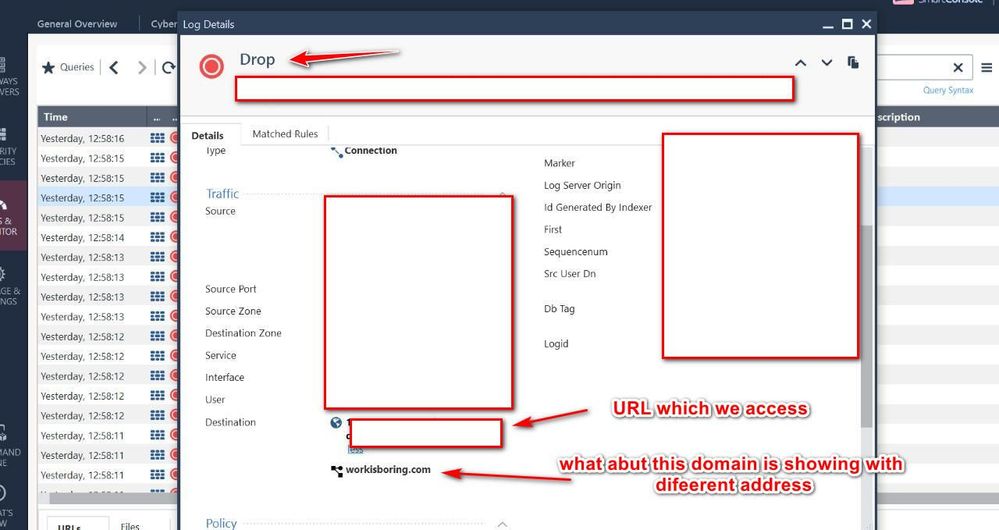
We are accessing a genuine URL but its DROP by matching a drop rule.
We check the logs and find out that its showing destination as a as accessing URL but also a additional domain address "workisboring.com".
For workisboring.com we already created a DROP rule for this which matched in our case for intial 5 to 10 min for 1st time access and then its matched the accept rule and able to access the URL and then again we checked the logs find out that its matched the accept rule but this time we have not saw the additinal workisboring.com because now its matched on different rule.
Let me knnown Team what is the issue that time?
What precise rule is it matching on?
What precise rule do you believe it should be matching on?
Is HTTPS Inspection being used?
What version/JHF?
Here are my questions...
1) What rule is it dropped on?
2) Are you using ORDERED or INLINE layer for URL filtering?
3) Did this ever work before?
Andy
Hi Andy,
Thank you so much for the response.
Here are my Answers :
1) What rule is it dropped on?
Rule number is 3 and 4 which is we using for block the incoming and outgoing connection towards blacklist IP address
we mentioned sources as ANY and destination as blacklisted on rule number 3 which we are multiple Blacklisted IP address as well as domain address also rule 4 for outgoing source will be Black listed IP address.
2) Are you using ORDERED or INLINE layer for URL filtering?
ORDERED
3) Did this ever work before?
Yes its working fine before but after upgrading to R81.10 we face this kind of issue
so during the firs time only we face this issue for few minutes and then it’s automatically working fine and till 3 days gone we haven’t see the access issue.
I Need a RCA for this pls help
Honestly, if I were in your situation, best thing I would look for is logs in smart dashboard and also maybe search for keywords in messages files...so for example, if you are wondering about specific site, say www.cnn.com (just as an example), you could do something like this from gateway master member (if its a cluster)
grep -i cnn /var/log/messages*
Andy
If you need a formal RCA, please open a TAC case.
That said, it's pretty obvious there is something in the traffic that causes it to be classified differently at different points of time.
As we are continually analyzing traffic flows, this is normal.
Packet captures of the relevant traffic are likely required to understand what's happening and why.
There are likely other debugs necessary here that the TAC can advise you on.
Manage and settings / blades / application control And URL filtering / advanced settings / general / Fail mode
is it set to fail-open or fail-closed ?
if its failed-closed I would check var/log/messages for the same time as you saw drops for any indication of errors.
Leaderboard
Epsum factorial non deposit quid pro quo hic escorol.
| User | Count |
|---|---|
| 20 | |
| 17 | |
| 13 | |
| 8 | |
| 7 | |
| 3 | |
| 3 | |
| 3 | |
| 3 | |
| 3 |
Tue 16 Dec 2025 @ 05:00 PM (CET)
Under the Hood: CloudGuard Network Security for Oracle Cloud - Config and Autoscaling!Thu 18 Dec 2025 @ 10:00 AM (CET)
Cloud Architect Series - Building a Hybrid Mesh Security Strategy across cloudsTue 16 Dec 2025 @ 05:00 PM (CET)
Under the Hood: CloudGuard Network Security for Oracle Cloud - Config and Autoscaling!Thu 18 Dec 2025 @ 10:00 AM (CET)
Cloud Architect Series - Building a Hybrid Mesh Security Strategy across cloudsThu 08 Jan 2026 @ 05:00 PM (CET)
AI Security Masters Session 1: How AI is Reshaping Our WorldAbout CheckMates
Learn Check Point
Advanced Learning
YOU DESERVE THE BEST SECURITY