- Products
- Learn
- Local User Groups
- Partners
- More

MVP 2026: Submissions
Are Now Open!
What's New in R82.10?
Watch NowOverlap in Security Validation
Help us to understand your needs better
CheckMates Go:
Maestro Madness
Hello Mates,
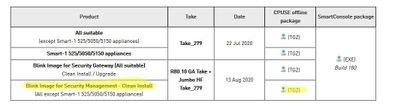
I was installing Jumbo HF Take_279 on the R80.10 management server, however it seems I downloaded the image for the "clean install only" not the other one suitable for the "upgrade and clean install".
After execution of the install, and allowing the reboot; we couldn't SSH to the server and we received access denied.
In this case what's the recommended action to do?
Thanks in advance,
If you have downloaded the Jumbo HF itself, you will have no option, but to upgrade only.
If you have downloaded the r80.10 with JHF and clean-installed it, you can authenticate to it with default credentials of admin, admin via SSH.
Needless to say, your configuration is a toast, unless it's been backed-up or exported from the management server.
It seems like you have downloaded and installed the Blink image that includes the base version and JHF in one image, and used it for clean installation.
if this is indeed the case, your configurations is back to defaults including the SSH credentials. on the bright side, if this is indeed what you did, you have an automatic snapshot available - you can restore it and install the Jumbo again as planned.
can you share the name or a screenshot of what package you installed?
What about the automatic snapshot thing ? I already had a snapshot before the upgrade incase anything went wrong, which unfortuantely happened.
So log into GAiA WebGUI with default credentials and revert...
indeed you downloaded and installed the Blink image that included R80.10 and the Jumbo. The Blink is being installed just like a CPUSE major upgrade - installed on a new partition, and the previous root partition is saved as a snapshot. so you have this automatic snapshot to revert to, or the snapshot you took on your own. as @G_W_Albrecht suggested, log in with the default credentials and revert.
I'll see how we can improve the documentation and the CPUSE notifications to make the difference between the different packages better understood.
Hi Tsahi,
Thanks for your response, now I rolled back the changes and now I'm ready to install the Hotfix only.
I should choose the Smart-1 525/5050/5150 appliances or ( All except Smart-1 525/5050/5150 appliances) depending on " show asset" ?
Best Regards,
yes. according to the relevant appliance you are using.
if your appliance is connected to the Check Point cloud, you can simply use the CPUSE WebUI and it will automatically show the relevant package.
Either way, if you choose the wrong one, the installation will be blocked.
Leaderboard
Epsum factorial non deposit quid pro quo hic escorol.
| User | Count |
|---|---|
| 19 | |
| 17 | |
| 13 | |
| 8 | |
| 7 | |
| 3 | |
| 3 | |
| 3 | |
| 3 | |
| 3 |
Tue 16 Dec 2025 @ 05:00 PM (CET)
Under the Hood: CloudGuard Network Security for Oracle Cloud - Config and Autoscaling!Thu 18 Dec 2025 @ 10:00 AM (CET)
Cloud Architect Series - Building a Hybrid Mesh Security Strategy across cloudsTue 16 Dec 2025 @ 05:00 PM (CET)
Under the Hood: CloudGuard Network Security for Oracle Cloud - Config and Autoscaling!Thu 18 Dec 2025 @ 10:00 AM (CET)
Cloud Architect Series - Building a Hybrid Mesh Security Strategy across cloudsAbout CheckMates
Learn Check Point
Advanced Learning
YOU DESERVE THE BEST SECURITY