- Products
- Learn
- Local User Groups
- Partners
- More

MVP 2026: Submissions
Are Now Open!
What's New in R82.10?
Watch NowOverlap in Security Validation
Help us to understand your needs better
CheckMates Go:
Maestro Madness
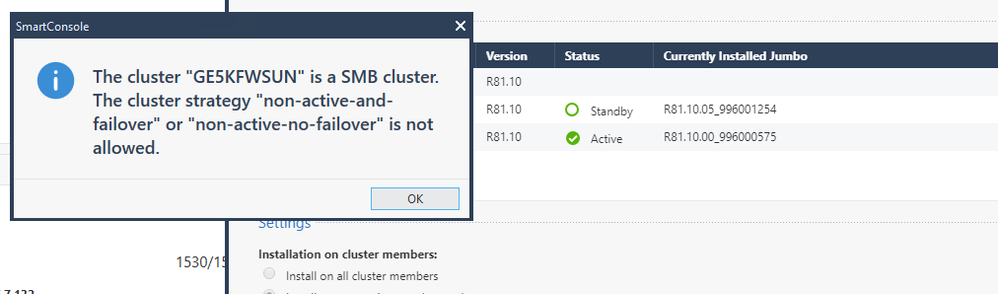
can somebody explain this error ? is it just because that first cluster member is not in Active state. Does it always need to be that first cluster member is active and second member is standby? Don't mention that actual state of cluster is that first member is active and secondary is in standby, just smartconsole is showing outdated status..
(1)
The "cluster strategy" term is taken from the Management API "install-software-package"
https://sc1.checkpoint.com/documents/latest/APIs/index.html#cli/install-software-package~v1.9%20
Parent Parameter Name = cluster-installation-settings
Child Parameter Name = cluster-strategy
Valid Values: all-members, non-active-members-and-failover, non-active-members-no-failover
(2)
As Dameon (PhoneBoy) wrote, the selected cluster must support the selected installation method
In this case, the Quantum Spark cluster does not support the selected installation method
You must select the option "Install on all cluster members"
So the management is R81.20 which JHF?
Of the options presented which did you select?
Does the error persist after installing policy for the cluster and trying again after some time?
r81.20 take 38, same even after policy install, it usually takes 1-2 days until it's refreshed to actual state, i'm having TAC opened for it as well.
In order to install a new version on only one cluster member (and not all). the underlying clustering must support it.
On regular Check Point gateways, this is supported from R80.40 (MVC).
SMB gateways do not have this support, to the best of my knowledge.
As such, this is likely expected behavior.
(1)
The "cluster strategy" term is taken from the Management API "install-software-package"
https://sc1.checkpoint.com/documents/latest/APIs/index.html#cli/install-software-package~v1.9%20
Parent Parameter Name = cluster-installation-settings
Child Parameter Name = cluster-strategy
Valid Values: all-members, non-active-members-and-failover, non-active-members-no-failover
(2)
As Dameon (PhoneBoy) wrote, the selected cluster must support the selected installation method
In this case, the Quantum Spark cluster does not support the selected installation method
You must select the option "Install on all cluster members"
Leaderboard
Epsum factorial non deposit quid pro quo hic escorol.
| User | Count |
|---|---|
| 5 | |
| 2 | |
| 2 | |
| 2 | |
| 1 | |
| 1 | |
| 1 |
Tue 16 Dec 2025 @ 05:00 PM (CET)
Under the Hood: CloudGuard Network Security for Oracle Cloud - Config and Autoscaling!Thu 18 Dec 2025 @ 10:00 AM (CET)
Cloud Architect Series - Building a Hybrid Mesh Security Strategy across cloudsTue 16 Dec 2025 @ 05:00 PM (CET)
Under the Hood: CloudGuard Network Security for Oracle Cloud - Config and Autoscaling!Thu 18 Dec 2025 @ 10:00 AM (CET)
Cloud Architect Series - Building a Hybrid Mesh Security Strategy across cloudsAbout CheckMates
Learn Check Point
Advanced Learning
YOU DESERVE THE BEST SECURITY