- Products
- Learn
- Local User Groups
- Partners
- More

The State of Ransomware Q1 2026
Key Trends and Their Impact
Good, Better, Best:
Prioritizing Defenses Against Credential Abuse
AI Security Masters E7:
How CPR Broke ChatGPT's Isolation and What It Means for You
Blueprint Architecture for Securing
The AI Factory & AI Data Center
Call For Papers
Your Expertise. Our Stage
CheckMates Go:
CheckMates Fest
Hello,
Reading both the R77.30 VPN Administration Guide and R80.10 Remove Access VPN Administration Guide, there is a mention of tool called SCVEditor and that it is available at opsec.com. Is this tool still around? I wasn't able to find it there or by searching SecureKnowledge.
SCVEditor is a legacy tool for SecuRemote, which is no longer supported.
The last version I'm aware of is here: SCV Editor
You would probably be better off using Endpoint Compliance checks instead.
SCVEditor is a legacy tool for SecuRemote, which is no longer supported.
The last version I'm aware of is here: SCV Editor
You would probably be better off using Endpoint Compliance checks instead.
Thanks Dameon, that is what I have been looking into.
SCV Editor is still mentioned in R80.10 documentation and the Remove Access Client for Windows Admin Guide 🙂
But the Endpoint compliance not work with client Endpoint Secure or Mobile, only with ssl portal.
This is correct?
Using E87.50_Check Point VPN.msi, I performed the installation of Remote Endpoint VPN on Windows 10.
I would like to set up a policy compliance check before connecting, for example: antivirus is installed and enabled, Windows updates are installed, etc.
I do not understand how and under what conditions does the Endpoint Compliance Settings work? is this VPN client enough?
Endpoint Compliance requires Endpoint Security management.
If you're not using that, then this is configured via SCV: https://sc1.checkpoint.com/documents/RemoteAccessClients_forWindows_AdminGuide/Content/Topics-RA-VPN...
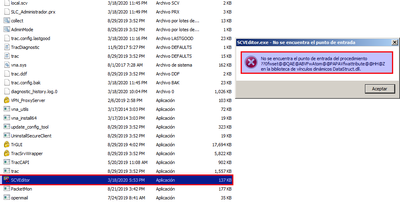
I am try to use this file, but i receive this issues:
The Issues is with DataStruct.dll
Any idea?
Hi I'm new here but i'm hoping i could help,
after some deep research i found an old manual NGX manual referencing to the OPSEC SDKs:
1) download the old OPSEC_SDK_6_0.WIN32
Link: "https://supportcenter.checkpoint.com/supportcenter/portal/user/anon/page/default.psml/media-type/htm..."
2) extract the tar.gz to some folder of your choice.
3) then put the file inside the "release.dynamic" folder so it will get all it will be a happy party with it's old DLLs.
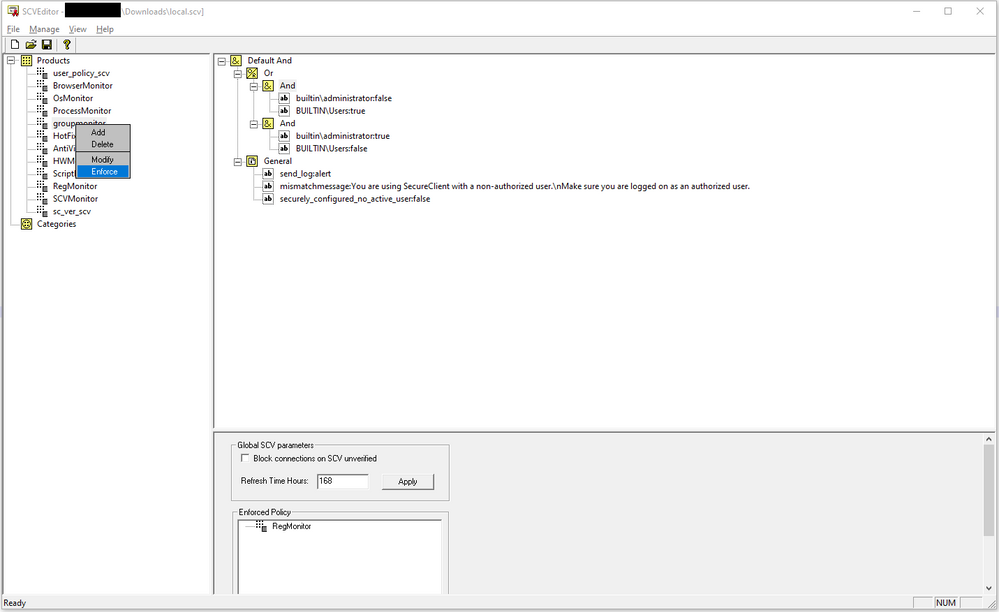
"Check_Point_OPSEC_SDK_6.0_win32\OPSEC_SDK_6_0.WIN32.tar\OPSEC_SDK_6_0.WIN32\pkg_rel\lib\release.dynamic\SCVEditor.exe"
and... voila!
It's Alive!
Hello @PhoneBoy ,
Unfortunately, the link is outdated, perhaps you have an up-to-date one?
You can try this: https://support.checkpoint.com/results/download/39520
However, you may not be entitled to view the file as it requires Software Subscription (comes with support agreement with Check Point or a partner).
Leaderboard
Epsum factorial non deposit quid pro quo hic escorol.
| User | Count |
|---|---|
| 4 | |
| 4 | |
| 3 | |
| 3 | |
| 2 | |
| 1 | |
| 1 | |
| 1 | |
| 1 | |
| 1 |
Tue 12 May 2026 @ 10:00 AM (CEST)
The Cloud Architects Series: Check Point Cloud Firewall delivered as a serviceWed 13 May 2026 @ 11:00 AM (EDT)
TechTalk: The State of Ransomware Q1 2026: Key Trends and Their ImpactThu 14 May 2026 @ 07:00 PM (EEST)
Under the Hood: Presentando Check Point Cloud Firewall como ServicioTue 12 May 2026 @ 10:00 AM (CEST)
The Cloud Architects Series: Check Point Cloud Firewall delivered as a serviceTue 19 May 2026 @ 06:00 PM (IDT)
AI Security Masters E8 - Claude Mythos: New Era in Cyber SecurityAbout CheckMates
Learn Check Point
Advanced Learning
YOU DESERVE THE BEST SECURITY