- Products
- Learn
- Local User Groups
- Partners
- More
MVP 2026: Submissions
Are Now Open!
What's New in R82.10?
10 December @ 5pm CET / 11am ET
Announcing Quantum R82.10!
Learn MoreOverlap in Security Validation
Help us to understand your needs better
CheckMates Go:
Maestro Madness
Hello CheckMates,
is there a way to check the available and used licenses of EndPointSecurityVPN connected to the VPN blade not MOB.
For the MOB this is easy with "cvpnd_admin license all".
With "fw tab -t userc_users -s" I can count all currently connected users, does this mean if there is a value of 100. 100 licenses are used ? If one user logged out one license is freed and available for another user immediately?
Wolfgang
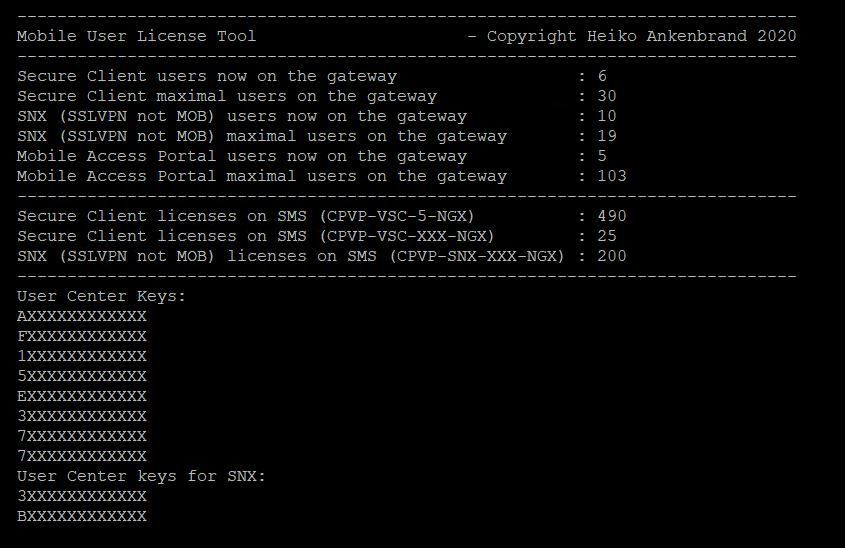
In the past days I have been working on a CLI script that can display all Secure Client license information centrally. This script creates a new command on the management server to read the Secure Client licenses. It displays all Secure Client licenses in total (sum). Furthermore, it can read out the currently used licenses on the gateway. If a connection to the gateway can be established, the following values are read out: Currently used Secure Client licenses and the maximum used Secure Client licenses.
If you execute the script via "copy and past" on the management server, a new CLI command "sclic" is created. Afterwards you can use this command to display all licenses in an overview. Please note that the execution of the new command may take a few seconds. This is a normal behaviour.
Now for following:
- Secure Client licenses
- Mobile Access Portal licenses
- SSLVPN licenses
More read here: R80.x - Mobile User License Tool - replaces "dtps lic"
Here an example:
# sclic 10.0.0.1
Now all license parameters for Secure Client are displayed:
It is not so hard - this is taken from my post Remote Access Users license + count
The "old" RA VPN client licensing worked by counting client IPs (called "seats", CLI "dtps lic" on policy server), and the used licenses count showed the number of clients that did connect during the last 30 days. This is different with MAB licenses, they are defined as the number of concurrent clients; MAB even has five grace clients, so the maximum number of concurrent clients is the number of licenses plus five.
...
From sk39034: How to check the number of currently connected Remote Access users and sk14496: How to check the names of remote access users that have sent traffic through the Security G...
To see the number of currently connected Remote Access users, run this command (in Expert mode) on the VPN Security Gateway:
[Expert@HostName]# fw tab -t userc_users -s
To see the username of each "connected" remote access user (in the last 15 minutes), run this command (in Expert mode) on VPN Security Gateway:
[Expert@HostName]# fw tab -t userc_rules -f
You can also run the following command on the gateway, in order to see the number of OM IPs which are currently assigned by the gateway:
# fw tab -t om_assigned_ips -s
HOST NAME ID #VALS #PEAK #SLINKS localhost om_assigned_ips 372 1 1 0
The above output (#VALS=1 ) means currently one client is assigned an OM IP. This includes SNX users with OM IPs as well, who take up from a different license (MAB). In order to find out how many there are of those and subtract them to leave only IPsec VPN clients (i.e. SecureClient, Endpoint Security VPN, Endpoint Connect), check the following table:
# fw tab -t sslt_om_ip_params -s
HOST NAME ID #VALS #PEAK #SLINKS localhost sslt_om_ip_params 372 1 1 0
In the past days I have been working on a CLI script that can display all Secure Client license information centrally. This script creates a new command on the management server to read the Secure Client licenses. It displays all Secure Client licenses in total (sum). Furthermore, it can read out the currently used licenses on the gateway. If a connection to the gateway can be established, the following values are read out: Currently used Secure Client licenses and the maximum used Secure Client licenses.
If you execute the script via "copy and past" on the management server, a new CLI command "sclic" is created. Afterwards you can use this command to display all licenses in an overview. Please note that the execution of the new command may take a few seconds. This is a normal behaviour.
Now for following:
- Secure Client licenses
- Mobile Access Portal licenses
- SSLVPN licenses
More read here: R80.x - Mobile User License Tool - replaces "dtps lic"
Here an example:
# sclic 10.0.0.1
Now all license parameters for Secure Client are displayed:
Leaderboard
Epsum factorial non deposit quid pro quo hic escorol.
| User | Count |
|---|---|
| 3 | |
| 3 | |
| 1 | |
| 1 | |
| 1 | |
| 1 | |
| 1 | |
| 1 |
Fri 12 Dec 2025 @ 10:00 AM (CET)
Check Mates Live Netherlands: #41 AI & Multi Context ProtocolTue 16 Dec 2025 @ 05:00 PM (CET)
Under the Hood: CloudGuard Network Security for Oracle Cloud - Config and Autoscaling!Fri 12 Dec 2025 @ 10:00 AM (CET)
Check Mates Live Netherlands: #41 AI & Multi Context ProtocolTue 16 Dec 2025 @ 05:00 PM (CET)
Under the Hood: CloudGuard Network Security for Oracle Cloud - Config and Autoscaling!Thu 18 Dec 2025 @ 10:00 AM (CET)
Cloud Architect Series - Building a Hybrid Mesh Security Strategy across cloudsAbout CheckMates
Learn Check Point
Advanced Learning
YOU DESERVE THE BEST SECURITY