- Products
- Learn
- Local User Groups
- Partners
- More

MVP 2026: Submissions
Are Now Open!
What's New in R82.10?
Watch NowOverlap in Security Validation
Help us to understand your needs better
CheckMates Go:
Maestro Madness
Hi,
we do have a problem, where access roles are not applied to VPN users. All our company users do have the Identity Agent installed and this seems to be working fine.
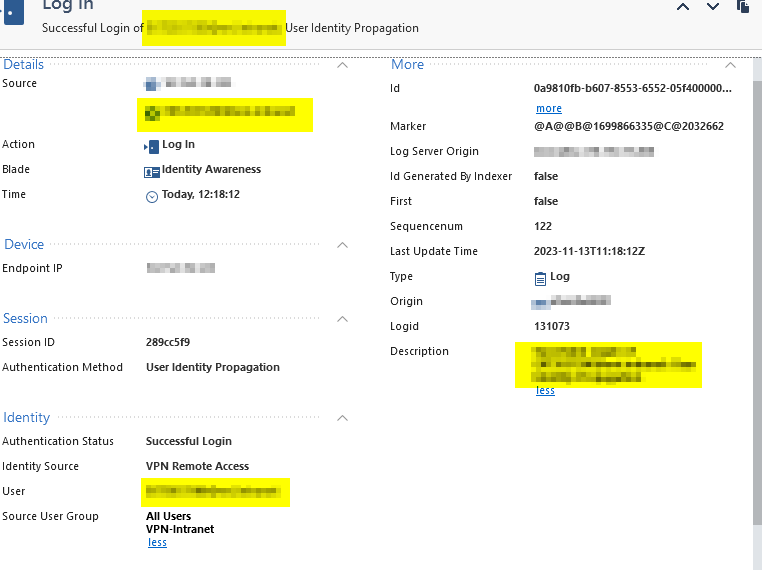
But we do also have some external users (contractors etc..) which do have their own equipment and do need a VPN connection for accessing some services. Currently we have the legacy user access for them working. I wanted to switch this to access roles. So i created a access role and added the AD user into it, but it doesn't get recognized. When VPN login is done, i can see an identity awareness entry :
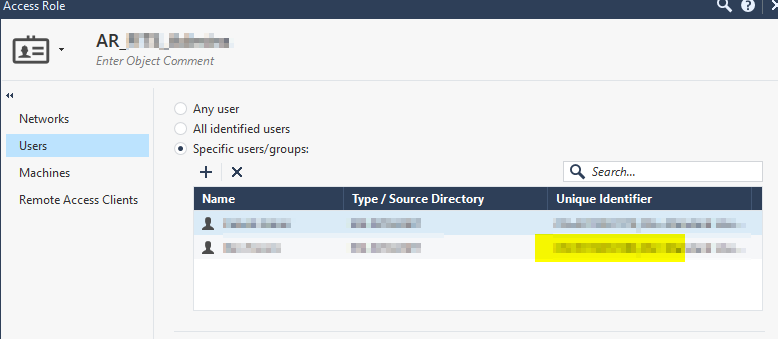
but it doesn't get matched to the access role:
any clue where could be the error?
thanks!
Georg
Is Remote Access set as one of your Identity Sources in the Gateway object in the Identity Awareness section?
yes, i have already checked that.
could it be the problem, that the users are authenticated via RADIUS Server (Entrust Identity) / External User Profile?
in the pepd.elg i can see only this:
[21381 4057782144]@XXXXXXXX[14 Nov 8:06:25] [TRACKER]: #2721205 -> INCOMING -> IDP_ASSOCIATION ->
Association
ip: XX.XXX.XX.XXX
user: XXXXXXXX@domain
realm: vpn
machine:
domain:
client-type: 3
[21381 4057782144]@XXXXXXXXX[14 Nov 8:06:25] [TRACKER]: #2721206 -> OUTGOING -> IDENTITY_UPDATE -> pep (v4): 127.0.0.1pep (v6): , identity: UpdateInformation dump:
Unique ID : 4faeb2ea
Client type : 3, (Remote Access)
Time to live : 86430, 86400
Client ID : XX.XXX.XX.XXX, 0
Username : XXXXX@domain
Log Username : XXXXX@domain
Log UserDistinguishName:
User domain :
User groups : All Users, VPN-Intranet
Identity Role :
Client Type Array : 3i would have thought, that Identity Awareness would use the Username and then do a lookup via LDAP to fetch the missing userdata, so it can matcht the corresponding Identity Roles.
If LDAP is set up correctly, this is exactly what should happen.
See if the following helps: https://support.checkpoint.com/results/sk/sk113363
i checked with the GUIDBEdit tool, and the do_fetch_ldap was set to false. i have set it to true, saved and then pushed policy again to the gateway. did not help. i think i have to get in contact with support.
i wanted to update the thread with the solution:
we did use the "legacy" authentication via VPN. After creating new VPN Authentication profiles (the LDAP lookup can be specified in them) - Identity Awareness is working - though not cross domain e.g. users from domain A are in groups of domain B. in the access rule is only the group from domain B specified - not working. but this is a problem which do have multiple apps regarding multi domain. directly specifying the users in the Access Roles is working
Leaderboard
Epsum factorial non deposit quid pro quo hic escorol.
| User | Count |
|---|---|
| 4 | |
| 3 | |
| 2 | |
| 2 | |
| 1 | |
| 1 | |
| 1 | |
| 1 | |
| 1 | |
| 1 |
Fri 12 Dec 2025 @ 10:00 AM (CET)
Check Mates Live Netherlands: #41 AI & Multi Context ProtocolTue 16 Dec 2025 @ 05:00 PM (CET)
Under the Hood: CloudGuard Network Security for Oracle Cloud - Config and Autoscaling!Fri 12 Dec 2025 @ 10:00 AM (CET)
Check Mates Live Netherlands: #41 AI & Multi Context ProtocolTue 16 Dec 2025 @ 05:00 PM (CET)
Under the Hood: CloudGuard Network Security for Oracle Cloud - Config and Autoscaling!About CheckMates
Learn Check Point
Advanced Learning
YOU DESERVE THE BEST SECURITY