- Products
- Learn
- Local User Groups
- Partners
- More

MVP 2026: Submissions
Are Now Open!
What's New in R82.10?
Watch NowOverlap in Security Validation
Help us to understand your needs better
CheckMates Go:
Maestro Madness
Hi Folks, I'm sitting here and the old #SecuRemote with R80.10 driving me crazy. I have configured IP Pool NAT in my R80.10 Cluster.

In 77.30 this was working properly. Since R80.10 it is not working any longer and I get IP's from a DHCP Server somewhere in the wild from my net. Do you have any ideas? How to get my IP Pool back?
Just for info, we just using the free SecuRemote licences.
Regards
Office Mode is not supported with the SecuRemote client.
The fact it worked in R77.30 could be considered a bug.
Hi Thorsten,
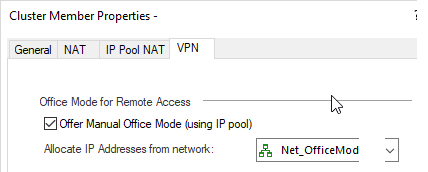
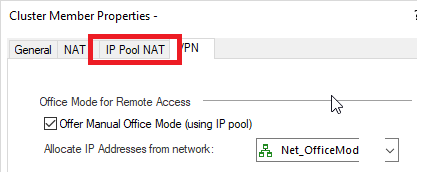
I guess it is no longer relevant, but your screenshot does not show the IP Pool-NAT settings, should be this Tab :

I have tested it with R80 a while ago and it was still working
Matthias
I know it has been a long time since this post last update, but I'm facing the same situation. I can't use the IP Pool NAT, even when I've set the network at the right location (image below). It is really like there is a DHCP server somewhere providing addresses that even are configured on the firewalls.
Someone knows how to implement this feature with SecuRemote?
OBS: I have read the article from @PhoneBoy about the use with SecuRemote (Quick Primer on How to Configure your Gateway for SecuRemote) but I think I'm missing something.
DHCP implies Office Mode, which SecuRemote does not provide.
That means DHCP is irrelevant, you can only use IP Pool NAT.
Each client will have something like a 192.168.0.1 assigned to it on the client itself.
Thanks for replying @PhoneBoy.
In my case, the SecuRemote client is getting a 10.8.220.0/24 network, which is not part of the topology, but I have one network object with this range. I can see new routes from the gateway VPN domain, and the output of "route print" points this routes to an IP of 10.8.220.0/24 range.
Can I state that if I am using SecuRemote I need to see the IP Pool NAT address range at the client?
Some IP address must be assigned to the client in order to route traffic for the relevant subnets through the Remote Access VPN interface.
In the case of Office Mode, we use the IP address assigned as part of that process.
For SecuRemote, we choose a subnet that doesn't conflict (it varies), and it probably won't be the subnet configured for IP Pool NAT.
So, can I assume that it is not user defined?
Sorry to stick on this, but I'm struggling to configure firewall rules and access from SecuRemote traffic. Can you give an example of how can I point my rules and routes to manage the SecuRemote incoming traffic?
Incoming from what: the SecuRemote client?
The primer you linked to previously should cover that.
Incoming traffic to the SecuRemote clients aren't supported.
That requires Office Mode, which is not supported with SecuRemote.
Leaderboard
Epsum factorial non deposit quid pro quo hic escorol.
| User | Count |
|---|---|
| 4 | |
| 3 | |
| 2 | |
| 2 | |
| 1 | |
| 1 | |
| 1 | |
| 1 | |
| 1 |
Tue 16 Dec 2025 @ 05:00 PM (CET)
Under the Hood: CloudGuard Network Security for Oracle Cloud - Config and Autoscaling!Thu 18 Dec 2025 @ 10:00 AM (CET)
Cloud Architect Series - Building a Hybrid Mesh Security Strategy across cloudsTue 16 Dec 2025 @ 05:00 PM (CET)
Under the Hood: CloudGuard Network Security for Oracle Cloud - Config and Autoscaling!Thu 18 Dec 2025 @ 10:00 AM (CET)
Cloud Architect Series - Building a Hybrid Mesh Security Strategy across cloudsAbout CheckMates
Learn Check Point
Advanced Learning
YOU DESERVE THE BEST SECURITY