Why is Java Still Required for SNX?
SNX itself doesn't require Java, but the cross-platform Mobile Access Blade Deployment Agent (MABDA) that deploys the SNX and Compliance Check components does. There is no specific timeline for implementing MABDA without Java currently, though alternatives are being investigated.
What about VPN Clients for Linux?
We have two community posts about how to set up and use strongSwan (Roadwarrier) and Libreswan 3.23 with R80.30, both written by @Soeren_Rothe. There is also official support for Strongswan through a Customer Release that you can obtain through your local Check Point Office.
How do I Load Balance Remote Access
This can be done with MEP (Multiple Entry Point) configurations. Refer to the product documentation links above.
What Limits the Maximum Concurrent VPN Connections?
Licensing and hardware capacity, both of which are discussed in our Remote Access Whitepaper.
What Authentication Options Do I Have? Is Multi-Factor Authentication Supported?
Yes, it varies by client, access method, and gateway version. You can see the different options listed in sk86240. Note that most third-party providers (Duo, Okta, etc) will integrate using RADIUS.
What about SSL VPN Client Options?
This can be achieved using SNX or the Mobile Access Blade Portal.
How Can I Get Reports on Who is Connected Over VPN When?
Three reports are provided in our Short List of Remote Access VPN Resources page. These reports require SmartEvent. There are some CLI-based options as well.
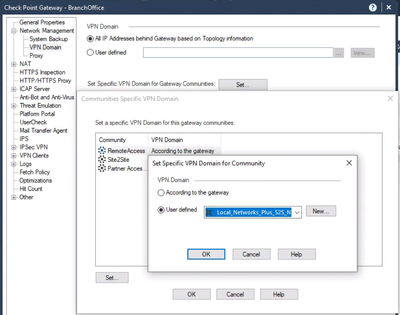
How Do I Redirect remote Access VPN Traffic Through A Site-to-Site VPN Connected to my Gateway?
Configure your Remote Access VPN Community to include the VPN Community of the remote site. This is done on the gateway object. In R80.40, it looks like this:
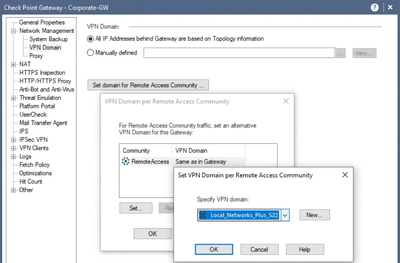
In releases prior to R80.40, it looks a little different, but similar:
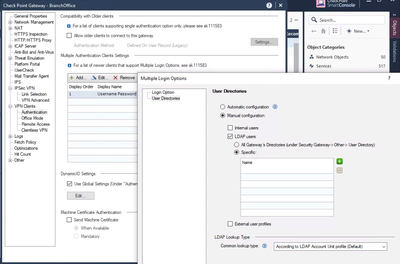
All of My Users Can Connect to my VPN, but only want to allow a Subnet to Authenticate. How do I Configure This?
In the specific gateway object(s), you will configure what LDAP Groups are allowed to connect.
Note these specific LDAP Groups must be defined in the management.
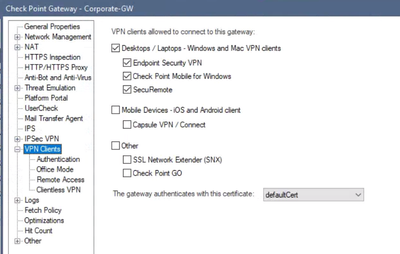
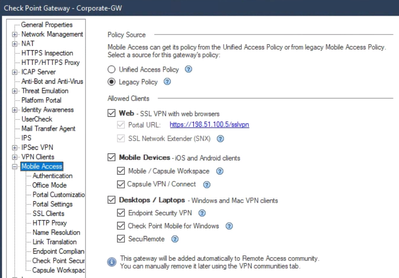
Can I Restrict What Client(s) My Users Can Connect With?
Yes. If you are not using Mobile Access Blade:
With Mobile Access Blade:
Can I Make Sure Users Only Connect with an AD-Associated Machine or Meet Basic Security Requirements?
These sorts of checks can be done with SCV (see sk147416) or Endpoint Compliance checks, as described in the product documentation links above as well as the Endpoint Security Admin Guide.
Can a User Be Required to Have the VPN Enabled?
This can be configured, yes. Refer to the product documentation links above.
What If I Cannot Trust the End User PC (e.g. Home PC), What Are My Options?
In this case, you may wish to provide access using RDP over an HTML5 using Guacamole or a similar proxy solution with Mobile Access Blade. @Shay_Levin produced a video that shows how to set up RDP with Mobile Access Blade Step-By-Step. This will prevent copy/paste between the local and remote system as well.
Can I Monitor Number of Connected Users over SNMP?
Yes, see this thread.
What Licenses Impact the Number of Office Mode Addresses?
Mobile Access licenses plus the number of Endpoint Security VPN/SBA licenses you have.
If I have SandBlast Agent licenses, do I need Mobile Access licenses?
SandBlast Agent (and Remote Access VPN licenses) are meant for managed VPN endpoints. If you have unmanaged VPN endpoints connecting (either via SNX, IPSEC, or through the Mobile Access Porta), then yes, you will need Mobile Access licenses.
Can I Configure Different Remote Access Communities for Different Group(s) of Users?
No, there can only be one Remote Access community for all gateways managed as part of the same management domain. Use Access Rules to control which users can connect to which networks.
Can I Route All Traffic for Most Users But Allow Some Users To Disable This?
If you enable Route All Traffic, all Remote Access users will have their traffic routed through the VPN by default. You can allow some clients (by group) to disable this, as described in sk114882.
Can You Mix Legacy and LDAP-Defined Users?
Yes.
I Have a Mix of MacOS and Windows Users that Need Remote Access Via IPsec VPN Client But Don't Need SandBlast Agent. What Are My Options?
Windows Users can connect using Check Point Mobile client using a Mobile Access Blade license for the number of concurrent users expected.
Mac clients requiring IPsec access need the full Endpoint Security VPN, which is licensed per installed seat. This can be provided through current SandBlast Agent licenses or legacy CPEP-ACCESS SKUs.
What is the Limitation of SecuRemote Without Office Mode?
This is discussed in the Quick Primer on Configuring Your Gateway on SecuRemote.
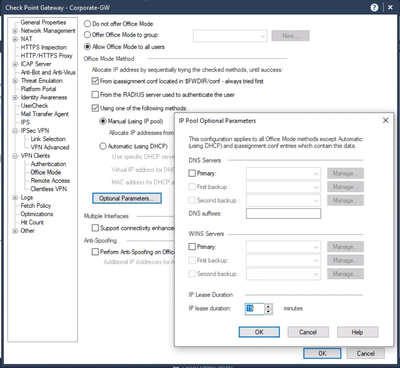
How can I append the FQDN with the Capsule VPN Client?
This is set in the Office Mode configuration:
Is it possible to enforce login uniqueness when users try to connect with SNX and Endpoint Client?
This is a setting in Global Properties and it should apply to all Remote Access clients:

Where Can I Download the SNX Client From?
SNX can be downloaded from one of two places:
- The VPN portal (https://gateway-ip:444), which may not necessarily work from modern browsers.
- The Mobile Access Portal, but in pre-R80.40 releases, will require the MABDA hotfix to be installed. See: sk113410