- Products
- Learn
- Local User Groups
- Partners
- More

AI Security Masters E7:
How CPR Broke ChatGPT's Isolation and What It Means for You
Blueprint Architecture for Securing
The AI Factory & AI Data Center
Call For Papers
Your Expertise. Our Stage
Good, Better, Best:
Prioritizing Defenses Against Credential Abuse
Ink Dragon: A Major Nation-State Campaign
Watch HereCheckMates Go:
CheckMates Fest
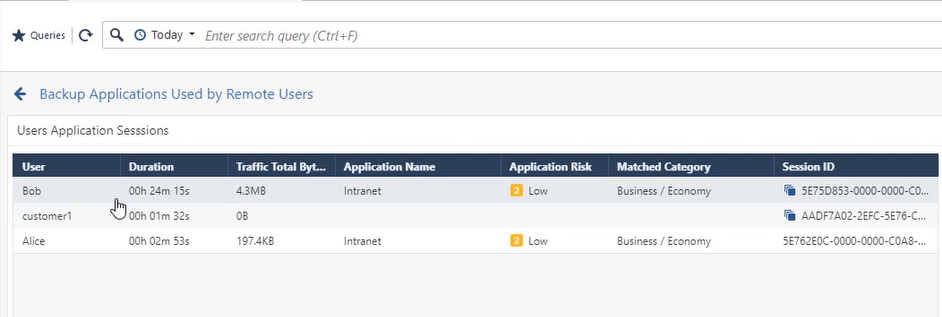
Following up the great work of @Tomas_Vobruba mentioning the importance of SmartView Remote Access support, I created the attached View.
It shows the how long the user was connected, which application she/he has accessed and that data volume transmitted. Check the video to learn more how you can use this view.
Have a look over on this page too for some more details in reporting for VPN : https://community.checkpoint.com/t5/Visibility-Analytics/SmartView-VPN-Client-enhanced-view/m-p/7887...
Designed to provide
- total time spend on VPN
- transferred total bytes.
- number of logs
- blade used
- client used for connection (workspace, endpoint, snx, etc)
- login fails and realauth schemes
Hi Peter,
are there any method to have a timeline with concurrent active users?
From your template we are able to see the timeline with login peak, but customer asking a timeline with concurrent users.
Thanks in advance.
Jacopo
Have a look over on this page too for some more details in reporting for VPN : https://community.checkpoint.com/t5/Visibility-Analytics/SmartView-VPN-Client-enhanced-view/m-p/7887...
Designed to provide
- total time spend on VPN
- transferred total bytes.
- number of logs
- blade used
- client used for connection (workspace, endpoint, snx, etc)
- login fails and realauth schemes
I already reviewed the link you posted, but there are no any references regarding concurrent users.
Talking with a TAC Engineer, he told me that it seems there are not any method to get concurrent users from SmartEvent. It seems that this information is only available on the Gateway.
Thanks.
Jacopo
Hi Peter,
Have tried this in lab and worked well.
However, integrating it in production (200+ RA users), hence, more users and log data causes the cpu to max out and ultimately to SmartLog/SmartEvent to fail.
Only recovering it with a evstop ; evstart, or waiting many hours.
This might probably be the reason: https://supportcenter.checkpoint.com/supportcenter/portal?eventSubmit_doGoviewsolutiondetails=&solut...
Do you know of any successful use cases in production environments?
In which case i may raise a SR to tac to see if there is something else going on with my Management.
There is a SmartEvent License needed to use this feature, right ?
Yes, these reports require a SmartEvent license.
My dash is with transferred total bytes in O, Can you help me?
How to create his custom report ? can anyone explain in details R80.30.
The report was attached to Peter’s original post and can be imported into R80.30.
Following up the great work of @Tomas_Vobruba mentioning the importance of SmartView Remote Access support, I created the attached View.
It shows the how long the user was connected, which application she/he has accessed and that data volume transmitted. Check the video to learn more how you can use this view.
Leaderboard
Epsum factorial non deposit quid pro quo hic escorol.
| User | Count |
|---|---|
| 4 | |
| 4 | |
| 3 | |
| 3 | |
| 3 | |
| 2 | |
| 2 | |
| 1 | |
| 1 | |
| 1 |
Tue 28 Apr 2026 @ 06:00 PM (IDT)
Under the Hood: Securing your GenAI-enabled Web Applications with Check Point WAFThu 30 Apr 2026 @ 03:00 PM (PDT)
Hillsboro, OR: Securing The AI Transformation and Exposure ManagementTue 28 Apr 2026 @ 06:00 PM (IDT)
Under the Hood: Securing your GenAI-enabled Web Applications with Check Point WAFTue 12 May 2026 @ 10:00 AM (CEST)
The Cloud Architects Series: Check Point Cloud Firewall delivered as a serviceThu 30 Apr 2026 @ 03:00 PM (PDT)
Hillsboro, OR: Securing The AI Transformation and Exposure ManagementAbout CheckMates
Learn Check Point
Advanced Learning
YOU DESERVE THE BEST SECURITY