- Products
- Learn
- Local User Groups
- Partners
- More

MVP 2026: Submissions
Are Now Open!
What's New in R82.10?
Watch NowOverlap in Security Validation
Help us to understand your needs better
CheckMates Go:
Maestro Madness
Hi,
We have problem to implement au DNS suffix search list in SNX connexion with Mobile Access.
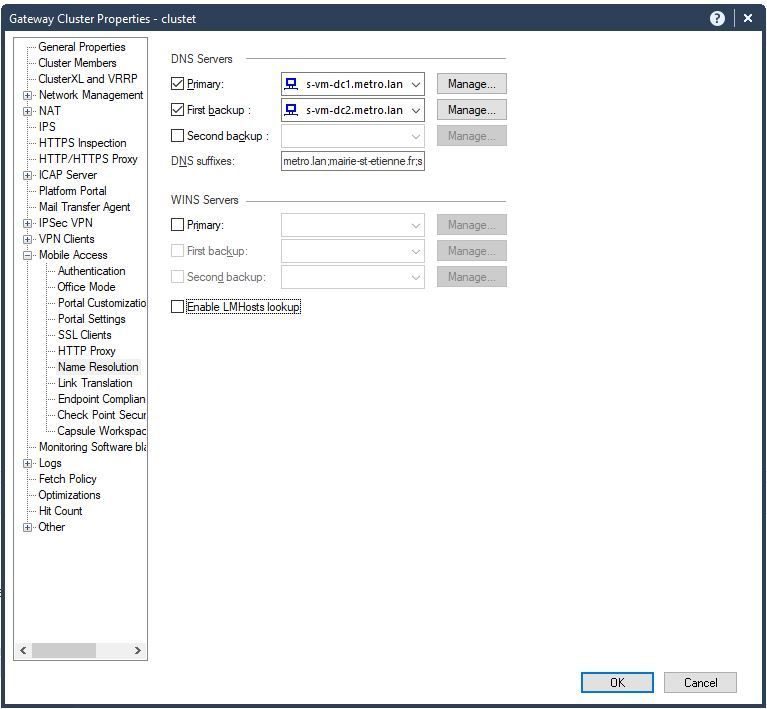
1) We have configured DNS suffixes in our cluster, Mobile Access - Name Resolution
Our first problem is the format. By consulting the help of this page (by clicking ?), there is this line :
"DNS suffixes can be one or more comma separated items, e.g. example.com, example.org".
But in this SK (https://supportcenter.checkpoint.com/supportcenter/portal?eventSubmit_doGoviewsolutiondetails=&solut... ), the seperator is not a comma but a semicolon !
What is the right syntax ? comma ou semicolon ?
2) We have tried with the 2 parameters but, running "ipconfig /all", instead of have a DNS suffix per line, we have a first line with our "default" domain, and a second one with example1.com;example2.com;example3.com.
So the DNS resolution only work with the default domain...
Anybody can help us ?
Best regards.
I have a customer with exact same issue. 4 dns suffixes defined and only 1st one works across multiple clients (capsule connect and endpoint connect) same behavior.
Hello together!
iam currently struggeling with exact the same issue ...
i seperated both DNS suffixes in the Office Mode settings via a "comma".
And it works only for my only Windows 8.1 client, not on my Windows 10 Build 1809.
i use the E82.50 End Point Mobile Client
In Windows 8.1 i see multiple DNS suffixes written on below each other. As it should be.
But not on Windows 10.
so i think its more an Microsoft Window Issue ...
also i played with "ipassignment.conf" and got the same results for this config line:
Gateway Type IP Address User Name
============= ===== ======================================== =========================================
#TEST
10.8.253.252 net 10.255.1.0/24 suffix=(suffix1.com,suffix2.com) dns=(10.4.8.105,10.4.5.32) GRP_USER_XXXXXXX
in runs on SNX and Check Point Mobile on Windows 8.1 but not the current Windows 10 1809.
i remember i got it to work with older Windows 10 versions, but something was changed...
maybe someone knows how to tweak it on the Windows side?
best regards
Thomas.
Hello,
and again iam struggeling with the same issue ...
this time on Windows 10 20H2 .
i knew this was working before, but now it doesnt ...
i opened a TAC case ... lets see what they find.
Leaderboard
Epsum factorial non deposit quid pro quo hic escorol.
| User | Count |
|---|---|
| 4 | |
| 3 | |
| 2 | |
| 2 | |
| 1 | |
| 1 | |
| 1 | |
| 1 | |
| 1 |
Tue 16 Dec 2025 @ 05:00 PM (CET)
Under the Hood: CloudGuard Network Security for Oracle Cloud - Config and Autoscaling!Thu 18 Dec 2025 @ 10:00 AM (CET)
Cloud Architect Series - Building a Hybrid Mesh Security Strategy across cloudsTue 16 Dec 2025 @ 05:00 PM (CET)
Under the Hood: CloudGuard Network Security for Oracle Cloud - Config and Autoscaling!Thu 18 Dec 2025 @ 10:00 AM (CET)
Cloud Architect Series - Building a Hybrid Mesh Security Strategy across cloudsAbout CheckMates
Learn Check Point
Advanced Learning
YOU DESERVE THE BEST SECURITY