- Products
- Learn
- Local User Groups
- Partners
- More
MVP 2026: Submissions
Are Now Open!
What's New in R82.10?
10 December @ 5pm CET / 11am ET
Improve Your Security Posture with
Threat Prevention and Policy Insights
Overlap in Security Validation
Help us to understand your needs better
CheckMates Go:
Maestro Madness
Hi,
anyone aware if we can configure the lease time for ip assignments given out via ipassignment.conf on the gateway?
/Fredrik
Not sure if I get what you need. Do you mean that you want every single user and IP assigned to him via ipassignment.conf to have specific lease time?
I have few customers using mainly ipassignment.conf for their vpn clients and as far as we tested the functionality, the lease time for these addresses is the same configured in SmartConsole for all VPN users.
One main disadvantage I faced using ipassignment.conf is when the remote user got disconnected via poor Internet connection, CP doesn't know that (the client may also not notice that he was disconnected for few seconds because of lost connectivity to Internet), the new client connection (few seconds after the poor connectivity caused the disconnection) is given a new IP address which is not in the ipassignment.conf and of course if you have granular rules in the policy they are not met and the client has no access and start complain.
The workaround that me and the customer met is setting the lease time close to 10-15 minutes in the SmartConsole so if the client face such issue he has to wait no more than 10-15 minutes to have access to the resource. You have to know that the short lease time cause more vpn-test-tunnel packets crossing around and may have impact on the GW performance if you have hundreds of vpn clients connected. 10-15 minutes of lease time was a win-win situation in my case, yours may be different.
Hi,
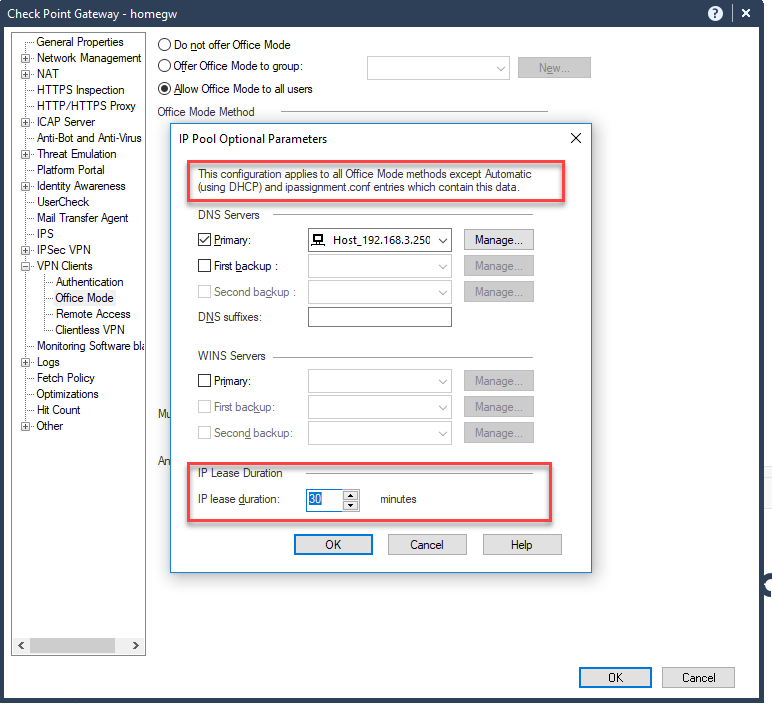
the configuration in the dashboard is not applied to ipassignments.conf or dhcp according to the text on the top of additional configuration.
Good point! I just did few tests and this is the summary: In CP I have configured Primary DNS server, in ipassignment.conf there is only my username and an IP. When I connect I got the right IP address and the DNS which is configured in the SmartConsole, so I believe this exception is a bit confusing and maybe it should means If you have configured DNS, WINS, DNS suffix in ipassignment.conf, the following configuration is not applied. As far as I know in SmartConsole is the only place where you can set lease time, in ipassignment.conf there is no such option explained, so I believe this option applies to every configuration.
During my tests with the customer last year with R80.10, we have set the lease duration to 10 minutes and a reserved IP address for a user in ipassignment.conf, connect to VPN with a client, receive the right IP and then cut the connectivity to Internet; After 2-3 minutes connecting again to the VPN and receive the next free IP address from the pool of Office mode addresses (not the one configured in ipassignment.conf because the lease time is not expired and the old one is not free); Disconnect and after another approx 10 minutes (the total minutes are more than the lease time configured) connect again and receive the right IP from ipassignment.conf.
These are my observation and it works more than an year and I did not receive any complains about this.
It will be good if any other did something similar to share his experience with ipassignment.conf
Do some tests in a test environment and see how it works without touching a live infrastructure.
As far as I know, the ipassignment.conf is only for assigning local users or LDAP users to a fixed office mode IP.
Lease Expires date displayed for Endpoint Virtual Network Adapter does not reflect configured Office Mode lease duration
sk112069
Leaderboard
Epsum factorial non deposit quid pro quo hic escorol.
| User | Count |
|---|---|
| 4 | |
| 3 | |
| 1 | |
| 1 | |
| 1 | |
| 1 | |
| 1 | |
| 1 |
Thu 04 Dec 2025 @ 12:30 PM (SGT)
End-of-Year Event: Securing AI Transformation in a Hyperconnected World - APACThu 04 Dec 2025 @ 03:00 PM (CET)
End-of-Year Event: Securing AI Transformation in a Hyperconnected World - EMEAThu 04 Dec 2025 @ 02:00 PM (EST)
End-of-Year Event: Securing AI Transformation in a Hyperconnected World - AmericasThu 04 Dec 2025 @ 12:30 PM (SGT)
End-of-Year Event: Securing AI Transformation in a Hyperconnected World - APACThu 04 Dec 2025 @ 03:00 PM (CET)
End-of-Year Event: Securing AI Transformation in a Hyperconnected World - EMEAThu 04 Dec 2025 @ 02:00 PM (EST)
End-of-Year Event: Securing AI Transformation in a Hyperconnected World - AmericasAbout CheckMates
Learn Check Point
Advanced Learning
YOU DESERVE THE BEST SECURITY