- Products
- Learn
- Local User Groups
- Partners
- More

MVP 2026: Submissions
Are Now Open!
What's New in R82.10?
10 December @ 5pm CET / 11am ET
Announcing Quantum R82.10!
Learn MoreOverlap in Security Validation
Help us to understand your needs better
CheckMates Go:
Maestro Madness
Hello everyone.
I currently have a ClusterXL R81.10, on which I want to implement a security rule, for a group of remote VPN users.
I think I understand that this works by putting the group object in an Access Role (and I have done so), but the problem is that when installing policies, I get an error, for not having activated the Identity Awaraness blade.
Is it mandatory to activate the blade, to work the Access Role?
There is no other way to work the local users that I have created in the Firewall, to give permissions to remote VPN user connections?
Greetings.
Identity Awareness is required to use Access Roles, yes.
The only other way to do it is to use Legacy User Access rules, but these are only supported in "Firewall only" layers per: https://support.checkpoint.com/results/sk/sk169493
Identity Awareness is required to use Access Roles, yes.
The only other way to do it is to use Legacy User Access rules, but these are only supported in "Firewall only" layers per: https://support.checkpoint.com/results/sk/sk169493
Hello,
Thank you for your reply.
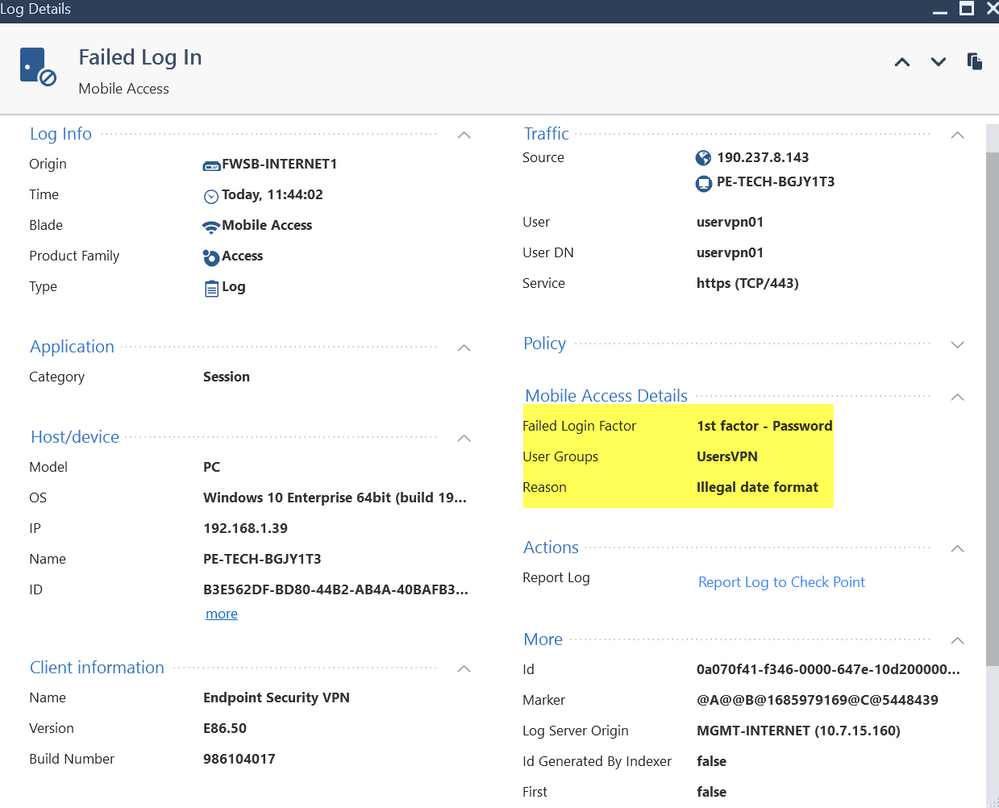
I have created a security rule, calling in the origin to a legacy object, for the connection of a remote VPN user, but it is not allowing me the connection, and it shows me the following error message.
Any idea why I get this error message and how to correct it?
The locally created group object is already inside the VPN Community, Remote Access.
Cheers.
Thats probably auth method issue on the gateway object properties.
Andy
Your rule is a "Legacy User Access" style.
As far as I know, this method only allows for a single authentication method.
This log implies you have more than one configured.
Try it with a properly configured Access Role and see if you get the same issue.
Sure, I could try it, but this demands that I activate the AI blade, right?
Yes, as stated previously.
For creating IA access roles, yes buddy.
Andy
Yes, what @PhoneBoy said is correct, because TAC told me the same in the past. If you do not want to enable IA blade, sk is the only other way to do this.
Andy
Leaderboard
Epsum factorial non deposit quid pro quo hic escorol.
| User | Count |
|---|---|
| 4 | |
| 3 | |
| 2 | |
| 1 | |
| 1 | |
| 1 | |
| 1 | |
| 1 |
Fri 12 Dec 2025 @ 10:00 AM (CET)
Check Mates Live Netherlands: #41 AI & Multi Context ProtocolFri 12 Dec 2025 @ 10:00 AM (CET)
Check Mates Live Netherlands: #41 AI & Multi Context ProtocolTue 16 Dec 2025 @ 05:00 PM (CET)
Under the Hood: CloudGuard Network Security for Oracle Cloud - Config and Autoscaling!About CheckMates
Learn Check Point
Advanced Learning
YOU DESERVE THE BEST SECURITY