- Products
- Learn
- Local User Groups
- Partners
- More

Step Into the Future of
AI-Powered Cyber Security
When the Agents Attack
A Live Look at Agentic Exposure Validation
Bridge the CAASM Gap
with Exposure Management
AI Security Masters E8:
Claude Mythos: New Era in Cyber Security
CheckMates Go:
CheckMates Fest
You have to configure Location Awareness, I believe.
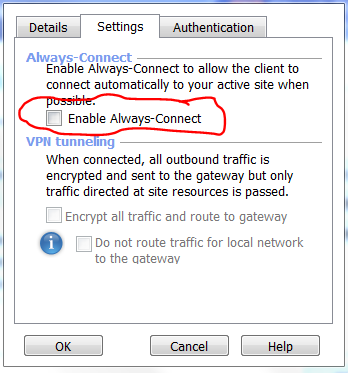
There is an option in the client configuration
Hello everyone,
Is there any automated way to disable auto connect in Endpoint VPN Version 81.10. I know this can be done manual, but I need to disable the auto connect in the MSI EPS.MSI. In the past with old version I used to use the adminmode then I can manipulate the MSI as I want. The autoconnect is causing users issues when they are connected to the network from the office.
I am having this issue as well.
There is an option called "Disconnect client when getting an IP from a VPN domain". See it in "https://community.checkpoint.com/t5/Remote-Access-VPN/Endpoint-VPN-and-auto-connect/td-p/47055". I think it will solve the problem when the users are inside the office.
Hi @Wolfgang :
do you know, where I can set this check box for all the clients?
We want it to be disabled, but setting it in trac.ttm endpoint_vpn_always_connected doesn't help - this parameter is not present in the local trac.config with E82.10
Best Regards
Johannes
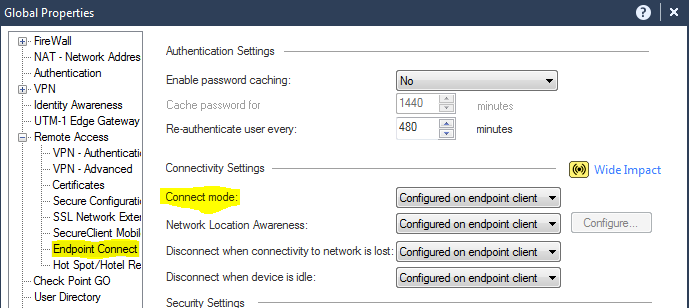
Note the following "global property" also please have a look at the following SK to see if it meets your requirements.
or you recreate the MSI and redeploy it to all clients. You can modify the client by the trac config file and there is an option for always connect.
Hi Chris,
If i change the change the connect mode to Manual then how does it work? I went through the below link but did not get much clarification on this.
Manual
Always Connect
Configured on Endpoint
Need to get more clarification on these 3 options.
Manual means no auto-connection to VPN is possible.
Always Connect means the gateway forces the client to always be connected via VPN.
Configured on Client means the end user can (optionally) configure the option to be always connected via VPN.
Thats great then i can go with the Manual Option 🙂
Thanks PhoneBoy.
Leaderboard
Epsum factorial non deposit quid pro quo hic escorol.
| User | Count |
|---|---|
| 2 | |
| 2 | |
| 1 | |
| 1 | |
| 1 | |
| 1 |
Wed 10 Jun 2026 @ 01:00 PM (EDT)
Deep Dive: When the Agents Attack: A Live Look at Agentic Exposure ValidationThu 11 Jun 2026 @ 11:00 AM (EDT)
Tips and Tricks 2026 #8: Say Yes to AI Without Saying Yes to RiskFri 12 Jun 2026 @ 10:00 AM (CEST)
CheckMates Live Netherlands - Sessie 47: Continuous Threat Exposure ManagementTue 16 Jun 2026 @ 05:00 PM (CEST)
Under the Hood: Check Point SASE | Internet Access Optimization & Performance TuningWed 10 Jun 2026 @ 01:00 PM (EDT)
Deep Dive: When the Agents Attack: A Live Look at Agentic Exposure ValidationThu 11 Jun 2026 @ 11:00 AM (EDT)
Tips and Tricks 2026 #8: Say Yes to AI Without Saying Yes to RiskFri 12 Jun 2026 @ 10:00 AM (CEST)
CheckMates Live Netherlands - Sessie 47: Continuous Threat Exposure ManagementTue 16 Jun 2026 @ 05:00 PM (CEST)
Under the Hood: Check Point SASE | Internet Access Optimization & Performance TuningThu 18 Jun 2026 @ 10:00 AM (CEST)
The Cloud Architects Series: Check Point WAF - The Next Generation of AI powered protectionAbout CheckMates
Learn Check Point
Advanced Learning
YOU DESERVE THE BEST SECURITY