- Products
- Learn
- Local User Groups
- Partners
- More
AI Security Masters E7:
How CPR Broke ChatGPT's Isolation and What It Means for You
Blueprint Architecture for Securing
The AI Factory & AI Data Center
Call For Papers
Your Expertise. Our Stage
Good, Better, Best:
Prioritizing Defenses Against Credential Abuse
Ink Dragon: A Major Nation-State Campaign
Watch HereCheckMates Go:
CheckMates Fest
Hello everyone.
We're testing a scheme where a Windows user would only enter username and then authenticate with a mail OTP from radius server. This is the first time we're going through something like this and I'm a bit confused. So let me try to describe what we did so far and maybe you can direct me to the right direction.
First I set up Multiple Login Options:
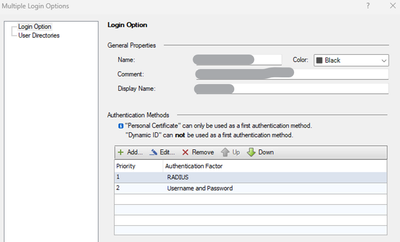
And then I configure Authentication factor for RADIUS. Here I clear the checkbox "Ask user for password" so that the user would only provide his username and then is only asked for the OTP he receives via email:
Now, in Endpoint Security on the user PC, user enters his username and clicks connect:
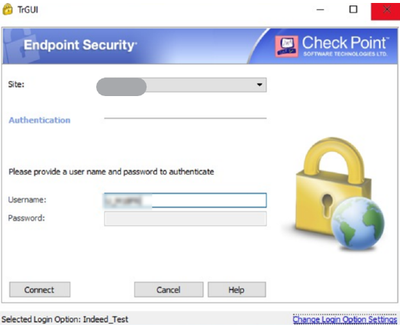
The password prompt is greyed out (as in the image above) or completely nonexistent (below):
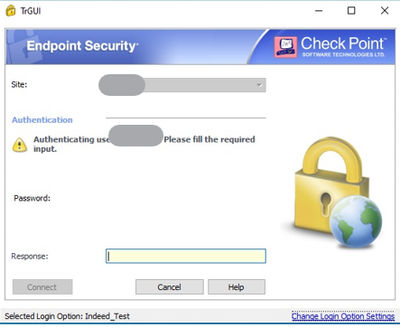
At this point gateway sends the Access-Request only when anything is entered. We tried entering the OTP code received by email and random characters. In all cases the connection gets reset.
I found this post, and tried sk167118 but when EnableBlankRadiusAuth is set to 1, we don't even see the "Response" prompt. When we set the RADIUS server's policy to use OTP from the mobile app, everything works fine, the problem seems to be with email. And there are no issues with the connectivity between the gateway and the RADIUS server.
Edit: I should've mentioned that EnableBlankRadiusAuth is still set to 1, but probably needs to be set back to 0. I'm not sure exactly what this does, though.
I'm sure there's some confusion at some point but we couldn't pinpoint where it is so far.
All help and ideas will be appreciated, as always 🙂
Cheers!
Open SR# with CP TAC to get this resolved asap !
@G_W_Albrecht Thanks for the recommendation. That will happen anyway if I can't find any answers 🙂
But before doing that, I still want to ask. Would you think it's the RADIUS server if everything works with mobile OTP but fails with mail OTP? Or is it possible for CP to have issues somewhere?
I have no idea at all ! Maybe an issue with the email server...
As far as I know, the only supported way to use RADIUS for MFA is to use a single prompt (user password + OTP on the same line).
No sense, but.... did u try to enter password into response field?
Yes, the problem is the challenge is being sent 'after' we enter anything in the response field.
We're already in the process with TAC. Let's see what'll come out of it.
We don't support challenge/response with RADIUS, which is what I assume the TAC will tell you.
You have to enter the password followed by the OTP code in the first dialog.
I see. Do you know if there's a specific reason for that?
No idea, but it’s been this way for as long as I can remember.
Leaderboard
Epsum factorial non deposit quid pro quo hic escorol.
| User | Count |
|---|---|
| 4 | |
| 4 | |
| 3 | |
| 3 | |
| 3 | |
| 2 | |
| 2 | |
| 1 | |
| 1 | |
| 1 |
Tue 28 Apr 2026 @ 06:00 PM (IDT)
Under the Hood: Securing your GenAI-enabled Web Applications with Check Point WAFThu 30 Apr 2026 @ 03:00 PM (PDT)
Hillsboro, OR: Securing The AI Transformation and Exposure ManagementTue 28 Apr 2026 @ 06:00 PM (IDT)
Under the Hood: Securing your GenAI-enabled Web Applications with Check Point WAFTue 12 May 2026 @ 10:00 AM (CEST)
The Cloud Architects Series: Check Point Cloud Firewall delivered as a serviceThu 30 Apr 2026 @ 03:00 PM (PDT)
Hillsboro, OR: Securing The AI Transformation and Exposure ManagementAbout CheckMates
Learn Check Point
Advanced Learning
YOU DESERVE THE BEST SECURITY

