- Products
- Learn
- Local User Groups
- Partners
- More

AI Security Masters E7:
How CPR Broke ChatGPT's Isolation and What It Means for You
Blueprint Architecture for Securing
The AI Factory & AI Data Center
Call For Papers
Your Expertise. Our Stage
Good, Better, Best:
Prioritizing Defenses Against Credential Abuse
Ink Dragon: A Major Nation-State Campaign
Watch HereCheckMates Go:
CheckMates Fest
Hi,
I'm trying to build a new .msi as we are updating from E80.70 to E80.90.
I've rebuild the .msi but one problem still remains.
In E80.70, the user could write username and password in one place, and then pres connect.
In E80.90, they are required to enter username, press connect, and THEN type the password.
When they enter the username, there IS a password field, but it is disabled.
I've looked all over in trac.config/default to change this behavior, but wit no luck.
Does anyone have an advice on this?
Br,
Thomas
Did you had any aditional feedback regarding this case /dificulty ?
We are having the same "problem" actually is just a behaviour change because we can enter username , choose connect, then we are asked to insert password and then the MFA auth
The difference we were able to observe is we had some endpoints with : Checkpoint Mobile and some with Checkpoint Endpoint Security.
Cheers
Pedro
I've not seen that issue in E80.90. If I configure the authentication method for username and password, I don't have to enter the password in a separate box .
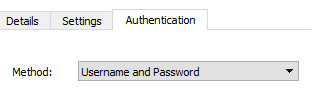
Are you sure you have username and password in the authentication tab of the site you configured, under properties?
Hi Josh,
That is the problem. It says 'Standard' and I'm not able to chose the value you show.
However in the previous client, this was not a problem. And it's connecting to the same VS.
Br,
Thomas
Recommend opening a TAC case.
Did you had any aditional feedback regarding this case /dificulty ?
We are having the same "problem" actually is just a behaviour change because we can enter username , choose connect, then we are asked to insert password and then the MFA auth
The difference we were able to observe is we had some endpoints with : Checkpoint Mobile and some with Checkpoint Endpoint Security.
Cheers
Pedro
Hello
Please follow the below process to resolve the issue
firewall properties >> VPN client >> Authentication
Select Setting >> tick " Ask user for password "
save >> install policy
Note: Please change Display name from Standard to username password under
Regards
Ajay
9920575543
Hi
Please follow the below process
go to firewall properties >> vpn client >> authentication
select setting >> change display name to username password
select ask user for password option >> install policy
Regards
Ajay
Hi
Please follow the below process
go to firewall properties >> vpn client >> authentication
select setting >> change display name to username password
select ask user for password option >> install policy
Regards
Ajay
Leaderboard
Epsum factorial non deposit quid pro quo hic escorol.
| User | Count |
|---|---|
| 4 | |
| 4 | |
| 3 | |
| 3 | |
| 3 | |
| 2 | |
| 2 | |
| 1 | |
| 1 | |
| 1 |
Tue 28 Apr 2026 @ 06:00 PM (IDT)
Under the Hood: Securing your GenAI-enabled Web Applications with Check Point WAFThu 30 Apr 2026 @ 03:00 PM (PDT)
Hillsboro, OR: Securing The AI Transformation and Exposure ManagementTue 28 Apr 2026 @ 06:00 PM (IDT)
Under the Hood: Securing your GenAI-enabled Web Applications with Check Point WAFTue 12 May 2026 @ 10:00 AM (CEST)
The Cloud Architects Series: Check Point Cloud Firewall delivered as a serviceThu 30 Apr 2026 @ 03:00 PM (PDT)
Hillsboro, OR: Securing The AI Transformation and Exposure ManagementAbout CheckMates
Learn Check Point
Advanced Learning
YOU DESERVE THE BEST SECURITY