- Products
- Learn
- Local User Groups
- Partners
- More

Scaling Check Point Automation with Arodonata
7 October @ 5pm CET / 11am EDT
What's New in Check Point SASE
The State of Ransomware Q2 2026:
This Quarter's Trends, and Their Impact on Your Defenses
AI Security Masters
Implementing the AI Security Trifecta
CheckMates Go:
Half is Not Enough
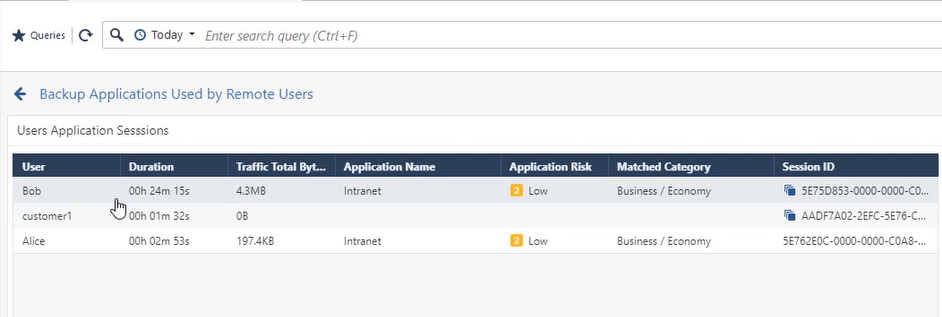
Following up the great work of @Tomas_Vobruba mentioning the importance of SmartView Remote Access support, I created the attached View.
It shows the how long the user was connected, which application she/he has accessed and that data volume transmitted. Check the video to learn more how you can use this view.
Following up the great work of @Tomas_Vobruba mentioning the importance of SmartView Remote Access support, I created the attached View.
It shows the how long the user was connected, which application she/he has accessed and that data volume transmitted. Check the video to learn more how you can use this view.
Following up the great work of @Tomas_Vobruba mentioning the importance of SmartView Remote Access support, I created the attached View.
It shows the how long the user was connected, which application she/he has accessed and that data volume transmitted. Check the video to learn more how you can use this view.
Hi Peter,
are there any method to have a timeline with concurrent active users?
From your template we are able to see the timeline with login peak, but customer asking a timeline with concurrent users.
Thanks in advance.
Jacopo
Hi Peter,
are there any method to have a timeline with concurrent active users?
From your template we are able to see the timeline with login peak, but customer asking a timeline with concurrent users.
Thanks in advance.
Jacopo
Have a look over on this page too for some more details in reporting for VPN : https://community.checkpoint.com/t5/Visibility-Analytics/SmartView-VPN-Client-enhanced-view/m-p/7887...
Designed to provide
- total time spend on VPN
- transferred total bytes.
- number of logs
- blade used
- client used for connection (workspace, endpoint, snx, etc)
- login fails and realauth schemes
Have a look over on this page too for some more details in reporting for VPN : https://community.checkpoint.com/t5/Visibility-Analytics/SmartView-VPN-Client-enhanced-view/m-p/7887...
Designed to provide
- total time spend on VPN
- transferred total bytes.
- number of logs
- blade used
- client used for connection (workspace, endpoint, snx, etc)
- login fails and realauth schemes
I already reviewed the link you posted, but there are no any references regarding concurrent users.
Talking with a TAC Engineer, he told me that it seems there are not any method to get concurrent users from SmartEvent. It seems that this information is only available on the Gateway.
Thanks.
Jacopo
I already reviewed the link you posted, but there are no any references regarding concurrent users.
Talking with a TAC Engineer, he told me that it seems there are not any method to get concurrent users from SmartEvent. It seems that this information is only available on the Gateway.
Thanks.
Jacopo
Hi Peter,
Have tried this in lab and worked well.
However, integrating it in production (200+ RA users), hence, more users and log data causes the cpu to max out and ultimately to SmartLog/SmartEvent to fail.
Only recovering it with a evstop ; evstart, or waiting many hours.
This might probably be the reason: https://supportcenter.checkpoint.com/supportcenter/portal?eventSubmit_doGoviewsolutiondetails=&solut...
Do you know of any successful use cases in production environments?
In which case i may raise a SR to tac to see if there is something else going on with my Management.
Hi Peter,
Have tried this in lab and worked well.
However, integrating it in production (200+ RA users), hence, more users and log data causes the cpu to max out and ultimately to SmartLog/SmartEvent to fail.
Only recovering it with a evstop ; evstart, or waiting many hours.
This might probably be the reason: https://supportcenter.checkpoint.com/supportcenter/portal?eventSubmit_doGoviewsolutiondetails=&solut...
Do you know of any successful use cases in production environments?
In which case i may raise a SR to tac to see if there is something else going on with my Management.
There is a SmartEvent License needed to use this feature, right ?
Yes, these reports require a SmartEvent license.
My dash is with transferred total bytes in O, Can you help me?
How to create his custom report ? can anyone explain in details R80.30.
The report was attached to Peter’s original post and can be imported into R80.30.
Following up the great work of @Tomas_Vobruba mentioning the importance of SmartView Remote Access support, I created the attached View.
It shows the how long the user was connected, which application she/he has accessed and that data volume transmitted. Check the video to learn more how you can use this view.