- Products
- Learn
- Local User Groups
- Partners
- More

AI Security Masters
E1: How AI is Reshaping Our World
MVP 2026: Submissions
Are Now Open!
What's New in R82.10?
Watch NowOverlap in Security Validation
Help us to understand your needs better
CheckMates Go:
Maestro Madness
The CPU, Inlet and Outlet temperature thresholds are different from each other on most models. I cannot work out in Grafana how to set these thresholds to each real temperature value.
hardware.temperature.max 50,50.100,100
hardware.temperature 30,27,64,71
Using Grafana, and the "Config from query results" in the transformation section, I can assign 50 to the Grafana built in variable of "threshold". However, it assigns the same value to ALL the hardware temperatures, and not matching each max value to its corresponding real value's "threshold" variable.
The threshold variable works in the graphs to do things like color coding and I assume alerting as well. However, I cannot assign a unique threshold to each of the temperatures.
This seems to be working as designed from what I can see as there is a note in the documentation that states.
"If you want to extract a unique config for every row in the config query result then try the rows to fields transformation."
The "rows to fields" transformation seems very broken at least in my install and doesn't give me any options to do anything like assigning the threshold values to each real value.
I was wondering how others were working around this issue or if I'm missing something simple.
I have not found a good solution to this where I can alert on the different temperature threshold values for the different temps. I can display them like below but there are even some format issues with this where you have to really look to match the threshold to the current value. This is really a grafana issue and not a skyline specifically but when I google this for grafana, I can't find many examples where a dataset has various different thresholds for a single set of data.
Hello,
I am not monitoring CPU temperature so maybe I am wrong how it is woprking.
But in the Grafan "Alert Rule"section you can create several different queries within one rule.
Maybe create a qeury for ecery type of firewalls which have the same cpu thresholds.
and in the "host_name" label you can do something like this:
"host_name=~".*fw1.*|.*fw2.*|.*fw3.*"
If you have 3 different models then you have 3 queries A, B and C.
Next use the "Math option" and select:
$A > 30 || $B > 50 || $C > 70
These are different thresholds within the same firewall. ie On the same firewall, the intake temp threshold is different than the CPU temp threshold.
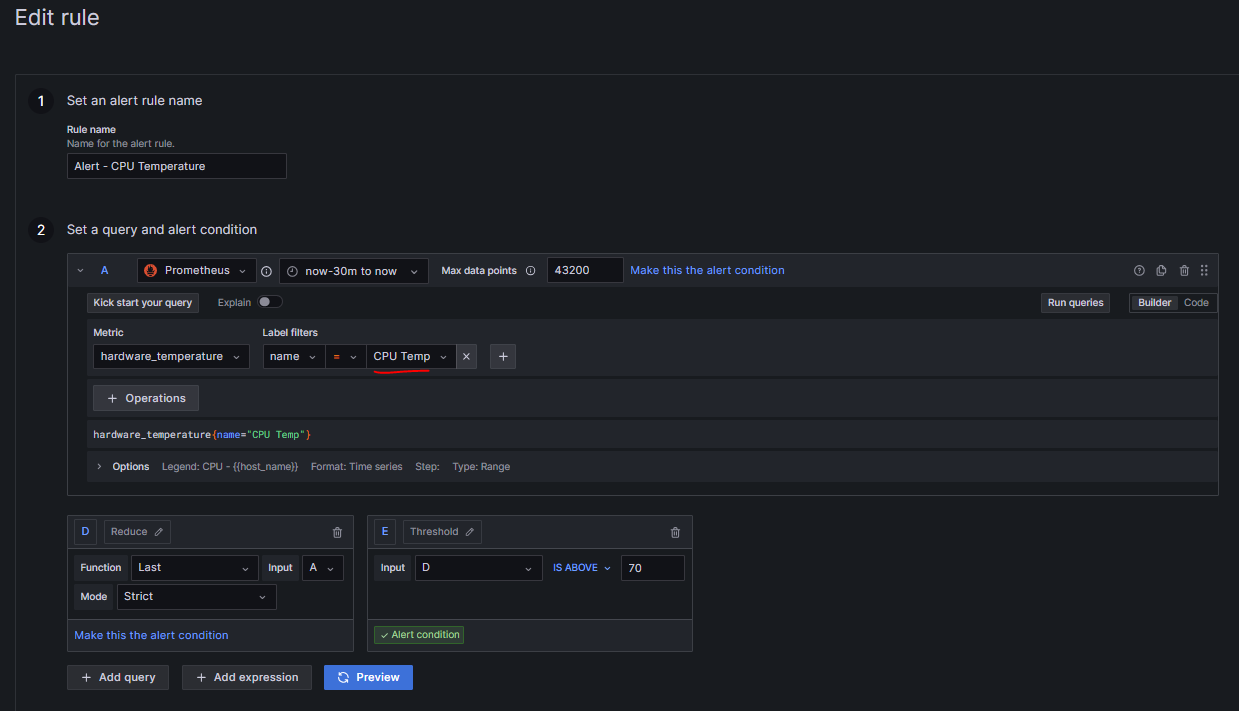
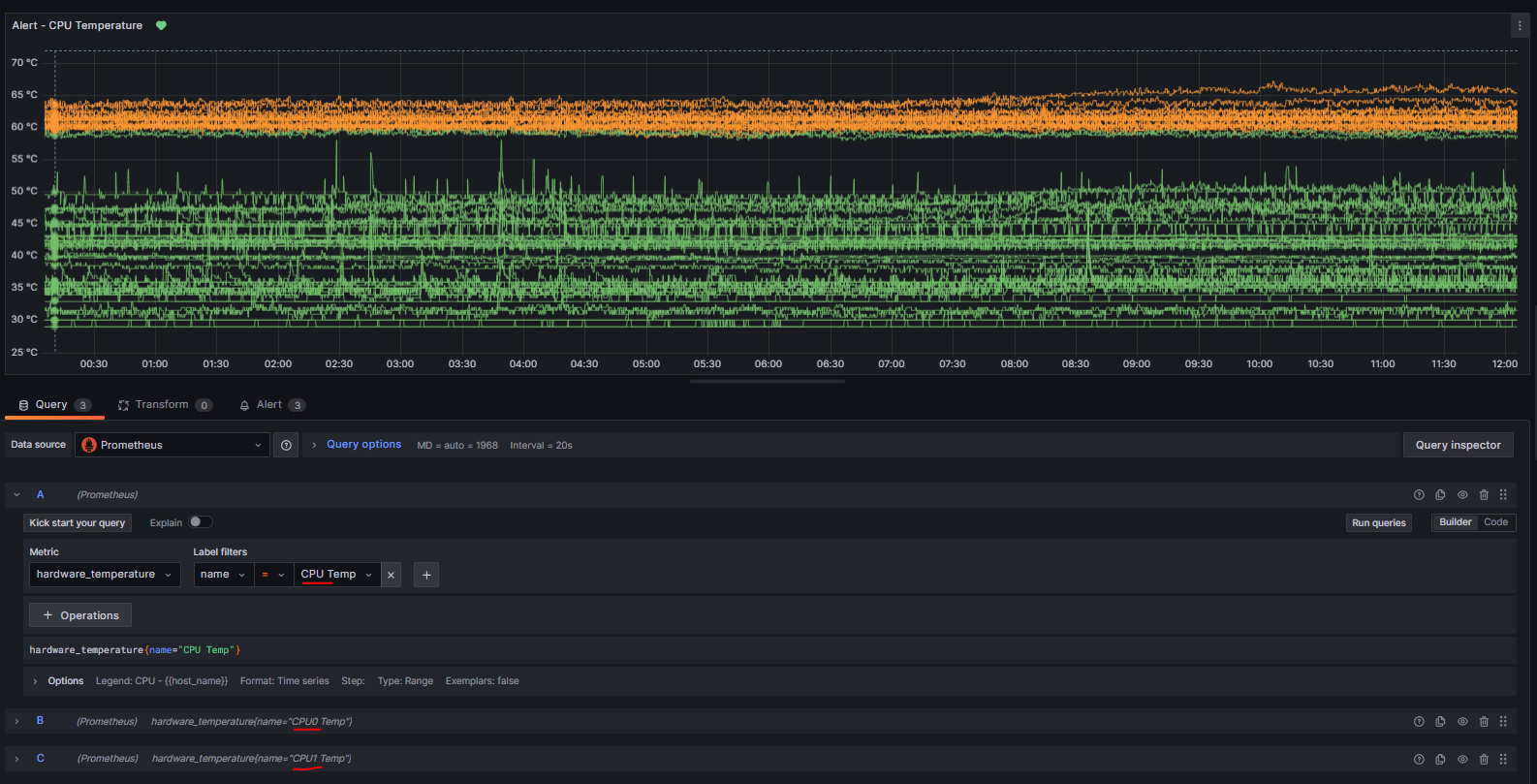
Hi David - when you say "However, I cannot assign a unique threshold to each of the temperatures. " - might be misunderstanding you but you could create separate Alert rules catering for each query/metric (ie one for CPUTemp, another one for CPU0Temp and so on.. see screenshot bellow.
I would probably create separate panels for CPU, Inlet, Outlet etc..
Hope this helps?
EDIT - just realised Alex already suggested something similar - hope the screenshots help
I don't see in your examples where you are dynamically matching up the reported threshold for each temperature "type" on each firewall. I have many models of checkpoint firewalls and I've noticed that on my 6000XL's the reported thresholds are different across the models. I haven't dug into it but I'm thinking its when the BIOS updates on the 6000's was done to take care of the RAM boot issue, the reported max thresholds also changed. (not true on further investigation, it was one of my failed attempts at trying to get this to work messing with the data) I would really like to not have to generate a huge table with each model and each temperature type to do the alerting when the thresholds are right there in the provided data.
For alerting I came up with this query.
Tue 16 Dec 2025 @ 05:00 PM (CET)
Under the Hood: CloudGuard Network Security for Oracle Cloud - Config and Autoscaling!Thu 18 Dec 2025 @ 10:00 AM (CET)
Cloud Architect Series - Building a Hybrid Mesh Security Strategy across cloudsTue 16 Dec 2025 @ 05:00 PM (CET)
Under the Hood: CloudGuard Network Security for Oracle Cloud - Config and Autoscaling!Thu 18 Dec 2025 @ 10:00 AM (CET)
Cloud Architect Series - Building a Hybrid Mesh Security Strategy across cloudsThu 08 Jan 2026 @ 05:00 PM (CET)
AI Security Masters Session 1: How AI is Reshaping Our WorldAbout CheckMates
Learn Check Point
Advanced Learning
YOU DESERVE THE BEST SECURITY