Create a Post
cancel
Showing results for 
Search instead for 
Did you mean: 
Pamela_S__Lee
Employee Alumnus
Employee Alumnus

Device security policy

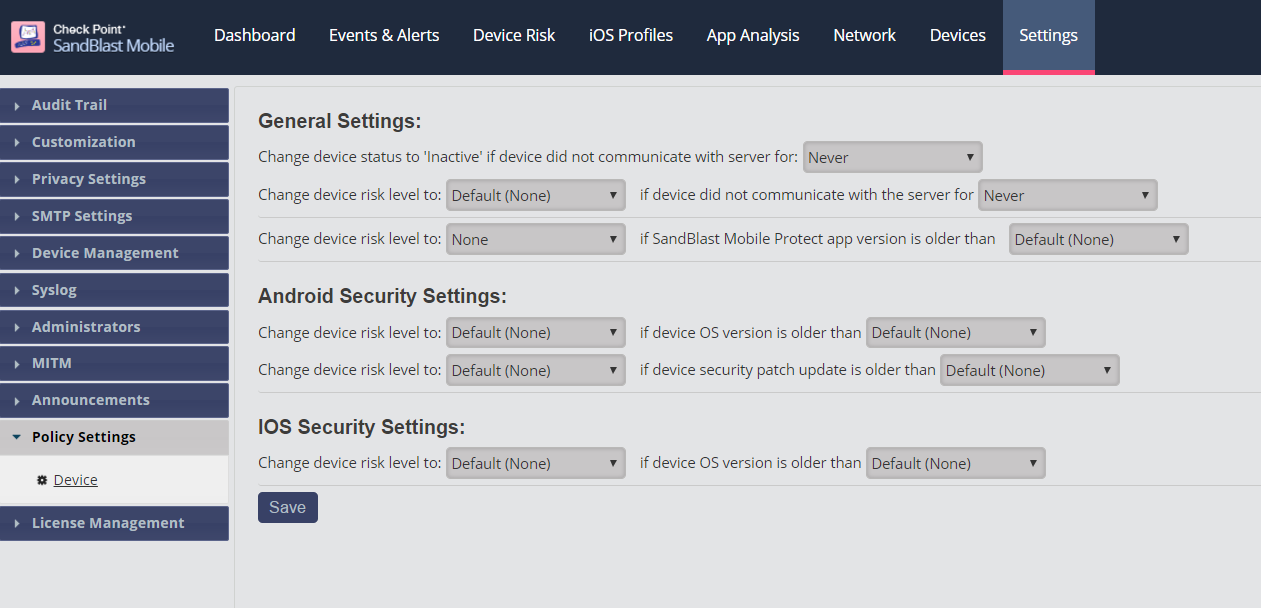
Device security policy enables the SandBlast Mobile Dashboard administrator to raise device risk in the following conditions:

  1. Device did not connect to the dashboard for X days
  2. Device SandBlast Mobile Protect app is older than X months
  3. Device OS version is older than version X (iOS & Android)
  4. Device security patch level is older than X months (Android)

The device security policy also enables the admin to automatically make a device inactive when it has not connected to the SandBlast Mobile Dashboard for more than X days.

This parameter needs to be greater than the parameter listed in #1.
Inactive devices are not calculated in the device risk widget and will be shown as inactive in the device status widget.

To configure, navigate to Settings > Policy Settings > Device. Click "Save" after making any changes.

0 Kudos
0 Replies
Upcoming Events

    Tue 24 Feb 2026 @ 04:30 PM (EST)

    Las Vegas: MDR/XMDR

    Wed 25 Feb 2026 @ 04:30 PM (MST)

    Tempe, AZ: MDR/MXDR

    Wed 11 Mar 2026 @ 12:00 PM (MDT)

    CheckMates Live Denver!
    CheckMates Events