- Products
- Learn
- Local User Groups
- Partners
- More

MVP 2026: Submissions
Are Now Open!
What's New in R82.10?
10 December @ 5pm CET / 11am ET
Announcing Quantum R82.10!
Learn MoreOverlap in Security Validation
Help us to understand your needs better
CheckMates Go:
Maestro Madness
Client calls me - Samsung / SM-A405FN used for phone calls, food orders and banking - this Android phone when using Google app sometimes offered him a selection of apps to open the link with - including Chrome (good choice 😊) and SBM (?).
Could SBM be better than Chrome ? Yes, must be much safer ! So he selected SBM...💀Now, all his searches open (! no, of course ! Only Scan Link opens) in SBM... No more online pizza 😠!
Workaround: Use Chrome. But can that be ? Sounds like an Urban Legend to me... Somewhere in the App Settings for Google you should be able to reset that, but i do not have the phone.
As i am on iPhone (addicted8)) only, maybe someone else could replicate this ? Should also be rather easy to delete this link if you know how...
Just giving you a few areas to look at. I personally have not changed my "Just Once" to "Always" for the Scan Link option within SMB that you are talking about.
If your customer goes into the Settings section on their Android and searches for "default". There is a Default browser app setting. For me, this is set to Chrome.
However I think you are asking about "Opening Links" defaults. To find this. Settings -> search for Default -> select Default Apps -> choose Default apps again (the first time was the search results) -> Opening links -> Scroll the app you want to reset. I/E Chrome -> Click the Clear defaults.
Yes, i can imagine - but why is SBM presented as an app to open URLs from Google at all ? Should be clear that SBM is no browser...
It is so the URL links can be scanned to make sure you are not heading to/accessing a malicious site.
But I have an idea that I will pass along to the dev team about an option to scan the link upon click and then continue to the default app if benign, only showing SBM if it is malicious.
I am using SBM on iPhone and never encountered such a feature. The problem is that you can not access the site as you stay in SBM. Does SBM not do a link scan while in background ?
Like Sophos Intercept X for Mobile features.
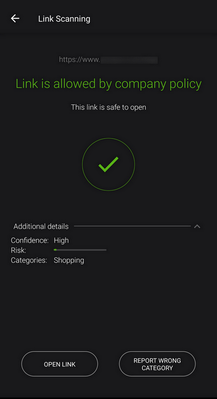
It could be that the link scanning feature hasn't made it to the iDevices just yet? I'm not sure as I don't own one anymore. However, there should be a Open Link button as seen in my screenshot. The links are not scanned until they are clicked, of course. This is the idea I want to run by R&D. Background scan the link, upon click, and open the native app if the link is clean, else pop up SBM.
Guys, SBM has the ONP functionality that is preventing the device from browsing to bad links (Can also prevent apps from communicating with malicious links - Anti-bot). When you click a link SBM will scan it against Threat Cloud and block it if it is malicious - by configurable policy.
A new feature was added to SBM latest version to allow it also to scan links before you click as an extra mean of protection. The scenario is relevant mainly when you are not sure if this link is safe or not. Your device is protected with the bets anti-phishing tool available so why not use it just to make sure. how this works?
BTW - if you click a new link that is not known to the Threat Cloud it will tell you that it is safe. Then when you actually brows to it the Zero-Phishing mechanism (activated by policy on your dashboard) will analyze the page and block it.
Yuval
Thank you, i understand now !
Fri 12 Dec 2025 @ 10:00 AM (CET)
Check Mates Live Netherlands: #41 AI & Multi Context ProtocolTue 16 Dec 2025 @ 05:00 PM (CET)
Under the Hood: CloudGuard Network Security for Oracle Cloud - Config and Autoscaling!Fri 12 Dec 2025 @ 10:00 AM (CET)
Check Mates Live Netherlands: #41 AI & Multi Context ProtocolTue 16 Dec 2025 @ 05:00 PM (CET)
Under the Hood: CloudGuard Network Security for Oracle Cloud - Config and Autoscaling!Thu 18 Dec 2025 @ 10:00 AM (CET)
Cloud Architect Series - Building a Hybrid Mesh Security Strategy across cloudsAbout CheckMates
Learn Check Point
Advanced Learning
YOU DESERVE THE BEST SECURITY