- Products
- Learn
- Local User Groups
- Partners
- More

AI Security Masters E7:
How CPR Broke ChatGPT's Isolation and What It Means for You
Blueprint Architecture for Securing
The AI Factory & AI Data Center
Call For Papers
Your Expertise. Our Stage
Good, Better, Best:
Prioritizing Defenses Against Credential Abuse
Ink Dragon: A Major Nation-State Campaign
Watch HereCheckMates Go:
CheckMates Fest
Hello All,
I have stumbled upon a weird issue on SmartEvent NGSE. This behavior is seen only on one machine.
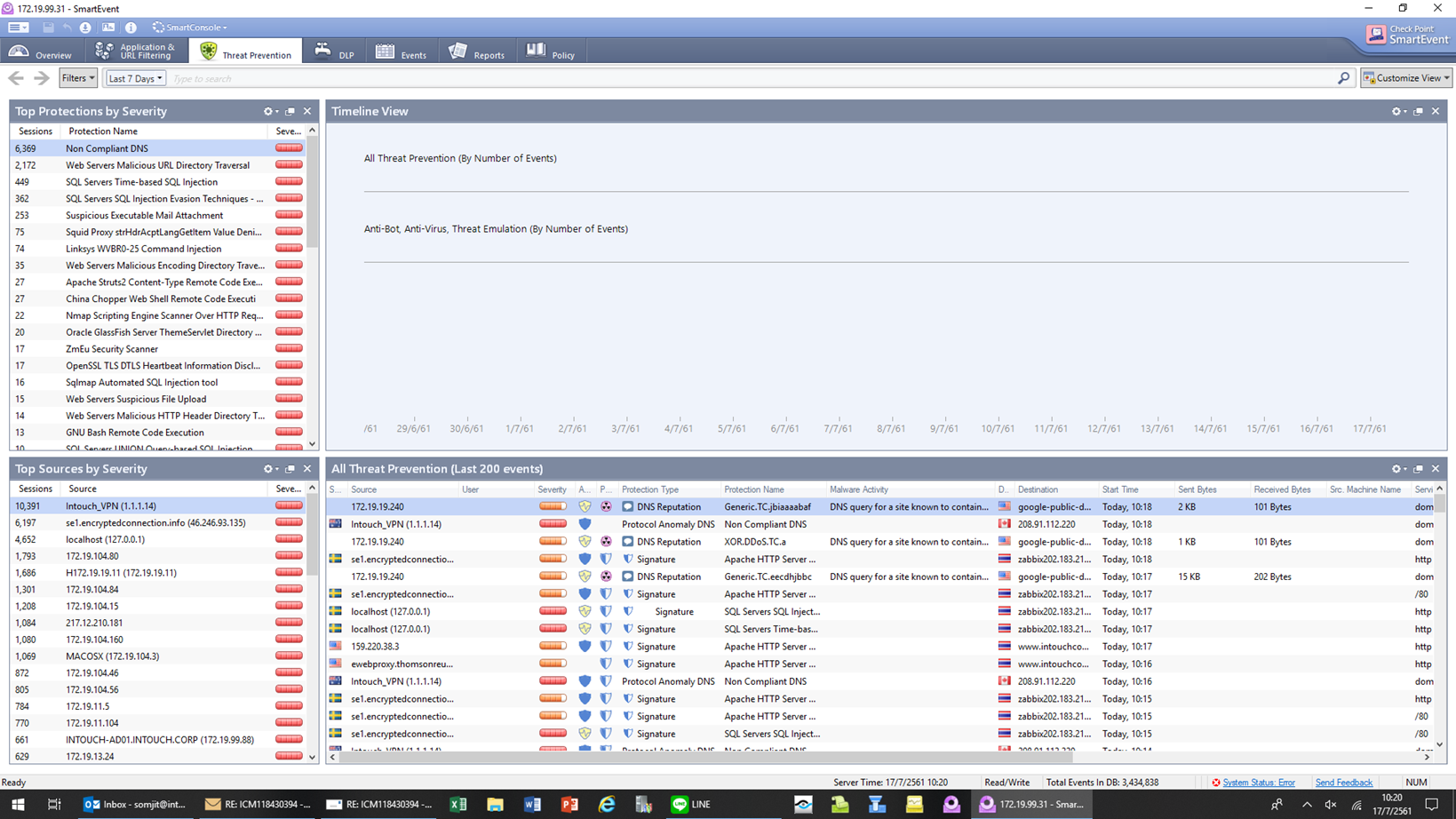
Whenever I launch SmartEvent, I don't see 'Activity timeline however the data to Smartevent is flowing because I am able to view the data on other filters like Top Source, Countries involved in the traffic etc.. I have another machine running the same NGSE client connecting to the same server where there are no issues to view the timeline.
Did not see any related sk article. Has anybody seen this?
Update
The issue was finally resolved. If anybody happened to look at the screenshot attached above, the Activity timeline was showing the year as '2561' in short it was DD/MM/61 in the GUI view.
Client was using a Buddhist calendar on the local windows which converts current 2018 to year 2561 (just google it
)
Changed the calendar type to standard, re-opened the GUI and we were able to the Activity time-line. Did not see any sk related to this behavior
So this is a Client machine issue, as the Smartevent Server itself Shows no Problems ? DId you already try to uninstall, reboot and reinstall NGSE Dashboard?
Yes this is indeed the issue on the client machine. Except the reboot part, i have tried rest of the things and it did not help
Which version are you running?
Do you see "Low resolution mode" on the top right corner? In lower resolution screens we hide some of the widgets so the others will layout properly.
Also, a screen capture can help to understand the problem.

Here is the screenshot. Timeline doesn't work in any of the tabs. Overview, threat prevention etc.
Version is R77. I don't see any 'low resolution mode option'
This is R77.30.
You can try to restart the SmartEvent services by running:
evstop; evstart
Otherwise, please open a task.
I wouldn't want to perform a evstop/start because another user from a different machine has no issues to view timeline.
Running the same client version on both machines
Update
The issue was finally resolved. If anybody happened to look at the screenshot attached above, the Activity timeline was showing the year as '2561' in short it was DD/MM/61 in the GUI view.
Client was using a Buddhist calendar on the local windows which converts current 2018 to year 2561 (just google it
)
Changed the calendar type to standard, re-opened the GUI and we were able to the Activity time-line. Did not see any sk related to this behavior
Maybe there is no sk related to this behaviour as CP SmartEvent Dashboard is used together with a Buddhist calendar not so very often 😉
Haha.. that's true as well!!
Leaderboard
Epsum factorial non deposit quid pro quo hic escorol.
| User | Count |
|---|---|
| 66 | |
| 19 | |
| 13 | |
| 12 | |
| 11 | |
| 9 | |
| 9 | |
| 7 | |
| 7 | |
| 7 |
Tue 28 Apr 2026 @ 06:00 PM (IDT)
Under the Hood: Securing your GenAI-enabled Web Applications with Check Point WAFThu 30 Apr 2026 @ 03:00 PM (PDT)
Hillsboro, OR: Securing The AI Transformation and Exposure ManagementTue 28 Apr 2026 @ 06:00 PM (IDT)
Under the Hood: Securing your GenAI-enabled Web Applications with Check Point WAFTue 12 May 2026 @ 10:00 AM (CEST)
The Cloud Architects Series: Check Point Cloud Firewall delivered as a serviceThu 30 Apr 2026 @ 03:00 PM (PDT)
Hillsboro, OR: Securing The AI Transformation and Exposure ManagementAbout CheckMates
Learn Check Point
Advanced Learning
YOU DESERVE THE BEST SECURITY