- Products
- Learn
- Local User Groups
- Partners
- More
MVP 2026: Submissions
Are Now Open!
What's New in R82.10?
10 December @ 5pm CET / 11am ET
Improve Your Security Posture with
Threat Prevention and Policy Insights
Overlap in Security Validation
Help us to understand your needs better
CheckMates Go:
Maestro Madness
Hi,
We upgraded our multi-domain infrastructure this past weekend and have started re-indexing previous logs that we keep online. We essentially set each domain's CMA to index back 14 days, then 28, 42, etc...
We predictably couldn't search for logs until re-indexing for that time period had completed but although we can now pull up logs for the time periods re-indexing has completed the reports and views still only show logs from after the upgrade.
NB: We did wait for re-indexing on the multi-domain log server to complete for the past 14 days before then initiating re-indexing on the Smart Event server.
Just to avoid ambiguity:
days=1827; # 5 years
for f in /var/opt/CPmds-R81/customers/*/CPrt-R81/log_indexer; do
if [ `grep -c days_to_index $f/log_indexer_custom_settings.conf` -lt 1 ]; then
sed -i "s/\(:max_disk_space_usage.*\)/\1\n\t:days_to_index ($days)/" $f/log_indexer_custom_settings.conf;
else
sed -i "s/\(:days_to_index\) .*/\1 ($days)/" $f/log_indexer_custom_settings.conf;
fi
done
mdsstop;mdsstart;
days=14;
for f in /var/opt/CPmds-R81/customers/*/CPrt-R81/log_indexer; do
if [ `grep -c days_to_index $f/log_indexer_custom_settings.conf` -lt 1 ]; then
sed -i "s/\(:max_disk_space_usage.*\)/\1\n\t:days_to_index ($days)/" $f/log_indexer_custom_settings.conf;
else
sed -i "s/\(:days_to_index\) .*/\1 ($days)/" $f/log_indexer_custom_settings.conf;
fi
done
mdsstop;mdsstart;
MDS management servers re-indexed the last 5 years worth of logs for 50+ domains within half an hour. The log server took predictably longer. When that finished the next day we were sure to start the Smart Event server re-indexing after the log server had started on the day before and told it to re-index the last 15 days of logs:
days=15;
f=/opt/CPrt-R81/log_indexer;
if [ `grep -c days_to_index $f/log_indexer_custom_settings.conf` -lt 1 ]; then
sed -i "s/\(:max_disk_space_usage.*\)/\1\n\t:days_to_index ($days)/" $f/log_indexer_custom_settings.conf;
else
sed -i "s/\(:days_to_index\) .*/\1 ($days)/" $f/log_indexer_custom_settings.conf;
fi
evstop;evstart;
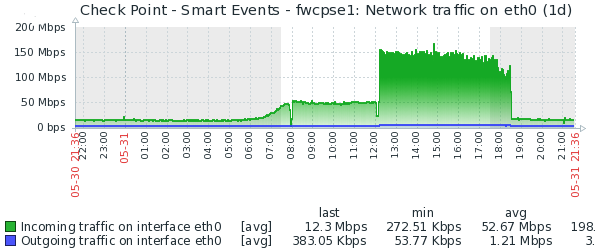
The Smart event and reporting server appeared to re-index the data from the log servers, producing a visible increase in inbound network traffic and CPU utilisation:
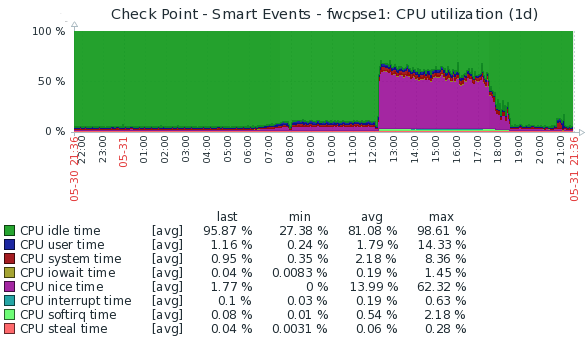
We subsequently increased the MDS log server re-indexing to 29 days (14 + 14 + 1) before subsequently wanting to then set the Smart Event server to re-index 29 days of logs in to the past.
We are now able to search for logs within the last week, for example:
We are however still not able to view reports for these time periods:
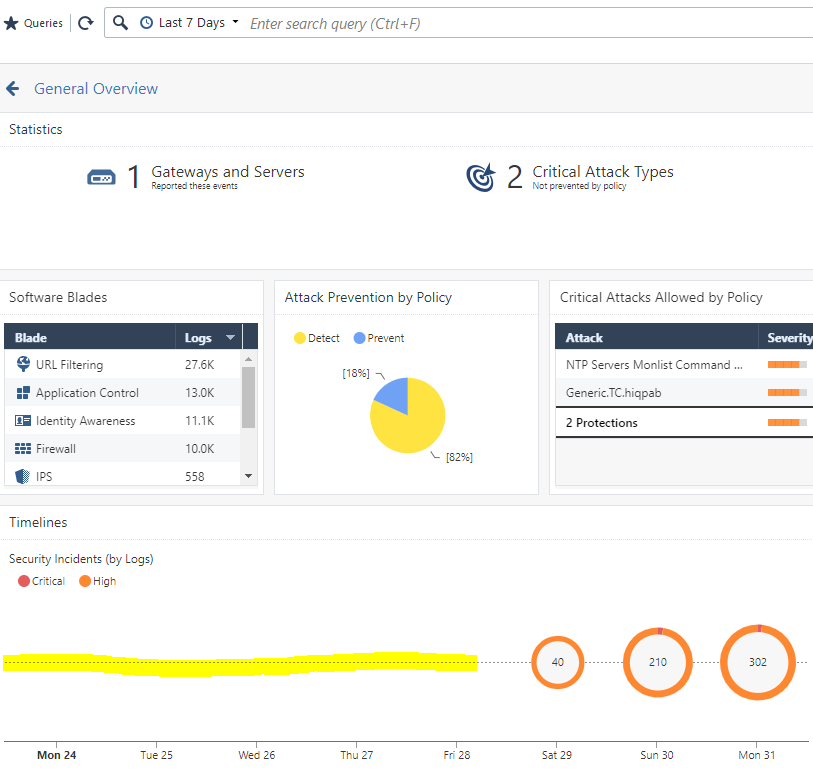
We can also confirm that the Smart Event server has indexes for the past two weeks that we asked it to re-index for:
[Expert@fwcpse1:0]# pwd
/var/log/opt/CPrt-R81/log_indexes
[Expert@fwcpse1:0]# du -s *
1028 audit_2021-05-17T00-00-00
888 audit_2021-05-18T00-00-00
1104 audit_2021-05-19T00-00-00
720 audit_2021-05-20T00-00-00
1204 audit_2021-05-21T00-00-00
656 audit_2021-05-22T00-00-00
680 audit_2021-05-23T00-00-00
724 audit_2021-05-24T00-00-00
984 audit_2021-05-25T00-00-00
880 audit_2021-05-26T00-00-00
716 audit_2021-05-27T00-00-00
488 audit_2021-05-28T00-00-00
1848 audit_2021-05-29T00-00-00
684 audit_2021-05-30T00-00-00
940 audit_2021-05-31T00-00-00
1836 files_2021-05-27T00-00-00
1144 files_2021-05-29T00-00-00
5100 files_2021-05-30T00-00-00
12476 files_2021-05-31T00-00-00
252 firewallandvpn_2021-05-29T00-00-00
612 firewallandvpn_2021-05-30T00-00-00
452 firewallandvpn_2021-05-31T00-00-00
10100 other_2021-05-16T00-00-00
3157056 other_2021-05-17T00-00-00
3259132 other_2021-05-18T00-00-00
3274084 other_2021-05-19T00-00-00
3377628 other_2021-05-20T00-00-00
3068380 other_2021-05-21T00-00-00
1002640 other_2021-05-22T00-00-00
806016 other_2021-05-23T00-00-00
3306924 other_2021-05-24T00-00-00
3681420 other_2021-05-25T00-00-00
3993888 other_2021-05-26T00-00-00
4442920 other_2021-05-27T00-00-00
150012 other_2021-05-28T00-00-00
296636 other_2021-05-29T00-00-00
1782444 other_2021-05-30T00-00-00
7185800 other_2021-05-31T00-00-00
39492 resources_2021-05-17T00-00-00
49812 resources_2021-05-18T00-00-00
44116 resources_2021-05-19T00-00-00
40788 resources_2021-05-20T00-00-00
38244 resources_2021-05-21T00-00-00
20096 resources_2021-05-22T00-00-00
11032 resources_2021-05-23T00-00-00
43084 resources_2021-05-24T00-00-00
42328 resources_2021-05-25T00-00-00
44000 resources_2021-05-26T00-00-00
51532 resources_2021-05-27T00-00-00
10632 resources_2021-05-29T00-00-00
115500 resources_2021-05-30T00-00-00
462532 resources_2021-05-31T00-00-00
468 smartevent_2021-05-29T00-00-00
1008 smartevent_2021-05-30T00-00-00
2288 smartevent_2021-05-31T00-00-00
12 template
Any clue as to what we've missed?
Regards
David Herselman
Have a case open with TAC but unfortunately not getting anywhere. Log re-indexing has now completed for those online (3-4 months) and Smart Events has also re-indexed all log servers for the last 3-4 months as well.
Strangely all MDS domains have full reporting, except about 9 which are all alphabetically after each other. We even destroyed all indexes on the Smart Event server, removed FetchedFiles and re-ingested everything but the problem persists for the same domains. One additional twist on the affected is that history is now again limited to 2 days prior to yet again re-indexing everything, not now since R81 upgrade.
Hi David,
I'll try to assist.
Can you please email/attach the SmartEvent's 'SmartEventCollectLogs'?
drora@checkpoint.com
thanks.
Hi,
Many thanks for your kind offer but I couldn't attach the 47 MiB file to an email, nor could I upload it directly to the case itself. I did share it via the SFTP fairfax site detailed in 6-0002727067.
I presume us to have hit some kind of log file limit or experiencing some other bug. If I search FetchedFiles for the IP of an affected domain's log server I have several references to 'fw.log' and mountains of records which are not in the typical format for this file, for example:
[Expert@fwcpse1:0]# grep '100\.127\.202\.23 ' FetchedFiles
118276 14 100.127.202.23 6 fw.log 1622634724 0 4294967295 1 0 2 0 2699822 4294967295 3
118687 14 100.127.202.23 6 fw.log 1622671253 0 4294967295 1 0 2 0 0 712493 3
118689 14 100.127.202.23 9 fw.adtlog 1622584870 0 4294967294 0 0 3
118692 14 100.127.202.23 9 fw.adtlog -1 0 4294967295 1 0 2 0 0 4 3
118825 14 100.127.202.23 6 fw.log 1622671244 0 4294967295 1 0 2 0 721147 1024497 3
118831 14 100.127.202.23 6 fw.log 1622671200 0 4294967295 2 0 2 0 1029496 2945333 2 0 2954580 3009579 3
118883 14 100.127.202.23 6 fw.log 1622719952 0 4294967295 1 0 2 0 3026461 4294967295 3
118950 14 100.127.202.23 9 fw.adtlog 1622671200 0 4294967294 0 0 3
118963 14 100.127.202.23 6 fw.log 1622757608 0 4294967295 5 0 2 0 0 258743 2 0 258774 258831 2 0 258862 258904 2 0 258931 258931 2 0 259049 259050 3
119060 14 100.127.202.23 6 fw.log 1622757600 0 4294967295 20704 0 2 0 1331314 1375154 2 0 1375160 1375160 2 0 1375183 1375187 2 0 1375216 1375216 2 0 1375234 13
75234 2 0 1375238 1375243 2 0 1375282 1375283 2 0 1375288 1375288 2 0 1375307 1375307 2 0 1375316 1375316 2 0 1375319 1375319 2 0 1375345 1375347 2 0 1375354 13
75354 2 0 1375362 1375362 2 0 1375374 1375374 2 0 1375376 1375376 2 0 1375380 1375380 2 0 1375389 1375389 2 0 1375406 1375406 2 0 1375413 1375416 2 0 1375445 13
75445 2 0 1375452 1375452 2 0 1375461 1375461 2 0 1375468 1375471 2 0 1375492 1375492 2 0 1375494 1375494 2 0 1375509 1375510 2 0 1375515 1375516 2 0 1375520 13
75521 2 0 1375523 1375524 2 0 1375526 1375526 2 0 1375528 1375528 2 0 1375534 1375535 2 0 1375558 1375558 2 0 1375568 1375570 2 0 1375583 1375583 2 0 1375600 13
75604 2 0 1375607 1375607 2 0 1375645 1375647 2 0 1375665 1375665 2 0 1375698 1375700 2 0 1375753 1375753 2 0 1375759 1375765 2 0 1375805 1375805 2 0 1375811 13
75813 2 0 1375815 1375815 2 0 1375840 1375840 2 0 1375843 1375843 2 0 1375860 1375861 2 0 1375882 1375882 2 0 1375889 1375890 2 0 1375905 1375905 2 0 1375907 13
75907 2 0 1375912 1375912 2 0 1375914 1375914 2 0 1375916 1375916 2 0 1375918 1375919 2 0 1375921 1375924 2 0 1375928 1375928 2 0 1375931 1375931 2 0 1375943 13
75944 2 0 1375947 1375947 2 0 1375951 1375951 2 0 1375954 1375954 2 0 1375957 1375958 2 0 1375996 1376003 2 0 1376040 1376040 2 0 1376043 1376043 2 0 1376048 13
76048 2 0 1376050 1376052 2 0 1376060 1376060 2 0 1376063 1376063 2 0 1376088 1376088 2 0 1376102 1376109 2 0 1376114 1376114 2 0 1376137 1376137 2 0 1376151 13
76152 2 0 1376161 1376161 2 0 1376205 1376210 2 0 1376238 1376249 2 0 1376251 1376253 2 0 1376255 1376255 2 0 1376269 1376269 2 0 1376271 1376271 2 0 1376284 13
76287 2 0 1376291 1376291 2 0 1376338 1376340 2 0 1376343 1376344 2 0 1376347 1376349 2 0 1376360 1376360 2 0 1376362 1376362
<snip>
37790 2 0 1837797 1837797 2 0 1837805 1837805 2 0 1837810 1837810 2 0 1837814 1837850 2 0 1837854 1837854 2 0 1837861 1837861 2 0 1837866 1837866 2 0 1837868 18
37868 2 0 1837883 1837884 2 0 1837898 1837899 2 0 1837902 1837902 2 0 1837905 1837906 2 0 1837909 1837968 2 0 1837980 1837980 2 0 1837985 1837986 2 0 1837988 18
37989 2 0 1837993 1837993 2 0 1837998 1837998 2 0 1838006 1838175 2 0 1838185 1838187 2 0 1838189 1838191 2 0 1838194 1838194 2 0 1838198 1838198 2 0 1838206 18
38208 2 0 1838211 1838249 2 0 1838252 1838252 2 0 1838256 1838256 2 0 1838258 1838259 2 0 1838261 1838267 2 0 1838274 1838274 2 0 1838289 1838369 2 0 1838371 18
38371 2 0 1838374 1838374 2 0 1838388 1838388 2 0 1838393 1838393 2 0 1838395 1838397 2 0 1838399 1838399 2 0 1838407 1838473 2 0 1838475 1838475 2 0 1838478 18
38480 2 0 1838491 1838491 2 0 1838496 1838496 2 0 1838506 1838506 2 0 1838509 1838509 2 0 1838513 1838713 2 0 1838719 1838719 2 0 1838724 1838724 2 0 1838729 18
38729 2 0 1838732 1838732 2 0 1838736 1838736 2 0 1838743 1838743 2 0 1838747 1838747 2 0 1838749 1838752 2 0 1838754 1838756 2 0 1838759 1838759 2 0 1838762 18
38763 2 0 1838769 1838770 2 0 1838773 2199767 2 0 2205587 4294967295 3
119201 14 100.127.202.23 6 fw.log 1622844050 0 4294967295 2 0 2 0 0 981273 2 0 983580 1657130 3
119202 14 100.127.202.23 9 fw.adtlog 1622757669 0 4294967294 0 0 3
119346 14 100.127.202.23 6 fw.log 1622844085 0 4294967295 1 0 2 0 1657131 4294967295 3
119412 14 100.127.202.23 6 fw.log 1622930405 0 4294967295 4 0 2 0 0 1132879 2 0 1142272 1182217 2 0 1198014 1202062 2 0 1258808 1285343 3
119430 14 100.127.202.23 9 fw.adtlog 1622844085 0 4294967294 0 0 3
183195 14 100.127.202.23 6 fw.log 1622930400 0 4294967295 1 0 2 0 1494956 1506099 3
183204 14 100.127.202.23 6 fw.log 1623016806 0 4294967295 3 0 2 0 251027 395012 2 0 407862 893094 2 0 1302265 1693344 3
183500 14 100.127.202.23 6 fw.log 0 0 4294967295 1 0 2 0 1131294 1291466 3
183505 14 100.127.202.23 6 fw.log 1623066128 0 4294967295 3 0 2 0 1724532 1732283 2 0 1757760 2342936 2 0 2384749 4294967295 3
234303 14 100.127.202.23 9 fw.adtlog 1623016828 0 4294967294 0 0 3
234469 14 100.127.202.23 6 fw.log 1623103239 0 4294967295 6 0 2 0 0 559973 2 0 560003 560121 2 0 560183 560274 2 0 560298 560299 2 0 560328 560328 2 0 560357 56
0357 3
234502 14 100.127.202.23 6 fw.log 1623103208 0 4294967295 4 0 2 0 612339 1285534 2 0 1285596 1285639 2 0 1285701 1285765 2 0 1285796 1285805 3
When I compare this to FetchedFiles in MDM for the affected domain:
[Expert@fwcpl1:0]# mdsenv 100.127.202.23
[Expert@fwcpl1:0]# cd $INDEXERDIR/data
[Expert@fwcpl1:0]# grep '2021-06.*\.log ' FetchedFiles
26 14 100.127.202.23 21 2021-06-01_000000.log 1622412009 1 3123541 0 0 3
56 14 100.127.202.23 21 2021-06-02_000000.log 1622498446 1 3612917 0 0 3
88 14 100.127.202.23 21 2021-06-03_000000.log 1622584815 1 3343616 0 0 3
90 14 100.127.202.23 21 2021-06-04_000000.log 1622671253 1 3184706 0 0 3
152 14 100.127.202.23 21 2021-06-05_000000.log 1622757608 1 3078598 0 0 3
155 14 100.127.202.23 21 2021-06-06_000000.log 1622844050 1 2412683 0 0 3
168 14 100.127.202.23 21 2021-06-07_000000.log 1622930405 1 1810281 0 0 3
184 14 100.127.202.23 21 2021-06-08_000000.log 1623016806 1 2498028 0 0 3
Hi David,
I've reviewed your data & I see several issues there.
I'd like to continue assisting in private, as it's a bit complicated.
Email me: drora@checkpoint.com
in the meantime, If you haven't done it lately, please run Logging/SME restart by:
evstop; evstart
and let me know if you notice any improvement.
then re-send these files only: $INDEXERDIR/log/log_indexer.elg*
Leaderboard
Epsum factorial non deposit quid pro quo hic escorol.
| User | Count |
|---|---|
| 17 | |
| 12 | |
| 11 | |
| 7 | |
| 6 | |
| 6 | |
| 5 | |
| 4 | |
| 4 | |
| 4 |
Thu 04 Dec 2025 @ 12:30 PM (SGT)
End-of-Year Event: Securing AI Transformation in a Hyperconnected World - APACThu 04 Dec 2025 @ 03:00 PM (CET)
End-of-Year Event: Securing AI Transformation in a Hyperconnected World - EMEAThu 04 Dec 2025 @ 02:00 PM (EST)
End-of-Year Event: Securing AI Transformation in a Hyperconnected World - AmericasThu 04 Dec 2025 @ 12:30 PM (SGT)
End-of-Year Event: Securing AI Transformation in a Hyperconnected World - APACThu 04 Dec 2025 @ 03:00 PM (CET)
End-of-Year Event: Securing AI Transformation in a Hyperconnected World - EMEAThu 04 Dec 2025 @ 02:00 PM (EST)
End-of-Year Event: Securing AI Transformation in a Hyperconnected World - AmericasAbout CheckMates
Learn Check Point
Advanced Learning
YOU DESERVE THE BEST SECURITY