- Products
- Learn
- Local User Groups
- Partners
- More

MVP 2026: Submissions
Are Now Open!
What's New in R82.10?
10 December @ 5pm CET / 11am ET
Announcing Quantum R82.10!
Learn MoreOverlap in Security Validation
Help us to understand your needs better
CheckMates Go:
Maestro Madness
Does anyone know how to unlock a GUI admin once locked out ? the CLI command seems to be removed and we have no idea how to unlock and admin account once it is locked besides deleting and recreating
Hi Tim Hall
In SMC installation you also has this domain:
cpm=# select name,comments,dtype from domainbase_data where dtype = 'SystemDomain';
name | comments | dtype
-------------+-------------------------------------------------------------------------------+--------------
System Data | This domain holds all the system data such as Administrators, Domains, etc... | SystemDomain
In order to unlock administrator in SMC just type command like this:
mgmt_cli -r true unlock-administrator name "admin" --format json -d "System Data"
{
"message" : "OK"
}
---------------------------------------------
Time: [18:22:19] 25/11/2016
---------------------------------------------
"Publish operation" succeeded (100%)
The R77.XX "fwm lock_admin" command is no longer available in R80 and the unlock-administrator command in the R80 mgmt_cli appears to only be for MDM/Provider-1 as it complains about not being in the System Domain when you try to execute it. This doesn't appear to be possible at all from clish/bash/mgmt_cli.
Only workaround I've been able to find is to uncheck the "Lockout Administrator's Account after X failed authentication attempts" checkbox under Manage & Settings...Permissions & Administrators...Advanced...Login Restrictions in the R80 SmartConsole. Publish the change and any active administrator lockouts will be immediately cleared (an "Install Database" operation is not necessary). Don't forget to recheck that box!
If all administrator accounts are locked out and you can't wait the default 30 minutes for the lockouts to clear, you'll have to run cpconfig on the SMS and create a new GUI Administrator account.
--
My book "Max Power: Check Point Firewall Performance Optimization"
now available via http://maxpowerfirewalls.com.
Hi Tim Hall
In SMC installation you also has this domain:
cpm=# select name,comments,dtype from domainbase_data where dtype = 'SystemDomain';
name | comments | dtype
-------------+-------------------------------------------------------------------------------+--------------
System Data | This domain holds all the system data such as Administrators, Domains, etc... | SystemDomain
In order to unlock administrator in SMC just type command like this:
mgmt_cli -r true unlock-administrator name "admin" --format json -d "System Data"
{
"message" : "OK"
}
---------------------------------------------
Time: [18:22:19] 25/11/2016
---------------------------------------------
"Publish operation" succeeded (100%)
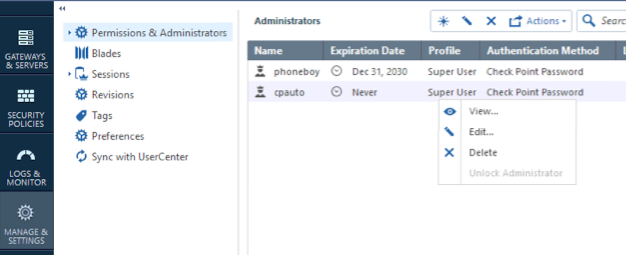
This can also be done in SmartConsole by right-clicking on the relevant administrator and selecting Unlock Administrator.

When SmartConsole is connected to a security management server
1. Open a command prompt on the management server
2. Login to the system data domain:
mgmt login user <admin name> password <admin password> domain "system data"
3. Use the "mgmt_cli" utility to run the unlock-administrator API command
mgmt_cli -s id.txt unlock-administrator name <name of locked admin>
When SmartConsole is connected to a multi-Domain server, you can run the “unlock-administrator” command directly on the API command line.
unlock-administrator name <name of locked admin>
There's also a technical training video:
https://www.youtube.com/watch?v=RJP-GuSGXD0&feature=youtu.be
Update: The unlock admin feature (in gui and CLI) only works if "Check Point password" is the method used to authenticate to the security management server.
Hi all,
You also could refer our Security Management R80.10 Administration Guide Section:Unlocking Administrators
We also provide a video about how to modify the lock configuration.

Leaderboard
Epsum factorial non deposit quid pro quo hic escorol.
| User | Count |
|---|---|
| 22 | |
| 14 | |
| 12 | |
| 7 | |
| 6 | |
| 5 | |
| 4 | |
| 4 | |
| 4 | |
| 4 |
Fri 12 Dec 2025 @ 10:00 AM (CET)
Check Mates Live Netherlands: #41 AI & Multi Context ProtocolTue 16 Dec 2025 @ 05:00 PM (CET)
Under the Hood: CloudGuard Network Security for Oracle Cloud - Config and Autoscaling!Fri 12 Dec 2025 @ 10:00 AM (CET)
Check Mates Live Netherlands: #41 AI & Multi Context ProtocolTue 16 Dec 2025 @ 05:00 PM (CET)
Under the Hood: CloudGuard Network Security for Oracle Cloud - Config and Autoscaling!Thu 18 Dec 2025 @ 10:00 AM (CET)
Cloud Architect Series - Building a Hybrid Mesh Security Strategy across cloudsAbout CheckMates
Learn Check Point
Advanced Learning
YOU DESERVE THE BEST SECURITY