- Products
- Learn
- Local User Groups
- Partners
- More

Secure Your AI Transformation
9 April @ 12pm SGT / 3pm CET / 2PM EDT
AI Security Masters E6: When AI Goes Wrong -
Hallucinations, Jailbreaks, and the Curious Behavior of AI Agents
Ink Dragon: A Major Nation-State Campaign
Watch HereCheckMates Go:
CheckMates Fest
Periodical updates to Smart Console appears in the CPUSE upgrades.
Am I correct that in order to keep your version of the console up to date, you need to uninstall the version you have on your PC and install the latest build you can download from your GAIA system?
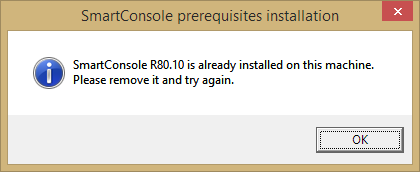
To install a new Dashboard build always requires to uninstall the older version first, then do a reboot and install the newer version. Although newer Dashboar versions do appear in CPUSE, i would rather suggest using the Dashboard version intended for the currently installed Jumbo HF instead (see sk116380 Jumbo Hotfix Accumulator for R80.10 (R80_10_jumbo_hf))
Thank you for the reply, it's what I thought since I checked software versions after uninstalling/installing, but wanted to be sure.
It's a bit cumbersome at some customers that the dashboard doesn't update itself though.
EDIT: what I mean is that before we used to have R77, R77.10, R77.20, R77.30 consoles, now it's the same software that's versioned differently. For customers, they still run R80.10, which is less obvious than R77.X where it was pretty clear it was successive releases. No big deal though, just had to clarify.
That is only partly true - also R77.30 Dashboard had different builds (with some for resolving special issues or for new Win versions, like Check_Point_SmartConsole_and_SmartDomain_Manager_R77.30_Win10.exe from sk110892).
In addition to this there are also:
+ not publicly available SmartConsole packages for specific customer requirements, for example to have Russian symbols in rules comments.
Yeah, a real SmartConsole zoo, if we also add the MDM / MDS GUIs 😉
Which SmartConsole is recommended for R80.10 Jumbo HFA 112? Build 42?
You can read following article where is explained everything, including how to install SmartConsole without any intervention (silent installation):
The silent installation is possible, but according to sk119612 it has to be preceeded by a manual uninstall 😞
Well, it is surprise for me that nowadays delevopers cannot write installation package which will automatically remove old version and install the new one just in one-click...

Or at least ask end user if he/she wants to remove older version and install the new one (if this new version is newer than already installed).
Yes, the art of programming can be much of a surprise for people not familiar with it 😉 But i did warn you beforehand...
Leaderboard
Epsum factorial non deposit quid pro quo hic escorol.
| User | Count |
|---|---|
| 67 | |
| 39 | |
| 17 | |
| 16 | |
| 13 | |
| 11 | |
| 10 | |
| 9 | |
| 9 | |
| 8 |
Tue 07 Apr 2026 @ 06:00 PM (IDT)
Under the Hood: Check Point WAF and IO River: Multi-CDN Security in ActionWed 08 Apr 2026 @ 10:00 AM (CEST)
The Cloud Architects Series: The Cloud Firewall with near 100% Zero Day prevention - In 7 LanguagesWed 08 Apr 2026 @ 07:00 PM (CST)
ERM al Descubierto: Amenazas Ocultas que Pondrán a Prueba tu Empresa en 2026Tue 07 Apr 2026 @ 06:00 PM (IDT)
Under the Hood: Check Point WAF and IO River: Multi-CDN Security in ActionWed 08 Apr 2026 @ 10:00 AM (CEST)
The Cloud Architects Series: The Cloud Firewall with near 100% Zero Day prevention - In 7 LanguagesWed 08 Apr 2026 @ 07:00 PM (CST)
ERM al Descubierto: Amenazas Ocultas que Pondrán a Prueba tu Empresa en 2026Tue 14 Apr 2026 @ 03:00 PM (PDT)
Renton, WA: Securing The AI Transformation and Exposure ManagementThu 30 Apr 2026 @ 03:00 PM (PDT)
Hillsboro, OR: Securing The AI Transformation and Exposure ManagementAbout CheckMates
Learn Check Point
Advanced Learning
YOU DESERVE THE BEST SECURITY