- Products
- Learn
- Local User Groups
- Partners
- More
Policy Insights and Policy Auditor in Action
19 November @ 5pm CET / 11am ET
Access Control and Threat Prevention Best Practices
Watch HereOverlap in Security Validation
Help us to understand your needs better
CheckMates Go:
Maestro Madness
Today, we announced new additions to our Quantum Smart-1 appliances line.
Continuing the refresh started in February by launching the high-end models: 6000-L & 6000-XL
Today we are announcing the Enterprise models: 600-S and 600-M
The new Quantum appliances are introducing up to 70% in all major logs KPIs, and together with R81 capabilities it will provide our customers a fast management platform
That will allow them a better respond to cyber-attacks and it will reduce their operational costs.
Customers have the flexibility to grow based on their needs by upgrading from Base to Plus configuration which will double the amount of managed gateways.
Software version:
The appliances are installed with R81 out of the box
Soon we will release support for R80.40
Old Platforms (405/410/625/5050/5150) support
End of sales will be September 2021.
End of support (based on Check Point life cycle policy) will be September 2026
Detailed Specs
|
Model |
600-S |
600-M |
6000-L |
6000-XL |
|
Peak Indexed logs |
15,000 |
21,000 |
40,000 logs/sec |
67,500 logs/sec |
|
Managed Gateways (Base/Plus) |
5/10 |
25/50 |
75/150 |
200/400 |
|
Memory (RAM) |
16/32GB |
32/64GB |
96/192GB |
192/384GB |
|
Storage |
2TB HDD |
8TB HDD |
Up to 48TB HDD |
Up to 48TB SSD |
|
Form Factor |
1U |
1U |
2U |
2U |
More details: https://www.checkpoint.com/products/security-management-appliances/

Hi Gary
Did you tried the latest Isomorphic build? It might be the issue.
If nothing is shown, you are probably connected through VGA, but option 4 & 5 are meant to install from console.
Hope this can help.
Thanks, Guy
I have a new smart-1 6000L that we need to have R80.40 installed on, I see there a .iso for 80.40 and this model but using the current isomorphic tool there is no option to install on this specific model, trying the Smart-1 options 4 or 5 it just sets and never installs. Thought of going the DVD USB install route but see this is not supported on these models. Any guidance on getting 80.40 on this model would be greatly appreciated. Thanks,
Try to use the R80.40 blink image, which can be installed from R81.
You can also install R80.40 from CPUSE via the Gaia WebUI.
Thanks for the input but we seem to have got stuck between a rock and a hard place. In the attempt to re-image with R80.40 using isomorphic build 181 the two options for smart-1 were attempted, now when booting we get "booting from hard drive C: no boot device available". Tried again with the R81 .iso and isomorphic but got the same results seen with R80.40 when attempting to install leaving us unable to re-image to 81 or 80.40. We have a TAC case open and will post the outcome.
Hi Gary
Did you tried the latest Isomorphic build? It might be the issue.
If nothing is shown, you are probably connected through VGA, but option 4 & 5 are meant to install from console.
Hope this can help.
Thanks, Guy
This was done thru the console and the 12 isomorphic options are shown, none of them show the smart-1-600/6000 devices, selecting option 4 or 5 it would just sit there and do nothing, now the appliance will not boot at all and we have no way to re-image it to R80.40 or R81.
Recommend a TAC case here
Not sure there is iDRAC with these models, but you could try build via this, if Checkpoint allow this?
A new isomorphic tool build 187 was released today which includes the new smart-1 appliances.
Other then the adding supported for new devices are there any other improvements? I could not see any release notes.
I assume that's the main enhancement unless there is anything new listed in the SK.
My assumptions too, the new 600/6000's are shown now in isomorphic and we will be testing this tonight on a 6000L.
genisis__ To answer the iDRAC install possibility, one known limitation, "Gaia ISO install via IDRAC LOM is not supported".
Not supported and functionally possible are two different things 😉
I have done R81 builds via iDRAC using Dell "OpenServers" and it works fine. There is a way to get high lever access to the iDRAC on Checkpoint appliances, but this was tested on v4.40 of the firmware, not really looked at since it went up to v4.40.10 and I have never attempted doing a build via iDRAC on an appliance.
I think iDRAC function should be fully in-place, so that underlining firmware can be updated and useful things like rebuilding a gateway that 200miles away is possible.
We are working on a solution that will enable remote installation of the management appliance using iDRAC. We still don't have ETA for that
Guy,
As these appliances are basically Dell Servers can we not update the underlining firmware using the iDRAC. Example NIC firmware updates, BIOS for the appliance, RAID card etc.
We are supporting with iDRAC only the functionality which is mentioned in sk122914
Has anyone with a smart-1 6000L been successful re-imaging the device with isomorphic to R80.40 or R81? We have had a TAC case open for over a month, it was decided that the device would be RMA'd and they would send a new one with R80.40 pre-installed, after receiving the new device the Mgmt port cannot be accessed using the IP 192.168.1.1, this is the same symptom we experienced on the old device after getting it to install R80.40 only by choosing open server as the device type, choosing the smart-1 6000L device type it would just sit and never install.
Hi Gary
Please write me offline to gisraeli@checkpoint.com
i want to better understand your flow and how to assist you.
Thanks, Guy
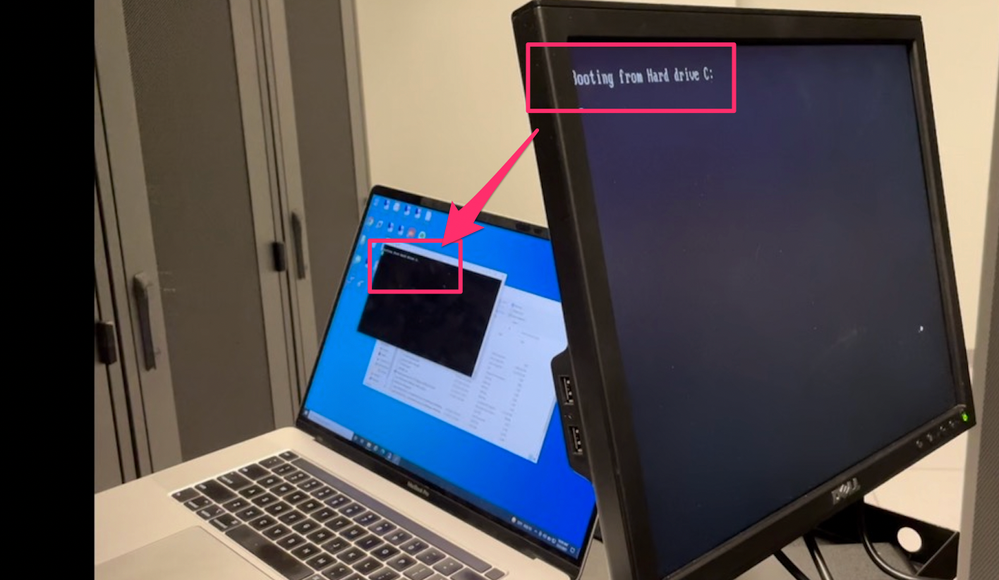
I have this same exact problem. I boot to the USB and it says Booting from Hard drive C:. Then the machine is frozen. I'm using isomorphic build 187.
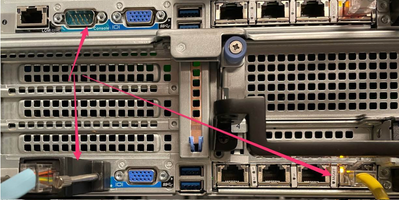
Hello Paul, are you using the monitor and keyboard connections on the device or the console cable? It is required to only use the console cable.
In the interest of time and trying to avoid TAC at any cost, I found a work around. None of the documented processes worked. Allow the box to come up as R81. IP it and get it online. Do the initial wizard and allow the DA to update. Once that is done go to sk171903 and download the 80.40 blink image. Import it for offline installation and then install it as a clean install. This did the trick for me. Just to be clear isomorphic build 187 with the proper 6K image from https://supportcenter.checkpoint.com/supportcenter/portal?eventSubmit_doGoviewsolutiondetails=&solut... with md5 hash ac1e7b0fa7c00329f964f0cebc1a2058 still did not work. Something is wrong with the normal, documented process.
The above process worked for two out of the three 6K boxes. The third one just keep coming back to the blink prompt no matter what I do. I guess I'm going to TAC anyway.
Thanks,
Paul
I tried to add the /etc/.wizard_accepted file and reboot and that did the trick in terms of not seeing the initial blink wizard anymore. That didn't give me the warm and fuzzies though. So I started from scratch again. Defaulted box to R81. Did the initial wizard. Allowed the DA to upgrade. Manually added the same exact R80.40 blink image via the webUI. Installed it. Went through the first time blink wizard and this time no repeated blink wizard. Did not need the /etc/.wizard_accepted file. Very strange, but at least its working. I would love to know the process for booting to a USB 80.40 image though. I would feel much better if it was fresh and clean.
Hi Paul, when I encountered this problem I was helping a customer setup this device and was told repeatedly that they had console connection, I assumed this was the console port but was wrong, they were connecting with a keyboard and monitor. After Guy_Israeli persistence I did get them to connect with the console port and was then able to do a fresh install with the USB using isomorphic 187 using the 6000L .iso for 80.40 Check_Point_R80.40_Smart1_600_6000_Appliances_T401.iso.
Understood and I believe you. It did not work for me.
Using console port for sure
I even went so far as to hook console and monitor up together (no keyboard) to watch it boot. I was expecting to see output to VGA and was expecting something went wrong during the image burn at the factory. But same output to both VGA and console at the same time:
Console and monitor -- same
Not entirely sure what the deal is. If anyone runs into the same issue with a need for R80.40 the process I followed above worked three out of 4 times. The one that failed I did a second time and got better results. Resulting in three 6000-Ls loaded with 80.40.
Gary, I'm working with TAC for this booting from a USB on a 6K box and they have two questions for you. They are as follows:
1. Exact make and model of the USB he used.
2. When he created the isomorphic, did he add the iso and jumbo hot fix? what exact settings did he use?
Thanks for your input.
Paul
Hi Paul, we used a sandisk cruzer glide 16GB 2.0 usb drive with Check_Point_R80.40_Smart1_600_6000_Appliances_T401.iso, choosing option 4 on install, it installed correctly when using the console port, there were no other settings used when we burnt the .iso with isomprophic 387, no hotfixes no pre-config. When it was being tried using the monitor/keyboard ports choosing option 4 or 5 it would just sit and never install, choosing option 11 for open sever in a hail mary did kind of a half install, it rebooted and displayed the same thing you are seeing, booting from hard drive C:
Leaderboard
Epsum factorial non deposit quid pro quo hic escorol.
| User | Count |
|---|---|
| 25 | |
| 14 | |
| 13 | |
| 7 | |
| 5 | |
| 4 | |
| 3 | |
| 3 | |
| 3 | |
| 2 |
Wed 19 Nov 2025 @ 11:00 AM (EST)
TechTalk: Improve Your Security Posture with Threat Prevention and Policy InsightsThu 20 Nov 2025 @ 05:00 PM (CET)
Hacking LLM Applications: latest research and insights from our LLM pen testing projects - AMERThu 20 Nov 2025 @ 10:00 AM (CST)
Hacking LLM Applications: latest research and insights from our LLM pen testing projects - EMEAWed 26 Nov 2025 @ 12:00 PM (COT)
Panama City: Risk Management a la Parrilla: ERM, TEM & Meat LunchWed 19 Nov 2025 @ 11:00 AM (EST)
TechTalk: Improve Your Security Posture with Threat Prevention and Policy InsightsThu 20 Nov 2025 @ 05:00 PM (CET)
Hacking LLM Applications: latest research and insights from our LLM pen testing projects - AMERThu 20 Nov 2025 @ 10:00 AM (CST)
Hacking LLM Applications: latest research and insights from our LLM pen testing projects - EMEAThu 04 Dec 2025 @ 12:30 PM (SGT)
End-of-Year Event: Securing AI Transformation in a Hyperconnected World - APACThu 04 Dec 2025 @ 03:00 PM (CET)
End-of-Year Event: Securing AI Transformation in a Hyperconnected World - EMEAWed 26 Nov 2025 @ 12:00 PM (COT)
Panama City: Risk Management a la Parrilla: ERM, TEM & Meat LunchAbout CheckMates
Learn Check Point
Advanced Learning
YOU DESERVE THE BEST SECURITY