- Products
- Learn
- Local User Groups
- Partners
- More

MVP 2026: Submissions
Are Now Open!
What's New in R82.10?
Watch NowOverlap in Security Validation
Help us to understand your needs better
CheckMates Go:
Maestro Madness
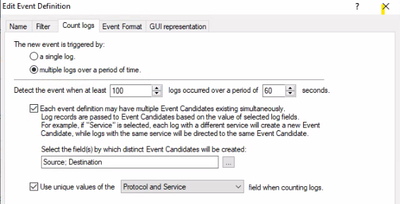
We have a Smart event definition which was working before but suddenly not anymore to detect a port scan with following conditions.
We launch a port scan and we see around 1000 connections being dropped in the logs but no correlated event is generated (anymore)
Should we engage with TAC or does someone have an idea how to fix this perhaps?
Hi we have this working.
did you enable host port scan in IPS as per
https://support.checkpoint.com/results/sk/sk110873
then you need to enabled smart event to see the events occuring.
if you use the sam rule you want to do this also.
Connect with SmartDashboard to Security Management Server / Domain Management Server.
Open the relevant Security Gateway / Cluster object.
Expand 'Other' - go to 'SAM' pane - check the box 'Purge SAM file when it reaches:' - set the desired limit - click in 'OK'.
Notes: The minimal size is 50 KB.
Save the changes: go to 'File' menu - click on 'Save'.
Install the policy onto relevant Security Gateway / Cluster object.
Thanks
Frank
Hi we have this working.
did you enable host port scan in IPS as per
https://support.checkpoint.com/results/sk/sk110873
then you need to enabled smart event to see the events occuring.
if you use the sam rule you want to do this also.
Connect with SmartDashboard to Security Management Server / Domain Management Server.
Open the relevant Security Gateway / Cluster object.
Expand 'Other' - go to 'SAM' pane - check the box 'Purge SAM file when it reaches:' - set the desired limit - click in 'OK'.
Notes: The minimal size is 50 KB.
Save the changes: go to 'File' menu - click on 'Save'.
Install the policy onto relevant Security Gateway / Cluster object.
Thanks
Frank
Hi,
No we dont rely on IPS to correlate this event but should be triggered by the amount of logs (100 within 60 seconds), I know it is another way of doing this.
what is the name of the event you using in smartevent ?
I have this enable with IPS and smartevent is correlating the events to only way I got to to work, think I tried to just use smartevent before couldn't get it to work.
attached what we see from high connection rate smartevent event email
not much help to you.
port scan from internal network event and yours is the legacy IPS event which should also work indeed
im using high connection rate to internal host on a service event from smartevent.
not using the portscan from internal network on my config.
Leaderboard
Epsum factorial non deposit quid pro quo hic escorol.
| User | Count |
|---|---|
| 16 | |
| 15 | |
| 7 | |
| 5 | |
| 5 | |
| 5 | |
| 4 | |
| 4 | |
| 4 | |
| 4 |
Tue 16 Dec 2025 @ 05:00 PM (CET)
Under the Hood: CloudGuard Network Security for Oracle Cloud - Config and Autoscaling!Thu 18 Dec 2025 @ 10:00 AM (CET)
Cloud Architect Series - Building a Hybrid Mesh Security Strategy across cloudsTue 16 Dec 2025 @ 05:00 PM (CET)
Under the Hood: CloudGuard Network Security for Oracle Cloud - Config and Autoscaling!Thu 18 Dec 2025 @ 10:00 AM (CET)
Cloud Architect Series - Building a Hybrid Mesh Security Strategy across cloudsAbout CheckMates
Learn Check Point
Advanced Learning
YOU DESERVE THE BEST SECURITY