- Products
- Learn
- Local User Groups
- Partners
- More

MVP 2026: Submissions
Are Now Open!
What's New in R82.10?
Watch NowOverlap in Security Validation
Help us to understand your needs better
CheckMates Go:
Maestro Madness
We have a problem that there are many Security Gateways connected to the management server and the logs on the management server are only stored for 3 days.
We would like the logs to be stored for at least 14 days.
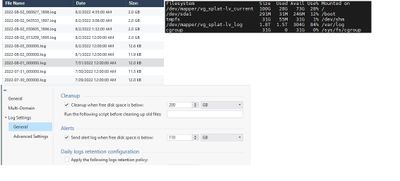
We are using MDS solution, MDS server is configured with settings (screen).
We have 300 Gb of space available on the server of interest.
How can we currently optimize log storage on the management server and increase log storage time? Or can we do it only if we buy a new Check Point server?
How do we calculate the number of logs that come to the management server per day (I am interested in the Gb figure) and for each of the Security Gateways.
According to the SmartConsole (File - Open Log Files...), we see 22-23 files of 2 Gb per day. The average is 40-45 Gb per day.
How can you find out where the rest of the space goes? And how do we optimize it? Do I understand correctly that the logs are stored in /var/log/?
You mean HD space, not memory, i guess ! See https://www.checkpoint.com/downloads/products/smart-1-security-management-platform-datasheet.pdf for such estimates according to the number of GWs.
Yes, we are talking about HD space. But as I write above, that in (File - Open Log Files...) there is information only for 22-23 files of 2 gb per day, that is, we get 40-45 Gb per day. Where does the remaining memory go if we have 1.8TB of memory on the management server. Maybe we need to configure additional settings to keep logs longer? Or do we need to clean up the space?
It seems to me that we have some settings that are not configured correctly and we need additional configuration either on the MDS or the management server to keep the logs longer and localize unnecessary logs.
UPD:
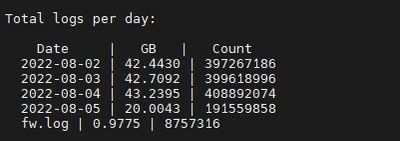
My assumption is correct, I see that the logs on the management server are stored logs 40 GB per day.
But /var/log/ is loaded up to 1.5 GB, and we see logs for 3 days.
What do we need to configure additionally to solve the space load problem and allow the logs to be stored for a longer period of time.
You can always start by checking largest directories in order to find out whats filling them. Might be backups or snapshot exports
du -k /var/log/ -b | sort -n
This screenshot shows that Logs Retention is currently configured as According to Multi-Domain settings. Select Override Multi-Domain settings and configure your numbers.
In the screenshot, no Daily Logs Retention configuration is set.
In that case, will the upstream server obey its local settings?
Can you please tell me how to correctly free the memory of /var/log/? I understand correctly that the logs are stored in /var/log/, right?
If my reasoning is correct, then /var/log/ stores all sorts of unnecessary files. And if we enable data storage settings and indexing them, we need to have free space in /var/log/.
For those reading at home the discussion was continued in a duplicate thread here:
Leaderboard
Epsum factorial non deposit quid pro quo hic escorol.
| User | Count |
|---|---|
| 19 | |
| 16 | |
| 7 | |
| 5 | |
| 5 | |
| 5 | |
| 4 | |
| 4 | |
| 4 | |
| 4 |
Tue 16 Dec 2025 @ 05:00 PM (CET)
Under the Hood: CloudGuard Network Security for Oracle Cloud - Config and Autoscaling!Thu 18 Dec 2025 @ 10:00 AM (CET)
Cloud Architect Series - Building a Hybrid Mesh Security Strategy across cloudsTue 16 Dec 2025 @ 05:00 PM (CET)
Under the Hood: CloudGuard Network Security for Oracle Cloud - Config and Autoscaling!Thu 18 Dec 2025 @ 10:00 AM (CET)
Cloud Architect Series - Building a Hybrid Mesh Security Strategy across cloudsAbout CheckMates
Learn Check Point
Advanced Learning
YOU DESERVE THE BEST SECURITY