- Products
- Learn
- Local User Groups
- Partners
- More

MVP 2026: Submissions
Are Now Open!
What's New in R82.10?
10 December @ 5pm CET / 11am ET
Announcing Quantum R82.10!
Learn MoreOverlap in Security Validation
Help us to understand your needs better
CheckMates Go:
Maestro Madness
Hi,
I implemented log exporter with version 81.10 management at a customer site. All working perfectly execpt one thing: We wanted to filter based on Inline Layer names so only logs from a specific sub policy get exported. Working with a "rule_name" works well but the "layer_name" filter doesn't seem to work.
If I have a look at the unfiltered exported logs, it seems like the "layer_name" field occurs twice: One for the network layer and one for the inline layer.
Does anyone has been successfully configured inline policy name filtering and has some hints for me?
Thanks in advance!
Michael
What is your precise filter configuration?
It's just a simple test configuration in a vmware lab:
<filters>
<filterGroup operator="and">
<field name="action" operator="and">
</field>
<field name="origin" operator="and">
<value operation="eq">192.168.1.1</value>
</field>
<field name="product" operator="and">
</field>
<field name="layer_name" operator="and">
<value operation="eq">Internet_Layer</value>
</field>
</filterGroup>
</filters>
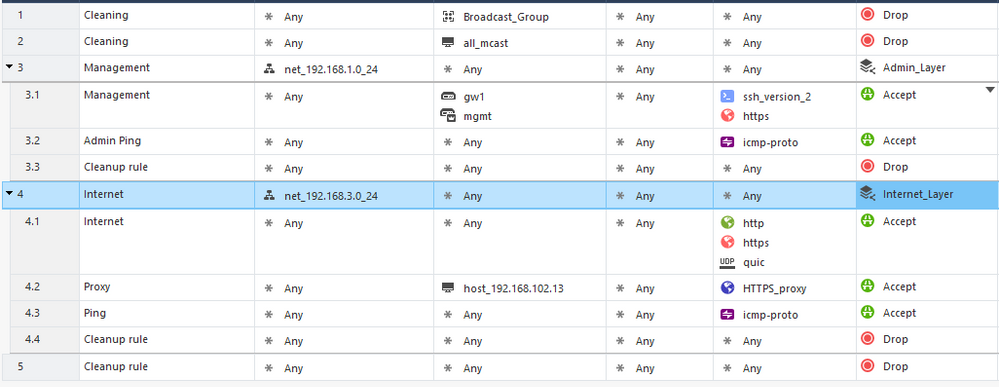
The policy is like
Also simple. Just a test.
The thing is: Before, I had a test policy without inline policy layers. There, I was able to filter by "rule_name". Then, I redefined the policy using inline layers (because that's the case I have with the current customer).
This is a log entry I had on the syslog server before (with a "standard" policy):
Nov 3 18:10:14 192.168.1.11 time=1667495411|hostname=mgmt|product=Firewall|layer_name=gw1_policy Network|layer_name=Internet_Layer|layer_uuid=bdb7fd2d-1aa3-4b26-bc34-dec23ec0f56d|layer_uuid=b137cd6e-2d76-4a00-9c64-9e51941d6df5|match_id=4|match_id=33554433|parent_rule=0|parent_rule=4|rule_action=Inline|rule_action=Accept|rule_name=Internet|rule_name=Internet|rule_uid=cecf9f41-ae8f-4148-ad88-0350fe0d644e|rule_uid=fa880521-bf5a-44ba-96f9-52fa8e6f67c3|action=Accept|ifdir=inbound|ifname=eth2|logid=0|loguid={0xcc68996a,0x9fba251a,0x54ca8851,0x1e3a7415}|origin=192.168.1.1|originsicname=CN\=gw1,O\=mgmt..j9f8c7|sequencenum=2|time=1667495411|version=5|dst=84.16.76.218|inzone=Internal|nat_addtnl_rulenum=0|nat_rule_uid=e4feb9d1-a96b-4e73-bc17-611cf578a499|nat_rulenum=2|outzone=External|proto=6|s_port=57608|service=443|service_id=https|src=192.168.3.111|xlatedport=0|xlatedst=0.0.0.0|xlatesport=43416|xlatesrc=192.168.178.11
(I use splunk format here)
After changing to inline layer policies, it seems like only the origin filter is working. Neither layer_name nor rule_name does anything. I just get no logs at all.
I have the strong feeling I just missed an important piece of configuration here... 😕
(BTW: I didn't touch fields configuration)
Okay the log entry is with inline layer but only origin filter. But I had logs before with a simple policy and just rule_name filter. Maybe it's a problem that the "layer_name" occurs twice? But why doesn't the "rule_name" filter work any more with inline policy?
I could be wrong when I say this, but not sure if it works based on below from the log exporter sk. Maybe worth checking with TAC.
Example:
cp_log_export set name <target-name> filter-action-in "accept,drop"
Only logs with action = "accept" OR action = "drop" are exported
Andy
Thanks for your answer. But that's not the problem IMHO because logs get exported corretly if I only use the origin filter.
Ok solved that: Will use a of Store-And-Forward server (rsyslog) to filter on inline layer names as long as this isn't working natively.
Okay got it now: Seems like the filter logic stops at the first matching field name. Because some of the fields are "reused" (layer_name for example), second field never matches. I checked that out with some of the fields that are used twice (layer_uuid, layer_name).
2022-11-19T14:09:10.667206+01:00 192.168.1.11 time=1668863346|hostname=mgmt|product=Firewall|layer_name=gw1_policy Network|layer_name=Internet_Layer|layer_uuid=bdb7fd2d-1aa3-4b26-bc34-dec23ec0f56d|layer_uuid=b137cd6e-2d76-4a00-9c64-9e51941d6df5|match_id=7|match_id=33554436|parent_rule=0|parent_rule=7|rule_action=Inline|rule_action=Accept|rule_name=Internet|rule_name=Ping|rule_uid=cecf9f41-ae8f-4148-ad88-0350fe0d644e|rule_uid=fae758eb-85d2-43f9-8c50-c57a56286959|action=Accept|ifdir=inbound|ifname=eth2|logid=0|loguid={0x25131dc9,0x6ae54246,0x3980fb28,0x758bd658}|origin=192.168.1.1|originsicname=CN\=gw1,O\=mgmt..j9f8c7|sequencenum=1|time=1668863346|version=5|dst=1.1.1.1|icmp=Echo Request|icmp_code=0|icmp_type=8|nat_addtnl_rulenum=0|nat_rule_uid=e4feb9d1-a96b-4e73-bc17-611cf578a499|nat_rulenum=3|proto=1|service_id=icmp-proto|src=192.168.3.102|xlatedport=0|xlatedst=0.0.0.0|xlatesport=0|xlatesrc=192.168.4.1Solution:
If I filter on inline policy parent rule name (field name="rule_name" + value "Internet") instead of inline policy layer name, filtering works as expected because parent rule name occurs before inline policy rule name.
Will check that in production but in my lab setup, it works.
Leaderboard
Epsum factorial non deposit quid pro quo hic escorol.
| User | Count |
|---|---|
| 21 | |
| 15 | |
| 6 | |
| 6 | |
| 5 | |
| 5 | |
| 4 | |
| 4 | |
| 4 | |
| 4 |
Fri 12 Dec 2025 @ 10:00 AM (CET)
Check Mates Live Netherlands: #41 AI & Multi Context ProtocolTue 16 Dec 2025 @ 05:00 PM (CET)
Under the Hood: CloudGuard Network Security for Oracle Cloud - Config and Autoscaling!Fri 12 Dec 2025 @ 10:00 AM (CET)
Check Mates Live Netherlands: #41 AI & Multi Context ProtocolTue 16 Dec 2025 @ 05:00 PM (CET)
Under the Hood: CloudGuard Network Security for Oracle Cloud - Config and Autoscaling!Thu 18 Dec 2025 @ 10:00 AM (CET)
Cloud Architect Series - Building a Hybrid Mesh Security Strategy across cloudsAbout CheckMates
Learn Check Point
Advanced Learning
YOU DESERVE THE BEST SECURITY