- Products
- Learn
- Local User Groups
- Partners
- More

The State of Ransomware Q1 2026
Key Trends and Their Impact
Good, Better, Best:
Prioritizing Defenses Against Credential Abuse
AI Security Masters E7:
How CPR Broke ChatGPT's Isolation and What It Means for You
Blueprint Architecture for Securing
The AI Factory & AI Data Center
Call For Papers
Your Expertise. Our Stage
CheckMates Go:
CheckMates Fest
Hi,
How can I estimate how large my migrate export file will be? My main concern is, will it contain logs? I can find no information on this in the migrate command docs :
I have a huge amount of logs on this management server and would prefer to export all objects and relevant information except the logs. I have currently 700G used of about 1000G on the log partition. I thought i might try to run the export file to the log partition. There's really not much to find about best practices to do this. Naturally if it takes the logs the partition will fill up.
I'm planning on doing a migrate export from a R77.30 management server and importing it to a R80.40 server.
Any help?
you can transfer the log files off the old box first from $FWDIR/log and then manually transfer them back once youve completed the migrate export to the new box. sk92440 has more info on the steps
You should look in the R80.40 Installation and Upgrade guide where it also references the CLI reference guide in the upgrade SMS with advanced upgrade.
There you will see that the export allows you to include or exclude the logs:
-l - Exports and imports the Check Point logs without log indexes in the $FWDIR/log/ directory.
-x - Exports and imports the Check Point logs with their log indexes in the $FWDIR/log/ directory
So you see the information is available in the manuals.
Next to that when you export without logs your export file, depending on revision databases (which you should remove before running the export) can, from our experience, be anywhere between 50MB to 300MB.
Yes, thank you for your reply but I will respectfully have to disagree about information being available in Check Point documentation. I find it quite hard to find as compared to other vendors - and if it's there it's open to interpretation - as in this case. It could be interpreted as that it will export them regardless, but that there are different ways it can be exported.
Hi Raine
FYI - we are looking at some Content Delivery Platforms to over come the accessibility of the information which will improve customer experience significantly.
As for the way of known what is the estimated size of logs in an export file - we will work with development to come up with a method.
Uri
If performing a migrate export on a R77.30 SMS, the big driver of how large the export file will be is the number of Database Revisions that are present, especially if revisions are being automatically taken every time a policy is installed. Try to clean these up as much as possible on your R77.30 SMS prior to the export.
For an R80+ SMS, the main two elements that will significantly increase the export file size are the presence of numerous old IPS update packages, and old sessions that should be purged. Once again cleaning these up will significantly reduce export file size.
Hello Timothy,
Can you tell me where the IPS update packages are located and how to remove them?
Now I need migrate from r80.10 to r80.40, and migration process failed with error.
Disk space not enough.
The update packages are here: $FWDIR/ips/update/
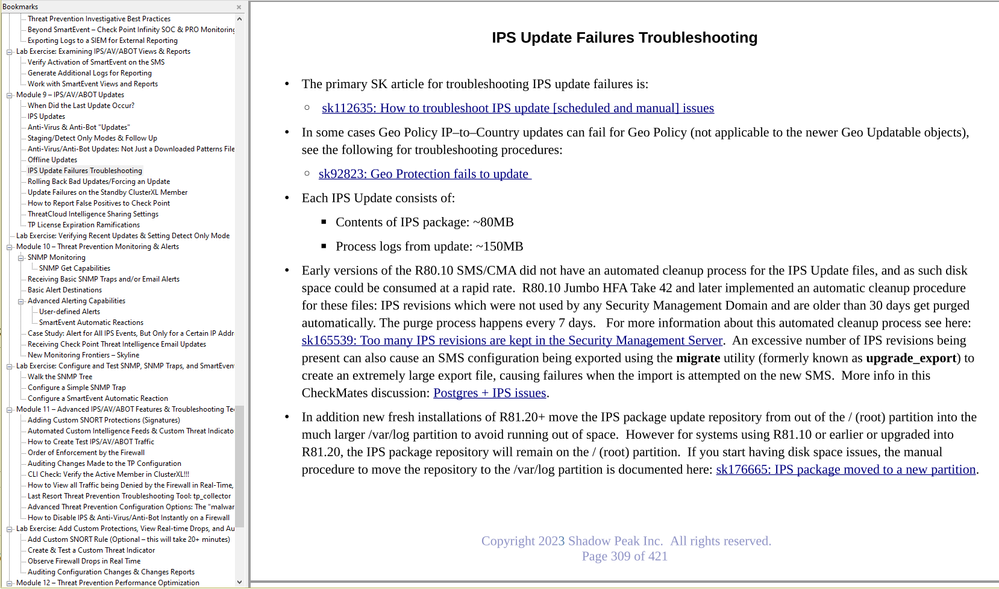
Here is the relevant page from my IPS/AV/ABOT Immersion class recently updated for R81.20; this page and the associated SK references should be everything you need:
Thank you)
Leaderboard
Epsum factorial non deposit quid pro quo hic escorol.
| User | Count |
|---|---|
| 34 | |
| 10 | |
| 10 | |
| 10 | |
| 10 | |
| 8 | |
| 7 | |
| 6 | |
| 6 | |
| 6 |
Tue 12 May 2026 @ 10:00 AM (CEST)
The Cloud Architects Series: Check Point Cloud Firewall delivered as a serviceWed 13 May 2026 @ 11:00 AM (EDT)
TechTalk: The State of Ransomware Q1 2026: Key Trends and Their ImpactThu 14 May 2026 @ 07:00 PM (EEST)
Under the Hood: Presentando Check Point Cloud Firewall como ServicioTue 12 May 2026 @ 10:00 AM (CEST)
The Cloud Architects Series: Check Point Cloud Firewall delivered as a serviceAbout CheckMates
Learn Check Point
Advanced Learning
YOU DESERVE THE BEST SECURITY